What's new

Color Management, I'm doing it wrong?

squirrels

No longer a newbie, moving up!
Joined
Nov 3, 2012
Messages
908
Reaction score
437
Can others edit my Photos
Photos OK to edit
So back in the day, Mr. Squirrels used to ply me with red wine and then go into long in depth discussions of the physics of magnetic resonance imaging. Hey, I like nerdy. Don't judge. On average, I'd pick up about 10% of it, but the wine was really nice. Anyway, I'm just staggering out of reading Cambridge in Colour's color management tutorials. I feel like the least Cambridge in Colour could have done was brought a bottle of red wine on the date. Whew. :confused:

I use Rawtherapee 4.0.9.50 and then usually gimp for touching up (just downloaded GIMP 2.8.0). I've downloaded an ICC file from Adorama pix.

I think I want select an srgb.icm file for GIMP's RGB profile. The ones I'm finding are all from Rawtherapee, but there are three (not to mention the sRGB***.icc files).

RT_sRGB gamma sRGB(IEC61966 equivalent)
RT_sRGB gamma BT709(IEC61966 equivalent)​
RT_sRGB gamma Linear1.0(IEC61966 equivalent)

Can I just close my eyes and pick the first?


OTHER SETTINGS
RAW Therapee
Input profile custom: Nikond3100.dcp
Working profile:sRGB
Output profile: sRGB Color Space Profile
Output gamma: default

For GIMP
Mode of operation: print simulation
RGB Profile: ??????
CMYK profile: none
Monitor profile: none
Display rendering intent: Perceptual
Print Simulation profile: Adoramapix_standard_metallic yadda yadda
Softproof rendering intent: Perceptual
Mark out of gamut colors: bright green


Is it too early for wine?
 
I cant help you here.. Though I bet Garbz can if you can get his attention.

However your post made me laugh most heartily, so consider this a free bump as thanks. :)
 
Thanks and happy birthday!:smileys:
 
I don't know anything about Rawtherapee but I don't think you'd want your Raw processor's working color space to be sRGB (the smallest one). For example, Lightroom uses a working color space that is practically the same size as ProPhoto RGB (very large). This should allow for the largest range of colors while working on/processing your raw files. And then when you output from there, you can choose the space you want. If you are going to work on it in Gimp, then you might want a larger color space like AdobeRGB or ProPhoto...but if you plan to upload or print the photos, they you'll eventually have to dumb it down to sRGB, so if you're not doing too much to it in Gimp, then you might be OK exporting from R.T. in sRGB.

But yes, if you can find Garbz...he's the expert.

And you do calibrate your monitor don't you? If not, then all of this is for not.
 
GIMP is only 8-bit .... Apparently GIMP now has a soft-proofing feature?

You don't want a linear gamma of 1.0 (RT_sRGB gamma Linear1.0(IEC61966 equivalent)
Raw conversion changes the linear image sensor gamma of 1.0 to a non-linear gamma, which is in the 1.8 to 2.2 range that human eyes see.
 
Thanks guys. The folks at adoramapix recommended that I embed color profile on my abstract landscape stuff in sRGB, and I'm really just to handle this as intelligently as the average bear. I'm on a laptop though I may just be kidding myself here. I do try to pseudocalibrate before playing with my pics (adjust the angle and check black point and for banding).

I don't know. This studying could also be similar to when I told Mr. Squirrels that I wasn't sure I believed in the fourier transform. I'll never get those hours of my life back.

I may not understand playing in a bigger colorspace is going to help if I'll be forced to dumbing it down to sRGB for printing, but I'm willing to do that without entirely understanding why. Perhaps if one day I might want to use a printer that can handle a bigger colorspace?
 
The first one is likely nearest to correct (sRGB sRGB) - but I'm not sure why you would want to use anything other than a standard sRGB profile for your purposes - but I have no clue about Rawtherapee. Do you not have a standard sRGB profile anywhere on your computer? (The BT709 probably mimics the Rec 709 / BT 709 HDTV video color space.)

Not sure that there's much point doing perceptual rendering to or from sRGB unless you are using sRGB v4, and rendering to and from another LUT-type space (if you don't understand that, you probably aren't using sRGB v4, but the much more common sRGB v2 - which, as I'm sure you know, is a matrix space. We know all about matrix spaces, don't we?)
 
Choosing the correct colorspace is all about the output method. Print, video etc... all have their specific colorspace. Most printer have their own color profile that they suggest using to have the best results.
 
Thanks Helen! The first one it is!:hug::

I..er..please not matrix space again. I promise to be good! :shock:
 
Though I bet Garbz can if you can get his attention.
But what if I don't wan...

But yes, if you can find Garbz...

Sigh can't be left alone today. :-)


Ok a simple primer. There's a few different types of colour profiles. Input, working and output profiles. Input profiles are what the RAW software uses to convert the camera data to the working profile. Output profiles are what's used to convert the working profile for something to display on the screen or printer. In the simple world we keep everything the same sRGB also defined under IEC 61966-2-1:1999 which is sometimes also in the title. Generally if you're giving someone else a file make sure the file is using this profile before you save it to be 100% sure their computer doesn't balls it up.

So in GIMP you want to set sRGB with gamma sRGB (KmH explained gamma below, but essentially Linear is not what you want). But ultimately it doesn't matter. The reason is that the only way for colour management to work is if you embed the working profile into the image when you save. So you may set sRGB in GIMP now, but if you then select ProPhotoRGB in RAWTherapee then GIMP *should* open the file using the embedded ProPhotoRGB colour space.

KmH mentioned something else which is important. GIMP only supports 8-bits per channel. Wide colour spaces than sRGB can not be fully represented using only 8bits per channel. So you may see some odd banding and posterisation in gradients if you use a wider colour space and then work on a file in GIMP. GEGL support currently expands this to 16 and 32 bits per channel and is available in the GIMP experimental branch (2.9) though support is not yet complete. In this respect going up to a wider colour space like AdobeRGB can actually be a step backwards.


To get the advantages of a wider colour space you need first a colourful scene (sunset or a really clear cyan water at the beach will do it), and you need a medium that can display the wider gamut. If you're just displaying it on your home screen, or posting pictures on the internet then there's no advantages to wider colour spaces, just headaches. If you're going to do fancy prints then you get a benefit, but only if the company you're using will make use of the fancy technology, as you have found out many companies don't.

Personally I have found little benefit to playing with colour management. There's a lot of headaches for very little gain. The workaround is to ensure everything stays in sRGB. Then if anyone is using something that doesn't understand colour management they will not run into problems since that's the default assumed space to begin with.

I don't know. This studying could also be similar to when I told Mr. Squirrels that I wasn't sure I believed in the fourier transform. I'll never get those hours of my life back.

Oh common, what could be harder than a little
b7f1b12cde784b0cadb5d023179136ed.png


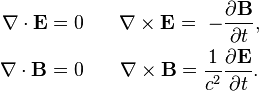
If you really want to get trashed, grab a bottle of scotch and study Maxwell's equations. Yes vector divergence, vector curls and partial derivatives all mashed into one big ball of fun.
a36887f7aef65b0539270faad53d2831.png
 
Oh common, what could be harder than a little
b7f1b12cde784b0cadb5d023179136ed.png


If you really want to get trashed, grab a bottle of scotch and study Maxwell's equations. Yes vector divergence, vector curls and partial derivatives all mashed into one big ball of fun.
a36887f7aef65b0539270faad53d2831.png

Hah! Simples, why not do it the hard way?
 
Thanks and happy birthday!:smileys:

Thanks. :)

Oh and lol... See? Garbz. Garbz is a total gear head. And you got Helen too! Between those two you've gotten about the best answer you'll ever get on the net. :)
 
What's a 'color space'?
 
Hey, I don't know much about color management but I sure do about wine. There is red wine and white wine and I can manage both pretty well. Only joking. You are far more advanced than I'll ever be on this topic.
 
(if you don't understand that, you probably aren't using sRGB v4, but the much more common sRGB v2 - which, as I'm sure you know, is a matrix space. We know all about matrix spaces, don't we?)

That's the one where you have Keanu Reeves do all your printing, with guns. Lots of guns.

Right?
 

Create an account or login to comment

You must be a member in order to leave a comment

Create account

Create an account on our community. It's easy!

Log in

Already have an account? Log in here.

New Topics

Back
Top Bottom