What's new

Confused about why so many of my dslr photos are going blurry

xstarx

TPF Noob!
Joined
Feb 7, 2013
Messages
19
Reaction score
1
Location
new zealand
Can others edit my Photos
Photos NOT OK to edit
Hey guys =) Hopefully i am posting in the right area! wasnt sure if this was better here or in the canon forum.
Anyway i have a canon 60d and have taken it out on a few casual shoots lately just trying to get better but every time im having a load of trouble with blurriness. The thing is if i have the shutter at anything faster then 1/250 it comes out really dark unless in really bright light even with the iso way up, and when its on 1/250 its very hard to get it sharp. When i have it on av with a shallow depth of field the images come out a bit lighter but the bluriness is still a hassle.

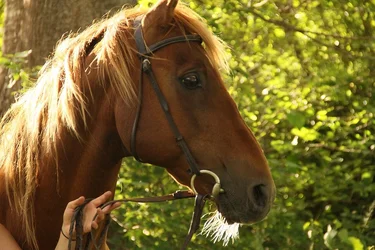
Ive uploaded two examples, they are by no means close to the bluriness of some of the shots but they still are blurry.
Am i just useless! i have a steady hand, or thought i did, i just dont know what im doing wrong and its disheartening =(
P.S Im not referring to the shallow depth of field which was deliberate but the main subject

The details for the girl photo are:
Canon lens 18-135
F/Stop f/5.6
Exp 1/250
Iso 1000
Exp bias 0 step
Focal Length 135mm
Metering: Partial

The Horse
Lens canon 18-135
F stop f/5.6
Shutter 1/250
Iso: 1000
Exp bias: 0
Focal Length 113mm
Metering Mode: Pattial
 

Attachments

  • $1f.webp
    $1f.webp
    76.9 KB · Views: 259
  • $1f.webp
    $1f.webp
    158.6 KB · Views: 263
Last edited:
Are you referring to the blurry background? If thats the case you may want to increase your aperture. F/5.6 Play with that until you reach what you're looking for. Good luck, and please share your results.

Michael
 
Hiya Michael, sorry i should have made that clearer, i was meaning the main subject. Its hardish to see here but when its in its larger size you can clearly see the blurriness. I just seems very hit and miss as to whetherits sharp or not
 
Those exposure values are equivalent to EV 10 (ISO 100) which is the light level under open sky just after sunset, or in deep shade. You don’t mention what lens you’re using, but if you have an “IS” lens, with image stabilization, turning it on could give you some help. The shutter speed you’re using is appropriate (following the rule that the minimum shutter speed should be no less than the reciprocal of the focal length).

When I look at your images, I don’t see any blurring due to camera movement. However, I do see focus issues – in the second image, the hand is sharper than the horse. That may happen if you’re letting the camera select the focus point, and if you’re shooting with all you AF points enabled. The camera will select the focus point that is closest to the camera, and that happened to be the hand.

As well, the best, most sensitive focus point is the center one (being a cross-type), so for getting an accurate auto-focus, it may be better for you to enable only the center AF point, use it to acquire the focus, and without releasing the shutter button, reframe before taking the photo. For this to work, you also need to verify that your AF mode is set to “one shot”. So, if you were using that method to shoot the girl, you would have aimed the center AF point at her eye, half-pressed the shutter button to activate the AF mechanism, which would acquire the focus on the eye, then you would move the camera to reframe the image (without releasing the shutter), and then take the shot.

Try this approach as see if it helps your situation.

The other thing to consider, is that your depth-of-field at 135mm and f/5.6 at a distance of 6 ft. is about 1 inch, and at 10 ft. it is about 4 inches. So if your focus is not precisely where you want it to be, the image will be soft. This puts a premium on accurate focusing. Therefore, my diagnosis of your situation is that between the very thin depth-of-field and your letting the camera acquire the focus itself, the camera is just not picking up the place where YOU want the focus to be.
 
Last edited:
It appears to me to just be missed focus. The hand in the lower left corner of the horse photograph appears to be in decent focus as does the girl's blouse on her left shoulder (camera right). That would indicate a rather narrow depth of field for f/5.6 at 135mm but it's what it looks like to me.

Have you been playing with your focus points so that you are focusing at the bottom of the image, or do you have some kind of auto-tracking focus mode enabled?
 
Set aperture to f/8 and you will notice pics coming out much sharper. Sweet spot of your lens should be around there.
 
What lens are you using??? You shot the girl at 135mm and the horse at 113mm, so probably a zoom. Is 5.6 close to wide open on it? Few lenses are at their sharpest wide open.... especially the less expensive zooms out there. There can be major image quality loss if shooting at less then 2 stops down from wide open, sometime a bit more can help.

Also you might want to try spot (single point) focus.. as it will allow you to precisely define where you want the focal point to be, instead of letting the camera decide.


[PhotoME]
PhotoME version: 0.79R17 (Build 856)

[Overview]
URL: http://www.thephotoforum.com/forum/...hy-so-many-my-dslr-photos-going-blurry-1f.jpg
File type: JPEG
File size: 311.6 KB
Creation date: 1/11/2013 18:13
Last modification: 2/7/2013 06:35
Make: Canon (Canon Global)
Camera: Canon EOS 60D
Software: Adobe Photoshop CS6 (Windows)
Dimension: 1000 x 667 px (0.7 MP, 3:2)
Focal length: 135 mm
Aperture: F5.6
Exposure time: 1/250"
ISO speed rating: 1000/31°
Program: Manual
Metering Mode: Partial
White Balance: Manual
Flash: Flash did not fire, compulsory flash mode
 
Your 60D has 9 cross-type focus points.
AF Points
9 (Cross-type, Center AF point with dual cross sensor for f/2.8)
 
Wow thanks guys that really helpful! Sorry im using a canon 18-135 lens.
I will definitely turn the focus point to the centre, i remember that when i shot the horse the far right focus point was selected and i couldnt figure out how to change it so had to go with it then, Im not sure with the girl what it was set on. I do keep the IS on always.
Ile also try messing with the DOF
Will let you know how it goes =)
 
Wow thanks guys that really helpful! Sorry im using a canon 18-135 lens.
I will definitely turn the focus point to the centre, i remember that when i shot the horse the far right focus point was selected and i couldnt figure out how to change it so had to go with it then, Im not sure with the girl what it was set on. I do keep the IS on always.
Ile also try messing with the DOF
Will let you know how it goes =)

Please see this link... DxOMark - Canon EF-S 18-135mm F3.5-5.6 IS STM
 
Use the Canon software that came with your camera and it will show you where the focus points were on all the images. One thing that helps out when you give the exif info is the distance to the subject. This is an important key to knowing what the area in focus will be.
 
Heya thanks heaps for all the advice, i think ive gotten a little better and more aware of what to look out for, eg not zooming but moving in more =)
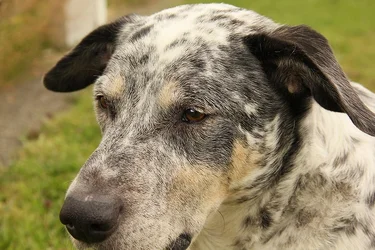
The dog i took today
Canon 18-135
F-stop 6.7
exp 1/500
Iso 640
F/length 53mm
Max apeture 4.75 ?

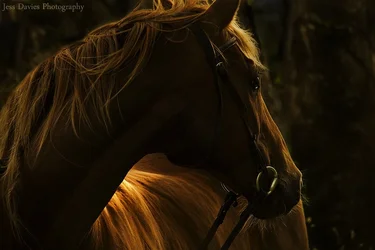
The horse here was from the old shoot but one of the ones that i really like i took (just wanted to show you guys, even though you may not like it because of the heavy editing) Have any of you heard of Robert Vavra? Hes my inspiration with horse photography anyway =) been a fan for years!

Thanks again for the help, no doubt i will post again sometime =)
 

Attachments

  • $small fb 2.webp
    $small fb 2.webp
    92.1 KB · Views: 178
  • $IMG_8975.webp
    $IMG_8975.webp
    210.7 KB · Views: 161
I quite like the horse shot. Nice backlighting.
 
My Nikon d5100 pics were coming out slightly soft. Turns out the default in-camera sharpness setting was set quite low. Bumping it up helped a lot. Not sure if Canon has the same setting but thought I'd throw the idea out there.
 
Try lowering your ISO, maybe cut in half. Or set your f stop around f/11. You will have a longer depth of field.
 

Create an account or login to comment

You must be a member in order to leave a comment

Create account

Create an account on our community. It's easy!

Log in

Already have an account? Log in here.

New Topics

Back
Top Bottom