What's new

Dancer in the studio

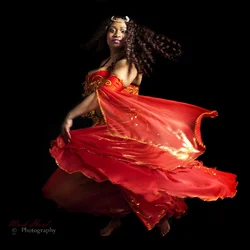
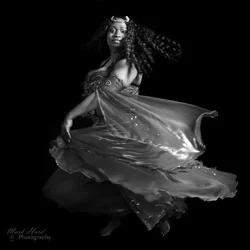
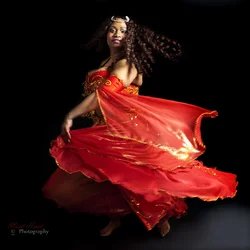
Here's another with black background from the set . I initially rejected this one because I had a shed load of work stacked up and I knew this was going to take an age to sort the lighting and background. She'd danced to the edge of the set and was at the max distance from my strobe and facing away from it. Inspired by TMC and Fotofashion.no I dug this out of RAW and went to work. A smooth transition of greys from the left where the edge of the backdrop was missed (needing filling in) and dark, to the right where the strobe light fell proved to be impossible (with my skill levels) so I finally went for full black. I left some grey in the front right on #1 to ground the image then did an all black background version in #2. Finally I thought I'd do a B&W conversion just to see how it looked. I'm still not sure about this one but it meets the criterion of motion. Which one works best, do you think?

1 $_DSC7001A.webp
2$_DSC7001B.webp

3$_DSC7001C.webp
 
I like the motion blur look. For me, the degree of blur is quite right. In the first,color shot, there's a bit of blur down by her foot which is visible, and which somewhat disappears when converted to B&W. For me, the color shot is the winner. This is a good shot! Glad you decided to complete it through work on it in post! I very much like all of the lines, the "flow", present in this shot! Makes her hair look awesome.
 
Here's another with black background from the set . I initially rejected this one because I had a shed load of work stacked up and I knew this was going to take an age to sort the lighting and background. She'd danced to the edge of the set and was at the max distance from my strobe and facing away from it. Inspired by TMC and Fotofashion.no I dug this out of RAW and went to work. A smooth transition of greys from the left where the edge of the backdrop was missed (needing filling in) and dark, to the right where the strobe light fell proved to be impossible (with my skill levels) so I finally went for full black. I left some grey in the front right on #1 to ground the image then did an all black background version in #2. Finally I thought I'd do a B&W conversion just to see how it looked. I'm still not sure about this one but it meets the criterion of motion. Which one works best, do you think?

1View attachment 39686

2View attachment 39687

3View attachment 39688


A++++++++
 
Wow...what hair and boobies!

WOWWW!

What can I say to such an insightful comment? :waiting: She's an impressive young lady in more ways than her figure and her dancing skill - she also won a photography prize from Samsung and had her photos used in a Facebook advertising campaign. :lol:
 
I really like the solid black background with the vibrant red dress. Very nice.

Just got a black backdrop yesterday... by chance they accidentally sent me two, the 6x10 I ordered and a 10x10. Which I :heart: but I am pretty sure I am going to have to inform them of so I can either return it or pay for it... Ugh... the joys of shopping on Amazon. On the plus side at least one of them was actually what I ordered which isn't always the case.

I am struggling though at this point to figure out if I am going to be able to pull off solid black being that I really only have ambient light or on camera flash to work with (I could do it with on camera flash but the shots just aren't as flattering)... Also, the kids are sick of being my subjects for playing around with backdrops. Although, I suppose in a pinch I could settle for stuffed animals, I mean for the sake of practice.

At any rate, thus concludes my ramblings.

Love this set. What editing software are you using?
 
I really like the solid black background with the vibrant red dress. Very nice.

Just got a black backdrop yesterday... by chance they accidentally sent me two, the 6x10 I ordered and a 10x10. Which I :heart: but I am pretty sure I am going to have to inform them of so I can either return it or pay for it... Ugh... the joys of shopping on Amazon. On the plus side at least one of them was actually what I ordered which isn't always the case.

I am struggling though at this point to figure out if I am going to be able to pull off solid black being that I really only have ambient light or on camera flash to work with (I could do it with on camera flash but the shots just aren't as flattering)... Also, the kids are sick of being my subjects for playing around with backdrops. Although, I suppose in a pinch I could settle for stuffed animals, I mean for the sake of practice.

At any rate, thus concludes my ramblings.

Love this set. What editing software are you using?

I understand the expense of setting up a home studio! I bought this kit on Ebay/UK for about £200 a year ago. It's not top quality but it works and does what it says on the box. All my studio shots are done with this kit. It's also portable (just) and packs up into a large holdall. You could get your flash off camera by investing in a cheap wireless trigger and rigging up a home made diffuser.

For editing software I have Lightroom 3 and PS Elements 8. I'd like to upgrade from elements as it only works in 8 bit but I'll have to start saving.

Try asking friends to model for you! :)
 
As an eBay Associate we earn from qualifying purchases.
Thanks so much for the advise :mrgreen:

Impressive kit! So much more advanced than what I was looking at. Do you have a stand for your backdrops? I have just been pinning and taping them up since I am not pro or anything. But I am also considering getting a stand. For the sake of not having the ripples in the fabric from uneven draping and also looking a little more assembled.

As for practicing on friends and family, I can totally do that. I actually invited my daughters friend over the other day, set up the white background with a bunch of home made flowers. Got the two of them in their little spring dresses. Turned out cute but as is the case with all the images with this cam, a bit on the soft side. That is my biggest gripe atm, my camera, but I hope to be working with something better soon. In the mean time just practice, practice...
 
Thanks so much for the advise :mrgreen:

Impressive kit! So much more advanced than what I was looking at. Do you have a stand for your backdrops? I have just been pinning and taping them up since I am not pro or anything. But I am also considering getting a stand. For the sake of not having the ripples in the fabric from uneven draping and also looking a little more assembled.

As for practicing on friends and family, I can totally do that. I actually invited my daughters friend over the other day, set up the white background with a bunch of home made flowers. Got the two of them in their little spring dresses. Turned out cute but as is the case with all the images with this cam, a bit on the soft side. That is my biggest gripe atm, my camera, but I hope to be working with something better soon. In the mean time just practice, practice...

Yes I use a backdrop stand - also a cheapie off ebay and a bunch of cheapie ebay clamps ... and a £5 charity store steamer to get the worst of the wrinkles out. ;) As for being pro :lmao: One day! ... I charge sometimes, if I'm asked to take the photos but my charges are very reasonable and all my profit usually goes into my photography kit account.

Re soft photos, do you shoot on single point focus?
 
These are gorgeous shots. Has she seen them yet? Let us know what she says.

She's going to be thrilled she changed flights!
 
Yes I use a backdrop stand - also a cheapie off ebay and a bunch of cheapie ebay clamps ... and a £5 charity store steamer to get the worst of the wrinkles out. ;) As for being pro :lmao: One day! ... I charge sometimes, if I'm asked to take the photos but my charges are very reasonable and all my profit usually goes into my photography kit account.

Re soft photos, do you shoot on single point focus?


At first I was trying to use the Face detection software which should be able to adjust for multiple faces in a shot. Never gets the precision focus I would like to see in my shots though. At the moment I am just trying to center the portion I want the focus on since my bridge only has auto focus capabilities. I am also playing around with the macro settings to try to get more detail out of the shots (being that those settings seem to be most sensitive to fine details). I am planning to move up to a DSLR in a couple months which I am hoping will be exactly the change I needed.

Love your siggy BTW :mrgreen:

And thank you for taking the time to help educate me. It's very appreciated.
 
These are gorgeous shots. Has she seen them yet? Let us know what she says.

She's going to be thrilled she changed flights!

Yes, she's seen them and she's delighted. She claims that people in the past have told her she's hard to photograph: for me she was a dream model. I also invited her to view this thread (I DO wish that some people wouldn't make comments about a model's physical attributes!). She's trying to help get me to go down to London with my studio sometime as several of her friends like my photos of her. :) I'll have to work out the logistics/economics of that as expenses, venue hire and hotel etc may be prohibititive.

Yes I use a backdrop stand - also a cheapie off ebay and a bunch of cheapie ebay clamps ... and a £5 charity store steamer to get the worst of the wrinkles out. ;) As for being pro :lmao: One day! ... I charge sometimes, if I'm asked to take the photos but my charges are very reasonable and all my profit usually goes into my photography kit account.

Re soft photos, do you shoot on single point focus?


At first I was trying to use the Face detection software which should be able to adjust for multiple faces in a shot. Never gets the precision focus I would like to see in my shots though. At the moment I am just trying to center the portion I want the focus on since my bridge only has auto focus capabilities. I am also playing around with the macro settings to try to get more detail out of the shots (being that those settings seem to be most sensitive to fine details). I am planning to move up to a DSLR in a couple months which I am hoping will be exactly the change I needed.

Love your siggy BTW :mrgreen:

And thank you for taking the time to help educate me. It's very appreciated.

I'm just sharing what I've picked up here like other people shared with me. If you're on a bridge camera that may restrict you but make sure you read what you can on it to get the most out of it. Google is a tremendous resource if you ask the right questions. I almost never use manual focus, partly because I shoot moving targets but also because my Nikon and lenses have darned good auto focus. I do shoot with manual settings, though. Auto settings are OK in some circumstances but in general I like to trust my eyes and my knowledge rather than a machine which has (probably) been programmed to meet the needs of dummies who think that a good camera will make them a good photographer. Face detection is great for family snapshots but if you have a group of 3 what it does is choose the average between 3 focus points - with the result that you get 3 faces that are sort of in focus-ish but none will be pin sharp. There's no substitute for knowing your stuff and your camera and YOU making the decisions about focus points and depth of field etc.

Macro settings probably won't help you much in portraits because macro is designed for small objects you want to appear larger than life size (Macro photography - Wikipedia, the free encyclopedia)

When you're ready to buy a DSLR I suggest you figure out your budget and what you will be using the camera for (there's a difference between which camera is good for landscapes and which is good for low light performances, for example) and ask for advice on the Photographic Equipment and Products forum. That's what I did and the advice I got was spot on! :)
 
Thanks a Million :mrgreen:
 

Create an account or login to comment

You must be a member in order to leave a comment

Create account

Create an account on our community. It's easy!

Log in

Already have an account? Log in here.

New Topics

Back
Top Bottom