What's new

Dark spot around an image

x1sc0

TPF Noob!
Joined
Sep 9, 2013
Messages
4
Reaction score
0
Hi,

I'm completely new to photography, and was attempting to shoot on a reflective surface (using a tablet for experimentation). I get some good results (to my untrained eye) but on my latest attempt, I get some weird shadow behind my subject. I do not know the correct terminology to try and google the problem, so I figured I'd ask here.

Thank you in advance for your help!

If you notice the back edge of the battery, there is a shadowy (dark) spot that is more prominent near the top corner of the battery...
https://www.dropbox.com/s/swvaqaxfqcz3xpp/DSC_0220.JPG
 
How is it a weird shadow? Its a shadow of the battery itself. You have light coming in from the back right the battery itself then blocks the light causing a slight shadow on the back left of the battery.

If you don't want shadows then you have to light the subject so as to minimize shadows as much as posable.
 
I am not quite sure what shadow you are talking about. Can you post a photo that have the issue circled?

Did you mean the at the edge of the copper top, there were some bleed?
 
Bottom right hand corner is probably lens flare
 
My guess is this:

BackShadow.jpg


It's a shadow of the subject itself....
 
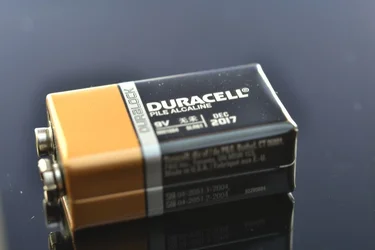
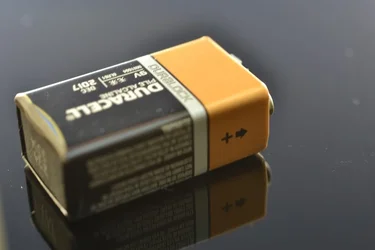
Hi! Thanks for the feedback! I'm adding a couple of shots. The dark area/shadow seems to be more prominent on the copper side of the battery. So it's not clear to me how to get rid of it.

The slower my shutter speed, the more prominent the problem becomes.

All shots are taken with a Nikon D3100, 60mm macro lens, F5.6 aperture, ISO 100, and a shutter speed of 1" (so that the problem becomes obvious). No lighting optimization or post processing was done. Shots were taken in jpeg (manual).

$DSC_0217.webp

Rotating the battery by hand makes the dark shadow rotate as well (following the copper side).

$DSC_0218.webp

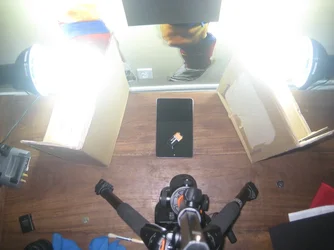
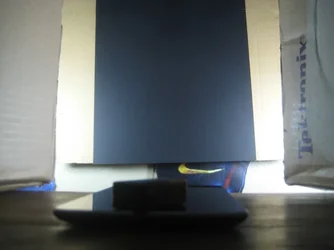
I followed a tutorial on flickr about tabletop photography. This is how my setup looks like.

From the top:
$IMG_2622.webp

From the front:
$IMG_2624.webp

Thanks again!
 
I noticed PS CS5 in the ExIF. Would it be over sharpening?
 
No post processing was done on the images though. I just used it to reduce the size and rotate the images by 180 degrees. The effect grows as I slow down my shutter speed so it's coming from the camera. Thanks for the help!
 
Is there any in-camera processing going on?
Might be a compression artifact due to in-camera contrast adjustment??

Is this shot in RAW or NEF.....or is it a jpeg? If jpeg...check your camera to see if there is anything preset in the menus to add contrast before writing jpeg to card...

Hope this helps!
 
I may be completely wrong here but it seems to be a phenomenon in where the brain is believing there is a shadow but there is not, looking up the munker white illusion is what I am thinking this is i also just found this video on youtube showing some more examples of the same thing.
can test it your self place some paper over the battery and the shadow goes. So if this is the reason find a good place not to trick the brain in thinking there is a shadow.
 
Last edited by a moderator:
I may be completely wrong here but it seems to be a phenomenon in where the brain is believing there is a shadow but there is not, looking up the munker white illusion is what I am thinking this is i also just found this video on youtube showing some more examples of the same thing.
can test it your self place some paper over the battery and the shadow goes. So if this is the reason find a good place not to trick the brain in thinking there is a shadow.

That's not the case here. A pixel-peeper program shows it IS darker behind the battery.
 
I see the "black" shadow too. It's not just around the copper top but also around other areas too.

His DOF is shallow? Is that on purpose because very few of the letters are in focus.
In his first picture the reflection of the battery contacts are in focus, everything else seems out of focus.

After reading about JPEG and it's compression techniques and seeing comparison pictures, it may be doing it in JPEG that could be causing this. Try it in RAW and compare it (I'm just guessing)
 

Create an account or login to comment

You must be a member in order to leave a comment

Create account

Create an account on our community. It's easy!

Log in

Already have an account? Log in here.

Back
Top Bottom