What's new

Depth of field and lenses relationship

Tatiana_

TPF Noob!
Joined
Apr 22, 2014
Messages
53
Reaction score
2
Can others edit my Photos
Photos OK to edit
Hello,
I am very new to photography and this forum, but I am learning.
My question - is there a relationship between depth of field and lenses? Can I obtain the same DoF with different mm or are some meant for distance A and another for distance B?
I was shooting my husband and my daughter in a portrait mode this weekend with a kit lens (18-55) and I was getting many images where my daughter who is slightly forward in the picture would be in focus, my husband who is slightly behind her would not be in focus. How to get the best image when they both are in focus, but everything behind them is blurry? Are some lenses better for this kind of shots?

Thanks!
 
Get closer to your subject and close up your aperture.
 
Go here and play around with the DoF calc and see what you can do to increase the DoF.

EDIT: oh man ... need to type faster next time. :D
 
Yes. Two lenses of different FL can provide the same DOF from different distances.

In fact, if you use the same aperture and frame the subject the same, the DOF will be the same.
 
Welcome, Tatiana!

Have each model's face the same distance from the camera. Have both of them step away from the background. The more distance, the more blurry the background.

Use the DOF Master here: Online Depth of Field Calculator to calculate your DOF. Using some average values like 55mm, f:5.6, I get this:

[TABLE="class: resultsTable, width: 100%"]
[TR]
[TD="class: textClassResults, width: 55%"]Subject distance[/TD]
[TD="class: textClassResults"]10 ft[/TD]
[/TR]
[TR]
[TD="colspan: 2"][/TD]
[/TR]
[TR]
[TD="class: textClassResults, colspan: 2, align: left"]Depth of field[/TD]
[/TR]
[TR]
[TD="class: textClassResults"]Near limit[/TD]
[TD="class: textClassResults, align: left"]8.99 ft[/TD]
[/TR]
[TR]
[TD="class: textClassResults"]Far limit[/TD]
[TD="class: textClassResults, align: left"]11.3 ft[/TD]
[/TR]
[TR]
[TD="class: textClassResults"]Total[/TD]
[TD="class: textClassResults, align: left"]2.27 ft[/TD]
[/TR]
[TR]
[TD="colspan: 2"][/TD]
[/TR]
[TR]
[TD="class: textClassResults"]In front of subject[/TD]
[TD="class: textClassResults, align: left"]1.01 ft (44%)[/TD]
[/TR]
[TR]
[TD="class: textClassResults"]Behind subject[/TD]
[TD="class: textClassResults, align: left"]1.26 ft (56%)

[/TD]
[/TR]
[/TABLE]


So you can see that the DOF is only 2.27 feet, total. So your subject's faces need to fit within that area. Have them more side-by-side.
 
Three things effect DoF. Aperture, Focal length (mm) and Distance between lens and subject. This is essentially what Sparky said.
 
Hello,
I am very new to photography and this forum, but I am learning.
My question - is there a relationship between depth of field and lenses? Can I obtain the same DoF with different mm or are some meant for distance A and another for distance B?
I was shooting my husband and my daughter in a portrait mode this weekend with a kit lens (18-55) and I was getting many images where my daughter who is slightly forward in the picture would be in focus, my husband who is slightly behind her would not be in focus. How to get the best image when they both are in focus, but everything behind them is blurry? Are some lenses better for this kind of shots?

Thanks!


As asked, your question is a theoretical one...
There are a few factors affecting depth of field.
And yes, there are different combinations that can approximate the same depth of field. However, that is an unusual way to look at it. The more usual way to approach it is how does the gear I will use affect what I can do?

Factors affecting depth of field:
Lens aperture
Lens focal length (and sensor size on different cameras, since it affects which focal length gives the view you want)
Subject distance: How close you stand to the subject, and how far is the background, etc.

Here is a good quick summary: Understanding the Factors that Affect Depth of Field - Tuts+ Photography Article
(those are the rules we learn, in a vague non-numeric way)

And here is a calculator that will approximate the results any specific conditions: Online Depth of Field Calculator

Note however, that depth of field Gradually falls off, there is no sharp deciding line. For example, if the calculation says DOF is good to say 20 feet, 23 feet and 17 feet will not be greatly different. It is a very gradual borderline. Exact focus point is the sharpest.

Generally focusing at around 1/3 of the depth into a landscape scene will give greatest range equally in front of and behind the subject (hyperfocal distance is that focus point which includes infinity distance).

At very close focus distances, this rule of thumb becomes more like 1/2 way into the scene.
 
Last edited:
Get closer to your subject and close up your aperture.

you may have meant to 'Open' the aperture? Not only is it the distance of your subject to the lens, but also the distance your background is from your subject being captured. You don't have to be super close to the subject if your background is really far behind it.
 
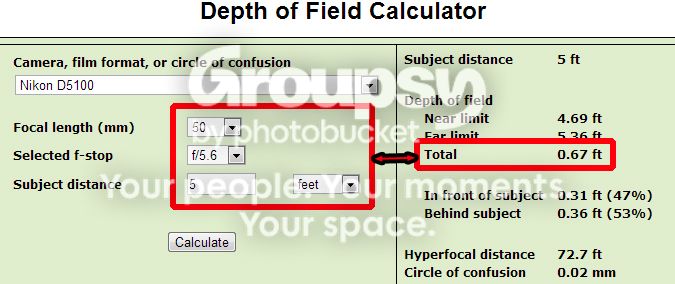
If you use a 50 mm lens set to f/5.6 with your subject (point of focus - PoF) distance 5 feet away,
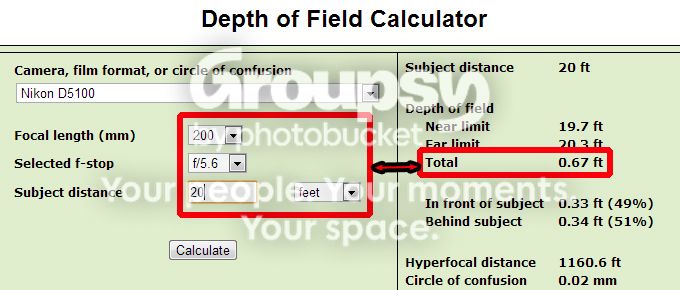
you will get the same DoF using a 200 mm lens (4x longer FL than the 50 mm lens) set to f/5.6 if you move back to 20 feet (also 4x) to keep the subject scale the same in the image frame.

However, note the slight change in the DoF distribution from 47% in front of the PoF, 53% behind the PoF (subject) with the 50 mm lens to 49% in front of the PoF, 50% behind the PoF with the 200 mm lens.

If you do landscape photography also note the BIG change in the hyperfocal distance.

50mm56Feet5.jpg


200mm56Feet20.jpg
 
Last edited:
Thank you all very much, I am reading the info.
In response to Designer - my husband was holding my daughter, so they were VERY close, but she was just inches forward. But I guess DoF was so shallow, that that was enough not to be in focus.

I am playing with the calculator. Do you all have those numbers memorized to know how far to position your object with with lens at which F stop??

It all feels a little overwhelming at first, I am trying to step away from Auto mode, but pictures don't quite work out. Do you all have a starting point, lets say Aperture or Shutter speed or ISO. Should I set one thing and let camera set others?

Thanks again. Sorry for silly questions. I know there are many books on theory, I have a few, but guidance helps!
 
Three things effect DoF. Aperture, Focal length (mm) and Distance between lens and subject. This is essentially what Sparky said.
Four, actually. The sensor size has a bearing as well which is why the type of camera is specified in online DOF calculators.
 
Three things effect DoF. Aperture, Focal length (mm) and Distance between lens and subject. This is essentially what Sparky said.
Four, actually. The sensor size has a bearing as well which is why the type of camera is specified in online DOF calculators.


Right, but technically, sensor size is merely a crop. This crop does affect which focal length must be used to get the same view, or where we have to stand with same lens to get the same view. But if standing at the same place and using the same lens, just changing only sensor size itself does not change the lens image at all, but only its cropped size.

However, we do look at the images, and if it is cropped smaller, then we have to enlarge it more to compensate. This greater enlargement of the smaller image makes the out of focus blur be more noticeable and objectionable. This is the arbitrary Circle Of Confusion factor in the DOF formulas - how well do we see this blurred spot?

Saying, crop size is not about DOF, but crop size is related to enlargement, which does affect the degree of blur we see when not in focus.

DOF charts are always written precisely, like maybe from 4' 11" to 9' 2". Like those numbers are important. But NOTHING happens at 4' 11" or 9' 2". There is a very gradual transition at these boundaries. A little more or less won't notice any change. The numbers are only what the math spits out. Math has to say something, that is what math does.

And then, the part that is never discussed is that there are certain implied conditions about enlargement, where this CoC assumption applies. Normally the standard assumption is this image enlarged to an 8x10 inch print viewed at 12 inches (or maybe it was 10 inches). CoC is the assumed size of blur that normal eyes can detect there. If your view is some other situation, you probably imagine the blur to be different.

Just saying, the chart numbers are not the important thing, situations vary. It is just a guide, but there are no absolutes. What is important is to know the factors increasing or decreasing DOF, what we can do about it. But it is all relative, NOT absolute.
 
I am playing with the calculator. Do you all have those numbers memorized to know how far to position your object with with lens at which F stop??

LOL! No! You can make some preliminary choices before you go out, and plug those values in to see if your choices will work. If the DOF is too narrow, make some adjustments in the settings and try the calculator again before going to make photographs.

Do you all have a starting point, lets say Aperture or Shutter speed or ISO. Should I set one thing and let camera set others?

It depends on what kind of photography that you are going to do. For portraiture, you might want to control both the aperture (for DOF, for instance) and shutter speed (because people can't hold perfectly still). Your only remaining variable is the ISO.

So as a starting point, let's say you want the shutter speed to always be at least as fast as the reciprocal of your hand-held lens focal length. A 55mm focal length, hand-held should be 1/55 second or faster. Is that fast enough to freeze motion in a posing person? Probably.

Next is the aperture. Say you want the DOF to be around 2 feet thick. In the example I posted above, the DOF is 2.27 feet, total with an aperture of f/5.6. Therefore, your aperture should not go any wider (that lens has reached its limit at that focal length).

Now if the exposure needs tweaking, go into the menu and adjust the ISO (or let it float automatically).
 

Create an account or login to comment

You must be a member in order to leave a comment

Create account

Create an account on our community. It's easy!

Log in

Already have an account? Log in here.

New Topics

Back
Top Bottom