What's new

Distant landscapes come out muddy

MercSoldier

TPF Noob!
Joined
Apr 1, 2013
Messages
2
Reaction score
0
Can others edit my Photos
Photos OK to edit
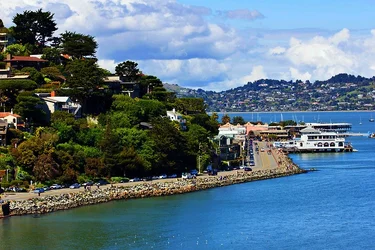
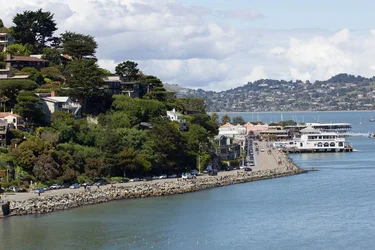
Whenever I take distant landscape photos, a lot of the content has this kind of muddy look to it. In this photo, the cars to the left aren't crisp at all. Neither are the trees. They just look bleh. Can anyone tell me what is going on with my photos?
$8610770505_6eed1e9fd9_b.webp
 
You have uploaded an image without the embedded exif on focal length, camera data, shutter speed, aperture.
Can you tell us what those are?
Where you using a tripod?

More than likely this is atmospheric haze, moisture hanging in the air above a moist substrate.
 
Go back about 4 hours later
I agree here. I think that there is little to no lighting effect going on right here. If you come back later when the sun is lower in the sky, then it will make everything look much better.
 
With such shots, I usually up the saturation and adjust colour curves if necessary to make the photo stand out a bit more. Most landscape shots in mid-day tend to be washed out especially if the sun is out. This is more the case in the tropics where I live. Skies are literally white or steel blue-grey even to the human eye.

Normally if you are a tourist going to exotic locales and on a tight schedule, you wouldn't be able to visit the same spot twice. So it comes down to luck and timing, but it can also possibly be fixed with a bit of Postprocess work.
 
$8610770505_6eed1e9fd9_b.webp
Here's an example after two minutes with GIMP.

What have I done?

First, adjusted colour curves to make the sky a little darker. Then used tone-mapping. Then increased the saturation and finally sharpened the image a bit. Landscapes and trees in the distance look better when slightly sharpened.
 
Last edited:

Create an account or login to comment

You must be a member in order to leave a comment

Create account

Create an account on our community. It's easy!

Log in

Already have an account? Log in here.

New Topics

Back
Top Bottom