What's new

Does anyone know any techniques for cleaning these images up?

Netskimmer

No longer a newbie, moving up!
Joined
Jul 23, 2009
Messages
1,392
Reaction score
229
Location
North Carolina
Can others edit my Photos
Photos OK to edit
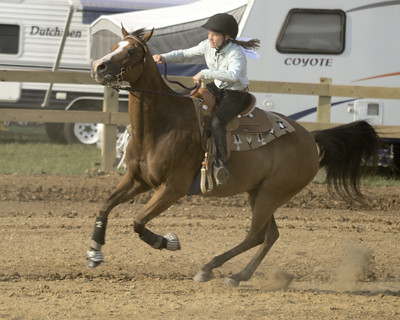
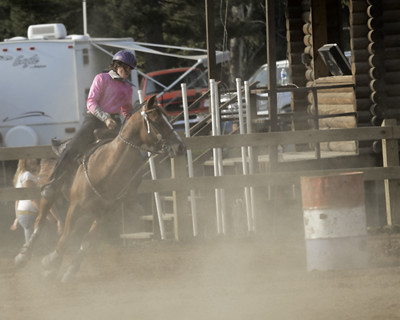
It was very dry and dusty on my last shoot and I pooched several shots due to dust clouds. I was just wondering if there are any tricks or methods for pulling a little more clarity out of these. It's a long shot, I know, and not the end of the world it nothing can be done. I was just curious.

1.
Copy-_DSC1438.jpg


2.
Copy-_DSC1408.jpg
 
I would try to boost the contrast, clarity and the blacks a little in lightroom, it should do the trick
 
Do you mean more clarity as in sharpness? OR do you mean more contrast? The biggest problem I see ( and granted this is on a laptop screen ) is the lack of contrast. I would adjust levels or curves to get some pure black into the images. The second one, you may be able to then add a gradiant mask that is graduated in both directions ( up and down ) to effect the contrast more in the cloudy area towards the bottom and less at the more clear top area. As for sharpness, you can add a highpass filter set to Overlay to add some sharpness. You can also use the same masking mentioned above.
 
Tried some quick tricks

Put them on Photoshop, duplicated the picture, put the duplicate to multiply and reduced the opacity of that layer.
Then reduced the yellow hue in hue and saturate


Copy-_DSC1438 by milos5, on Flickr


Copy-_DSC1408 by milos5, on Flickr

milo

First I like. Second ???
 
Nice tweaks milo.
 
Tried some quick tricks

Put them on Photoshop, duplicated the picture, put the duplicate to multiply and reduced the opacity of that layer.
Then reduced the yellow hue in hue and saturate


Copy-_DSC1438 by milos5, on Flickr


Copy-_DSC1408 by milos5, on Flickr

milo

First I like. Second ???
I like what you did with them. The second photo was more of a great example of the problem rather than a great shot.

I should have mentioned before that I don't have photoshop or lightroom yet, I'm stuck with GIMP for now. :(
 
Have you tried editing in a way to make the dust clouds a stronger part of the composition? I'm not sure how but just an idea.
 
GIMP can do precisely the same thing Milo did with Photoshop. :thumbup: Go to the Windows menu and select Dockable Dialogs -> Layers. Dupe the background layer and then set the blending mode. In addition to the multiply blending mode consider also the Overlay blending mode and or even a second dupe of the layer mixing Multiply and Overlay and varying the opacity

Joe
 
HI, I did this in GIMP to see if it would work. There are 4 different layers, some overlay and masking

Untitled-15.jpg
 
Last edited:
Cool, I'm gonna have to dig into GIMP and learn to use it better. I will start reading when I get home! Thanks alot for the help.
 

Create an account or login to comment

You must be a member in order to leave a comment

Create account

Create an account on our community. It's easy!

Log in

Already have an account? Log in here.

New Topics

Back
Top Bottom