What's new

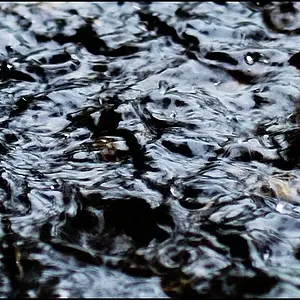
dots on this image?

frommrstomommy

Been spending a lot of time on here!
Joined
Feb 3, 2010
Messages
2,345
Reaction score
1,003
Location
florida
Can others edit my Photos
Photos OK to edit
they only seem to be on these few I took for my husband's shop?? didn't even notice til I had to have one printed. my google search tells me possibly just from airborne dust particles?? hes not pictured by the way.. he was away for training during this photo. lol

$dots.webp

ShopPhoto-4 by capturedbybc, on Flickr
 
not seeing these dots on any other photos.. more recent even?
 
It shows up easier in some photos than others. But giiiiiirl, you got yerself some sensor dust. Or a dirty lens. Either or. Get your shiz cleaned. ;)
 
I doooooo really need a cleaning though. Boo.
 
UGH. HOPEFUL THINKING. DREAMS SHATTERED. THANKS.

Yeah, this likely involves sending the thing out for cleaning because we have nowhere local. ;\
 
UGH. HOPEFUL THINKING. DREAMS SHATTERED. THANKS.

Yeah, this likely involves sending the thing out for cleaning because we have nowhere local. ;\

:lol: Sorry. But it's gonna have to be done at SOME point. :lol:

That being said... you could do it yourself...

Just buy a kit off Adorama or something.
 
It's chickenpox. Definitely, definitely chickenpox, B.
 
No need to send it anywhere, I was like this at first and was paying store to clean my sensor, the kits you can buy are fine, you may even be able to blow the dust off with a blower, if not a wet/dry or just a dry cleaning swab should do the trick..
 
Yuup that's sensor dust. It shows up typically at smaller apertures. Take a shot at f22 and then one at f5.6 and the f22 shot will show more dust than the f5.6 (which might not show any at all in some cases).

There are 2 ways of dealing with sensor dust;

1) Before you shoot clean the sensor - this can be with a natural air blow (don't use compressed air*); a dry or a wet swab - sometimes requires several passes of the swabs to clean fully.

2) After the shot you can use the "spot heal tool" in photoshop (or similar programs) to remove the spot - generally works well but takes time and ideally you want to avoid having to do it - so option 1 is the best.

* many compressed air canisters use a liquid as part of the formula; as a result you'd get even more flecks and material on the sensor. Also even when you've got a pure air cannister the speed makes the air super cooled - use that for too long and you can freeze the sensor and again cause far more harm than good.
 
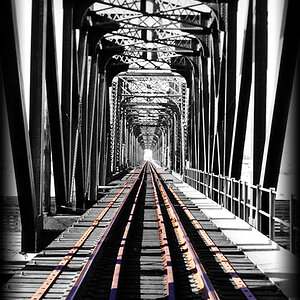
Here's a lovely example of a dirty sensor, long exposure plus f16 or 20 I think...

$By the River.webp
 

Create an account or login to comment

You must be a member in order to leave a comment

Create account

Create an account on our community. It's easy!

Log in

Already have an account? Log in here.

Back
Top Bottom