What's new

Enlarging photos without sacrificing quality

Jaebird

TPF Noob!
Joined
Apr 23, 2013
Messages
1
Reaction score
0
Location
Oregon
Hello,

I am brand new to photography; meaning, I have yet to even buy a camera!

Well, after living in this beautiful state (Oregon) for a year, I cant wait for summer! The vegetation is so lush, the mountains are majestic and day trips are plentiful. For this reason, I want to capture all of the beauty this state has to offer and hang it on my wall!

Yes, I want a camera which can produce photos with such clarity and quality that when enlarged maintains its quality. Now, I know a lot goes into this. Such as, camera body, lense, cropping, professional printer, home printer etc. Well, my intention is to enlarge photos to say.. 36"x60". A nice size photo to frame and hang in your home.

Lets work down the line and determine if this is possible and if so, how I would go about it.

Is this achievable with a professional photo lab? I think that is the most important question... if it is avhievable with a pro photo lab, what will I need in a DSLR body/lens to make this happen? How about taking cropping into consideration.. what will I need inside a DSLR above and beyond a body/lens to ensure I maintain qulity when cropping a photo?

Thank you all in advance for your kind responses!
 
There are not a lot of online labs that offer prints as large as 36 x 60.

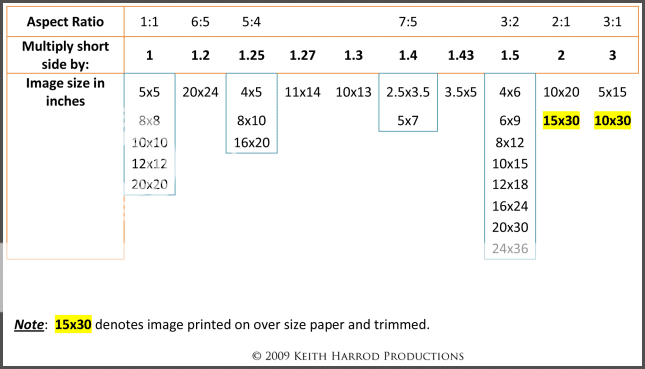
First lets consider image aspect ratios, which is how rectangular the image frame is.
Most DSLR cameras deliver images that have a 3:2 aspect ratio. Another way to think of 3:2 is that the long side of the image is 1.5 times longer than the short side (3 divided by 2 = 1.5). 36x60 is an oddball (1.666....) aspect ratio.
40 x 60 is 3:2.
So is 4x6, 6x9, 8x12, 10x15, 12x18, 16x24, 20x30, 24x36

4/3 image sensors and most P&S cameras deliver images that have a closer to square, 4:3 (1.3333...) aspect ratio.
Other popular aspect ratios are 5:4 (1.25 - 8x10), and 7:5 (1.4 - 5x7).

3:2 images have to be cropped the most to get to those aspect ratios that have long sides less than 1.5x the short side. Landscape images tend to look best in a rectangular format. Landscape photographers often stitch multiple images together side by side and make very rectangular 'panoramic' images, so 3:2 is a popular landscape aspect ratio.
Cropping means throwing away pixels, which reduces image resolution.

Nikon's entry-level D5200 ($700 new, body only) delivers image that have pixel resolution of 6,000 x 4,000 pixels.
At 100 pixels per inch (ppi), 6000x4000 px will be a 60x40 print - 6000 px / 100 ppi = 60 inches
At 150 ppi, 6000x4000 px will be a 40x26.7 print.
At 200 ppi, 6000x4000 px will be a 30x20 print.

Most print labs will handle the ppi issue for you, but if you want a print size that exceeds the print lab's minimum resolution requirement (often 100 ppi) they won't make the print.
How many ppi are needed varies with image content, image quality, and print size.
The bigger a photo is printed, the further from the photo people stand to look at it.
As viewing distance increases the ppi requirement decreases.

Large framed prints eat up wall space real fast.
There are also technical considerations that have to be addressed if you want high quality prints - Tutorials on Color Management & Printing

AspectRatioChartv2-1.png
 
Last edited:
If you want enormously large prints then you want a camera with a physically large sensor and resolution. A medium format camera would be ideal... I hope you've got a lot of money because they don't come cheap.

Most of these are easily over $30k, but there are a few "bargains" out there for just over $20k.

You can save a TON of money by going with a full-frame DSLR (Nikon D800 or D800E or D600, or a Canon 5D III or 6D) but these are not without trade-offs. All of these cameras have 36mm x 24mm sensors. The D800/D800E has the highest resolution (36MP) and the rest have resolutions in the 21-24MP neighborhood. But the D800 is diffraction limited at f/8 or above (meaning that due to the laws of physics regarding properties of light, it's not possible to focus a single point of light onto a single pixel... it's going to bleed somewhat into adjacent pixels (and these laws assume "perfect" optics... so a more expensive lens wont solve this problem.) Landscape shots usually are shot at high focal ratios. The 5D III, 6D, and D600s get about an extra stop before they become diffraction limited (they can maybe handle f/11.)

Normally we don't worry about being diffraction limited because you can only tell that an image is diffraction limited if you (get ready for it) .... plan to print REALLY big sizes. But that's EXACTLY what you're asking to do.

Cameras with physically large sensors have more breathing room before they become diffraction limited... which is why a medium format or large format camera can handle it, but a camera with a smaller sensor can't.

There is a way around this that costs significantly less.

You can create panoramic shots by taking a series of shots and stitching them together. Suppose instead of shooting just 1 shot... you take 9 shots... 3 shots wide by 3 rows tall. Now you're effectively mulitplying the size of the sensor and number of pixels enormously without running into the diffraction limits which cause the shot to look soft.

It'll take more time and some learning, but at least you wont need $30k for a camera.

Gigapan makes a robotic panoramic head and software that can make VERY high res detailed images using camera with significantly lower resolution (so you don't need a very expensive camera.) This gear is a big bulky... it's more of a destination item (e.g. the whole reason you're going out to a vista is to create an image, so you don't mind hauling the gear.) It's not suited for going on a nature hike and having a camera to take whatever happens to catch your eye. See: GigaPan EPIC Pro Robotic Camera Mount EPIC PRO B&H Photo Video (they have a video that explains how it works.)

You don't need a device like the Gigapan... you can do it manually. You don't even necessarily have to have a tripod (but then you'd want a lot more overlap between frames). The Gigapan automates the whole process and, since it's a robot, it's more precise.
 
You will have to go to a print shop for that size. Also you picture will be on lower pound paper like a poster. My husband runs a print shop and I also work for them part time. To get that high of resolution they use a laser printer on steroids. The paper comes in rolls. I have some prints framed and the resolution is awesome! I had to get use to thinking ever picture needs to be like a 4x6.
 
High quality papers are available for large fine art prints, as are the somewhat specialized printers (7 or more ink colors) needed to make them.
You're also not limited to printing on paper - http://www.millerslab.com/wallart

Here is a 44 inch wide by 39 foot long fine art paper - http://www.bhphotovideo.com/c/product/593956-REG/Hahnemuhle_10643195_Baryta_Photo_Rag_Paper.html

There are 3 main types of print:
1. The classic C-Print Chromogenic color print - Wikipedia, the free encyclopedia
2. Inkjet Giclée - Wikipedia, the free encyclopedia
3. Off-set press Offset printing - Wikipedia, the free encyclopedia
 
Last edited:
Welcome aboard.

Now, I know a lot goes into this. Such as, camera body, lense, cropping, professional printer, home printer etc.
You left out a good quality tripod, but more importantly, you left out knowledge, skill, talent and determination.

Don't expect that you can buy a bunch of gear and instantly come home with high quality images that will look great when enlarged. I'm sure you can get there, but if you're like the rest of us, it will take some time and lots of practice.
 
Printed images do not need "all that much" resolution to look quite,quite good. The surface of many printing papers is going to offset/neutralize a lot of the technical mumbo-jumbo that several members are providing you with here. A local landcape photographer used to regularly exhibit 40 x60 inch prints made from his "lowly" 5.4 megapixel Nikon D1x...a camera that actually used some in-cemera jiggering of the pixels to ARTIFICIALLY up-sample (aka up-resolution AKA up-rezz) the image data to get to its "5.4 megapixel" sized image; after it was on the market for a year, a texas company run by Eric Hyman developed Bibble Softeware's MacBibble into a product that could artificially take the D1x's "faked" 5.4 MP files and up-rez them to 10 MP.

As far as the above chart on print sizes and pixel counts and PPI and all and all: yeah, fair enough. Buuuuuuuut....any place that prints big prints has a multi-thousand-dollar Raster Image Processor [aka a RIP] that can up-rezz your 10,12,16,or 24 MP files to as high a resolution as is needed for ANY size print they can make...so...no worries! Canvas prints cannot actually SHOW all the resolving power a modern camera can record...so,again...mumbo jumbo vs wall-hangers.

Seriously....you want big prints? You don;t need a lot of megapixels. You need decent glass, and GOOD exposing technique; good focus; good exposure; steady camera. That's it. You can make BIG prints from modest megapixel cameras.

Buy a Nikon D7100 and two really GOOD lenses, and BE DONE WITH IT for years. all the theoretical mumbo-jumbo is going to get in the way. Buy a modern Nikon, and two good lenses. Learn how to shoot.
 
It also depends a great deal on viewing distance. 300dpi is a good standard for stuff you're viewing at a normal readin distance. Big prints on the wall are normally viewed from somewhat farther away. But, it depends. If you're putting behind the couch, that's one thing. In the hallway, with spot lighting, that's another thing entirely.

If you're viewing it from twice as far away, you can print it twice as big - with no apparent loss of quality.
 
Got two on the wall for examples for customers. 6mp point and shoot camera, 72-ish ppi, 24x36 print. Looks great.

I like the post keith made....I should print it and give it to customers who bring in thier 240gb *.tiff file at 12345322 resolution 'cause they read somewhere higher res is always better, and they confuse crop ratio with resolution, crop for 16x20 and make it 1200 resolution at the same time, thus adding in pixels and making a chit print. I hate them.

/rant

got off on a rant....lol oops.

lol
 
There is no escaping the fact that there is a lot of fundamental mumbo-jumbo technical stuff to doing digital photography.
And that's before all the fundamental mumbo-jumbo technical stuff that applies to getting high quality or even just mediocre prints made.

We get people posting here all the time that don't understand why parts of their photos get chopped off when they order 8x10, 16x20, 24x30 prints (5:4 aspect ratio) made from 3:2 aspect ratio images they uploaded to the print lab.
Other people post wondering why the print lab is telling them their photo doesn't have enough resolution and the print lab can't make a 20x30 print from a photo that has been cropped to only 800 x 534 pixels (40 ppi).

Anyone that wants to can skip technical posts.
Those that do skip, or that don't make an effort to actually understand the fundamental technical stuff, will likely never understand 'why'. Given enough time they may eventually figure out 'how' by trial and error.
Trial and error can be minimized, or even eliminated entirely, by knowing the technical stuff.
 
Botom line: gorgeous wall-hanging sized prints are easily within reach of even a 10 year old Nikon with 5.4 megapixels of "jiggered", faked up-sampling done in-camera...and any 12 to 24 MP d-slr has all the image quality needed to make big prints...as long as the user uses decent lenses, but even more-importantly, uses good,solid technique and "best practices".

Again...I saw 40x60-inch presentation prints of highly-detailed landscapes printed around 10 years ago from both the D1x and the D1h--the 4.2 megapixel Nikon. LOTS of them. BIG prints. From two camera that today we would say have "chit-quality" sensors...not even within the top 200 sensors tested on DxOMark. The companies that specialize in making wall-sized prints have high-end, EXPENSIVE,custom-designed RIPS that can up-rezz anything even halfway decent and make a wall-hanger print.

As amolitor mentioned, appropriate viewing distance is, basically, viewing the enlargement in a display environment...not with a magnifying lgass from 2 inches away, under a 250 Watt quartz inspection lamp.
 
Botom line: gorgeous wall-hanging sized prints are easily within reach of even a 10 year old Nikon with 5.4 megapixels of "jiggered", faked up-sampling done in-camera...and any 12 to 24 MP d-slr has all the image quality needed to make big prints...as long as the user uses decent lenses, but even more-importantly, uses good,solid technique and "best practices". ...

I'm 100% with Derrel here.

My recommendation: A D-SLR with 12MP sensor. More importantly: a good lens. Ideally a prime lens. The 50mm prime lenses are usually around $100. If you buy a new D-SLR it may come as a kit with some cheapish wide angle zoom lens which might fit the bill also.

One thing that nobody brought up (I think...):

Instead of using a 60MP sensor you might as well start stitching your images together to achieve large formats for top quality printing.

If you are planning on shooting outdoors like mountains, landscapes etc. this can all be done with stitching. I do it all the time and you can easily get 10,000x10,000 pixel images with every little detail visible.

Of course you need a nice tripod to go along with that. But it can be done for under $1,000.00 new and maybe around $700 used.

Anyway, I've printed plenty of my 12MP shots on 24x36 and if you stand 3 feet away it looks great. If you are a pixel peeper with your eyeball half an inch away from the print you will see some blurriness ;)
 
I've been shooting for a few years with pretty good equipment and, only in the last couple of years, have I gotten to the point with my skills tha I will comfortably shoot for very large images.

If you know doodly-crap now, I can pretty much guarantee that it will be a while before your pictures will get good enough that a big print won't just be ego.
 
I am brand new to photography; meaning, I have yet to even buy a camera!...

Well, my intention is to enlarge photos to say.. 36"x60". A nice size photo to frame and hang in your home...

Lets work down the line and determine if this is possible and if so, how I would go about it.

Yes its possible but perhaps you should learn to ride a bicycle before trying to win the tour de france. Whats the point of focusing on making BIG prints if the images you are printing are poor.
 
Last edited:

Create an account or login to comment

You must be a member in order to leave a comment

Create account

Create an account on our community. It's easy!

Log in

Already have an account? Log in here.

New Topics

Back
Top Bottom