What's new

Exposure changes with apeture change in aperture priority mode

Goldcoin79

TPF Noob!
Joined
May 23, 2012
Messages
152
Reaction score
2
Location
Uk, Hemel Hempstead
Can others edit my Photos
Photos OK to edit
Hi, I have noticed something that someone here may be able to explain so this is what I am questioning.

when I have done some landscape shots and used aperture priority mode, I have taken the shot with the apeture at F8 and the aperture at F11 so I can compare which shot has come out with the required amount of depth of field that I want. The depth of field is fine but what I have notice is that the picture sometimes comes out a little darker on the shot taken at F11 than the picture at F8. Now I know that F11 will reduce exposure if I was using manual but as I am using aperture priority the shutter speed should adjust so the exposure is the same weather I use F8 or F11.

Any able to explain why this is?
 
My educated guess (a guess nonetheless) is that it has something to do with how the light falls on the exposure sensing elements. Assuming you're shooting with a DSLR, those elements are on the mirror or near the focusing screen not on the main sensor. As depth of field increases, bright circles of confusion shrink, which changes how much light falls on elements. The camera tries to adjust, but probably doesn't do so perfectly. Have you tried different metering modes (spot, center-weighted, etc.)? One or more may not be so sensitive to this issue.

You can always bracket your shots.
 
F/11 is a smaller lens opening and is in fact a full stop smaller and 1 stop smaller lets in only 1/2 as much light.

In aperture priority mode the shutter speed and/or the ISO also have to be changed to compensate by 1 full stop of light.

If the ISO is not in auto mode, the camera can only change the shutter speed. If ISO is set ti Auto the camera can adjust both shutter speed and ISO.
 
Hi, I have noticed something that someone here may be able to explain so this is what I am questioning.

when I have done some landscape shots and used aperture priority mode, I have taken the shot with the apeture at F8 and the aperture at F11 so I can compare which shot has come out with the required amount of depth of field that I want. The depth of field is fine but what I have notice is that the picture sometimes comes out a little darker on the shot taken at F11 than the picture at F8.

Are you using partial or spot metering? If so that could certainly explain why the exposures differ "sometimes" as you say here.
 
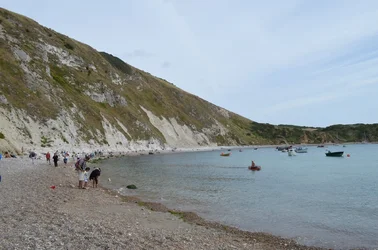
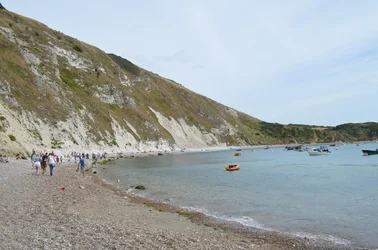
Here are 2 pictures the darker one is taken at F11 and brighter one at F8. Both taken within seconds of each other on aperture priority mode with the same ISO setting.

$DSC_0129F11.webp$DSC_0130F8.webp
 
First image:

Camera Maker: NIKON CORPORATION
Camera Model: NIKON D5100
Image Date: 2013-09-01 12:24:33 +0100
Focal Length: 18.0mm (35mm equivalent: 27mm)
Aperture: f/11.0
Exposure Time: 0.0063 s (1/160)
ISO equiv: 100
Exposure Bias: none
Metering Mode: Matrix
Exposure: aperture priority (semi-auto)
White Balance: Auto
Light Source: Unknown
Flash Fired: No
Orientation: Normal
Color Space: sRGB
GPS Coordinate: undefined, undefined
Software: Adobe Photoshop Elements 5.0 (20060914.r.77) Windows


Second image:

Camera Maker: NIKON CORPORATION
Camera Model: NIKON D5100
Image Date: 2013-09-01 12:25:30 +0100
Focal Length: 18.0mm (35mm equivalent: 27mm)
Aperture: f/8.0
Exposure Time: 0.0031 s (1/320)
ISO equiv: 100
Exposure Bias: none
Metering Mode: Matrix
Exposure: aperture priority (semi-auto)
White Balance: Auto
Light Source: Unknown
Flash Fired: No
Orientation: Normal
Color Space: sRGB
GPS Coordinate: undefined, undefined
Software: Adobe Photoshop Elements 5.0 (20060914.r.77) Windows


There's a good one full minute between the two. Perhaps the lighting changed.
 
Last edited:
It appears that the camera performed as expected, and compensated for the 1 stop aperture increase by a 1 stop shutter speed decrease.

I'll take a guess at the JPEG software within the camera itself. The picture was framed slightly differently in the second shot, and perhaps some internal 'rule' in the firmware brightened up the picture more for the f8 shot than the f11 shot.
 
Other than some sort of in camera inconsistency, I think the only explaination is that the light changed between shots. Based on the amount of cloud cover, that seems the likely reason. My first guess was the meter was picking up something different between the two, but the exif shows two identical exposures. Interesting. This is one of the reasons why I try to always shoot in manual and bracket if possible.
 
Matrix metering averages the light in the entire scene.

By slightly changing the framing you also changed how much light was in the scene.
There is somewhat more bright sky in the darker, 2nd photo.
Because there was more light, the camera compensated by reducing the exposure.

If the cloud cover had changed making the scene darker the camera would compensated by making the 2nd photo brighter.

If you want very consistent exposure, don't use matrix metering. Use Center-weighted or Spot metering instead.
 
Last edited:
Matrix metering averages the light in the entire scene.

By slightly changing the framing you also changed how much light was in the scene.
There is somewhat more bright sky in the darker, 2nd photo.
Because there was more light, the camera compensated by reducing the exposure.

If the cloud cover had changed making the scene darker the camera would compensated by making the 2nd photo brighter.

If you want very consistent exposure, don'r use matrix metering. Use Center-weighted or Spot metering instead.

Or better yet, once you "select a meter reading", put the camera in M and make your own adjustments.

By select a meter reading, I mean use spot metering, and shoot some frames (or just read the exposure values indicated in the finder) metering on different parts of the frame. Then choose the one that matches your intended result. DON'T FORGET TO CHECK THE HISTOGRAM as some cameras adjust the displayed image making it look "correct" when in fact it isn't.

Then, using the settings from that image, put the camera in M mode, setting the Shutter, Aperture and ISO.

From here, you can adjust your exposure as needed. To change DOF, adjust the aperture one stop one way (+/- stop), and the shutter one stop the other way. If you run out of lattitude in either shutter or aperture, you can use ISO instead (w +/- noise).
 
Thank you very much for all your replays, very helpful. It seems that there was more time between each shot than I realised.
 

Create an account or login to comment

You must be a member in order to leave a comment

Create account

Create an account on our community. It's easy!

Log in

Already have an account? Log in here.

Back
Top Bottom