What's new

Family Portraits | Running Back & Forth | C&C Me!

MichaelHenson

No longer a newbie, moving up!
Joined
Nov 15, 2013
Messages
746
Reaction score
176
Location
St. Louis, MO
Can others edit my Photos
Photos OK to edit
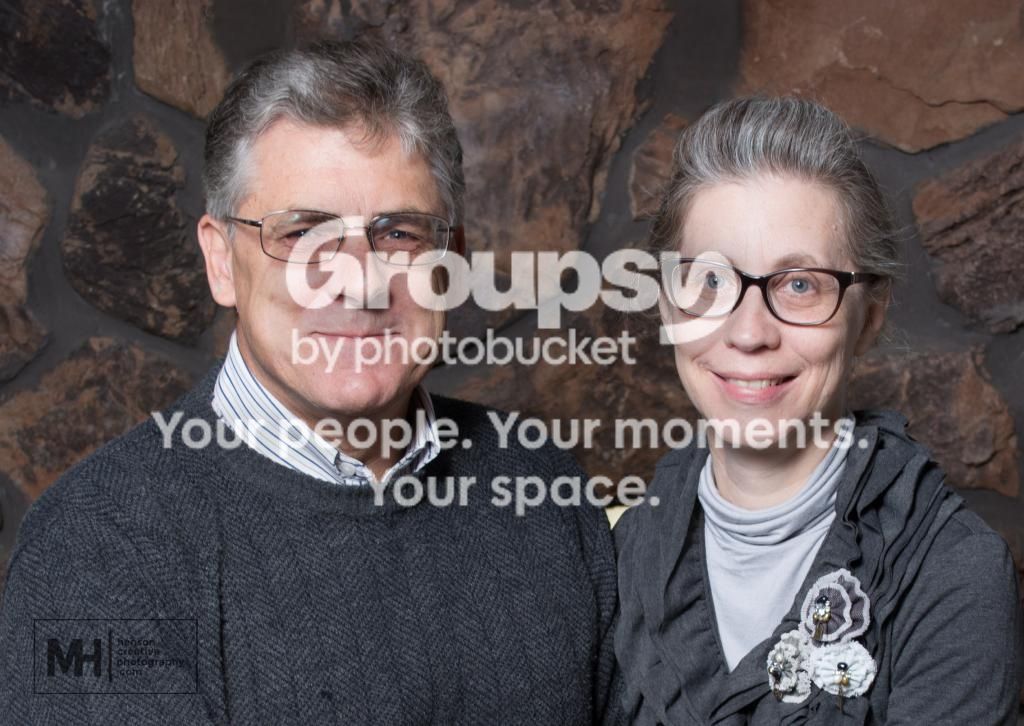
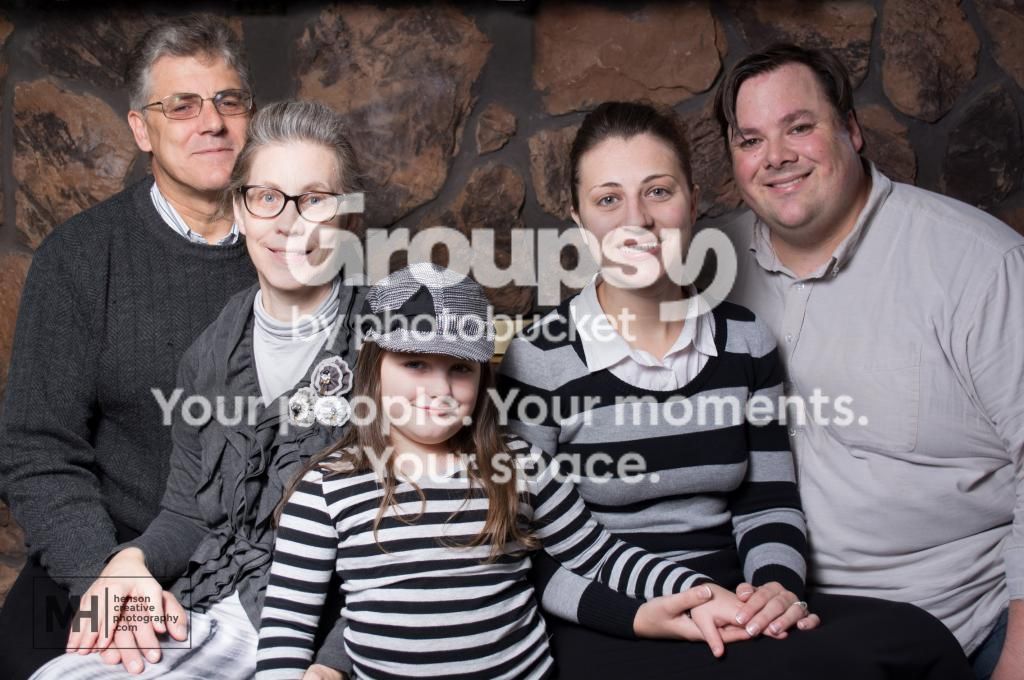
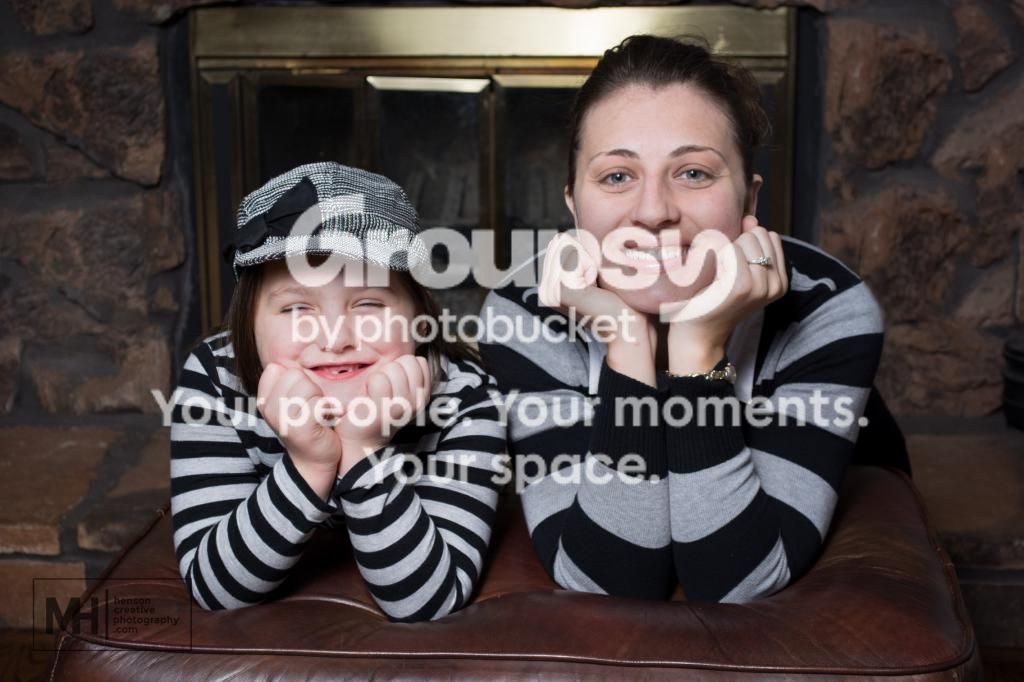
Well, I was able to get my wife's parents to pose really quickly for a few family portraits. I had to run back and forth checking composition, adjusting settings, etc. and triggering the camera with a remote several times due to the lack of cooperation from the munchkin. Despite that, I feel like I got a couple fun, decent portraits. That being said, I'd like some feedback so I can continue to skip along down the merry path of improvement...

Things I'd change:
1. We were really close to the camera and the only lens option I had that worked was my kit (18-55) lens. I'd prefer to have set up differently but didn't feel like/have the energy to insist on a different location.
2. Again, the location. I really like the stones in the fireplace but there are some registers that I don't like in the background. My PS skills aren't where they need to be in order to cleanly remove them but I'm going to be practicing to get rid of them ASAP.
3. On a couple of the photos, my daughter's hat casts a shadow across her eyes. I'm torn on it because part of me likes the way it looks but I feel like there are those that will list that as a critique...(And that's okay! :) )

Anyway, on to the photos. Let me know what you would/I should have done differently. :) Thanks!

1. Larabell-Henson-11 by mhenson1104, on Flickr

2. Larabell-Henson-14 by mhenson1104, on Flickr

3. Larabell-Henson-20 by mhenson1104, on Flickr
 
Lighting seems even (bit hot on the left of the first, but overall pretty even). Biggest thing for me would be some background separation, but that's tough with an 18-55 indoors like that. Definitely a good start!
 
Cool! I'm currently working with just a Yongnuo flash and a 43" umbrella. I was basically shooting under and slightly right of the umbrella. I had it at full power so I should have turned it down a bit... I don't have a light meter and at the prices I've seen I probably won't be getting one soon so it's all trial and error for now. Unfortunately, that means that when I find something close to what I have in mind I "just go with it." Gotta get out of that mindset.

Agreed on the background separation. I guess another light behind or moving the umbrella may have helped with that?
 
Bumpage for the marnin' crowd.
 
needs added warmthness.
 
needs added warmthness.

So move the "warmthness" slider to the right a bit in Lightroom? :)

Kidding, I can see why you would say that... So, maybe I should up the temperature a bit?
 
The images do seem a bit cool to me, so yes, I would agree with moving the WB slider slightly to the right. I would also suggest cloning out the bits of mantle bracket and surround frame visible. They're minor, but removing them will definitely cut down on the distractions. I would also suggest dialing back your highlights just a bit. Overall, they're not bad at all for a first go, and you're definitely on the right track. As far as a flash meter, there are a ton of them on eBay, some for very little money, that said, they're NOT essential. Read up on the GUIDE NUMBER method of flash exposure.
 
The images do seem a bit cool to me, so yes, I would agree with moving the WB slider slightly to the right. I would also suggest cloning out the bits of mantle bracket and surround frame visible. They're minor, but removing them will definitely cut down on the distractions. I would also suggest dialing back your highlights just a bit. Overall, they're not bad at all for a first go, and you're definitely on the right track. As far as a flash meter, there are a ton of them on eBay, some for very little money, that said, they're NOT essential. Read up on the GUIDE NUMBER method of flash exposure.

I'll warm them up a bit when I get a chance (hopefully later this evening) and dial my highlights back as suggested. I'll definitely check out the Guide Number method of flash exposure. I understand the value of light meters and how it takes the guess work out of proper exposure but I guess I'm still new enough to photography that I don't want to add that to my process right now.

I would love to remove the heat registers and the mantle brackets, I just don't trust my PS skills yet. I've done some cloning, etc in Lightroom to remove blemishes, etc. in the past but the texture of the rocks makes doing so beyond my current skills. I'm working on fixing that though!
 
I'll give the cloning a go if you want.
 
...the texture of the rocks makes doing so beyond my current skills. I'm working on fixing that though!
Make copies of the images and use them to practice on. That's one of the best things about digital photography: Unlimited negatives of every image for practice! Something else that might help would be to use layers and selection tools to "lift" the people off of the image and apply a light, gaussian blur to the background to give a bit of a "depth of field" impression. There are literally thousands of YouTube and similar tutorials on these techniques... give 'em a whirl!
 
I'll give the cloning a go if you want.

Sure! I'd love to see them without the distractions.

...the texture of the rocks makes doing so beyond my current skills. I'm working on fixing that though!
Make copies of the images and use them to practice on. That's one of the best things about digital photography: Unlimited negatives of every image for practice! Something else that might help would be to use layers and selection tools to "lift" the people off of the image and apply a light, gaussian blur to the background to give a bit of a "depth of field" impression. There are literally thousands of YouTube and similar tutorials on these techniques... give 'em a whirl!

That's my plan. This is one of the first instances where I've had something like this to remove from the background so I have a lot of practice ahead of me. I played with the Gaussian blur on one of them and wasn't too sure about it. I'll definitely be playing around with these a lot in the near future and as I make progress I'm sure I'll post some before and afters for critique/feedback.
 
I'll give the cloning a go if you want.

Sure! I'd love to see them without the distractions.

Kinda quick and dirty, but I'll give you an idea of what I did. On the first two, I worked in tiny sections and cloned the gray spaces between the rocks up over the brackets. On the third one, I selected a square of rocks above the grates, big enough to cover the grates, and copied and pasted them over the grates on a new layer. Masked off the excess and anything that covered part of the subject. Merged the layers and then dodged/burned a bit, and then took a big healing brush and clicked on a couple spots on the covered areas. This alters the pattern of the rock a bit to make it less obvious, so it doesn't look identical or like repeating pattern.

15307985953_ba8326152c_o_zpsb908855e.jpg


15925672611_cb91e90f29_o_zpscc728cb2.jpg


15740343410_1803eefe68_o_zps3ebec8b6.jpg
 
Wow! Very, very cool and I like them so much more without the distractions. I'll be attempting this on my own when I get home from work! Thanks!
 
note how each of the faces is a radically different brightness.
The older woman looks as if she is staring into a searchlight while the man next to her has a more standard colioration.
The faces probably should be fixed.
When you darken then they will look overfly flat because the light is just toooo bright and has blown out all the detail.
 

Create an account or login to comment

You must be a member in order to leave a comment

Create account

Create an account on our community. It's easy!

Log in

Already have an account? Log in here.

Back
Top Bottom