Welcome to TPF.
The exposure looks good. And I realize that you said you adjusted it a bit, but as I look at the histogram for your image nothing is clipped/blown.
Here's a thumbnail of your histogram (you can click the attachment to see it in a larger size).
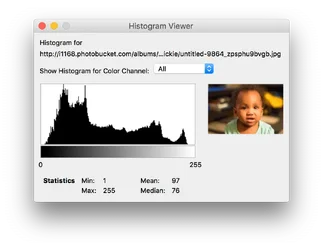
A histogram will look like a silhouette of a mountain-range or hills. From left to right represents the relative brightness of the pixel and the height of the "mountains" at any given point represent the number of pixels that have that particular amount of brightness. So the darks are on the left and the lights are on the right.
But what we're really looking for is to see if you have data slammed up against the left wall or right wall of the histogram.
If there were data slammed up against the left wall then that would indicate that there were a lot of pixels that are completely black (an RGB value of 0,0,0) which means you probably had data that was even darker but the camera couldn't expose it. That would be an indication of an underexposed shot.
If there were data slammed up against the right wall then that would indicate a lot of data was completely "white" (RGB value of 255,255,255) and that means there was PROBABLY data that was even brighter that the camera could record. In other words it would mean an over-exposed shot.
Since none of your data is slammed up against either wall, it indicates that all of your data fits within the range of what your sensor can properly record -- that's a good exposure.
You can view this on your own camera at the time of capture (or when reviewing the images). There's a button labeled "Info" on the back of your camera. When you are looking at an image, press the "info" button a few times and you'll see that it cycles through 4 or 5 different possible displays... the "histogram" being one possible display (every time you press "info" it switches to the next display layout and when it gets to the end it goes back to the beginning ... in other words just keep pressing "info" until it shows you what you want to see.)
As for the image quality... yes, you did miss focus on the eyes.
Your 7D II allows you to set focus mode type and also pick the focus points used. If you use "spot" focus then you want to select the focus point on the subject's eyes to get that tack sharp.
Your 7D II has "spot" (it uses only a single AF point and then even reduces the area that the point will sample to lock in focus -- this is used to lock focus on a tiny area with a lot of detail (such as a human eye).
If the selected area does not have enough contrasty detail then it may struggle to lock focus... at which point you would switch to either "single point" (still uses a single point but it uses the whole point ... not a reduced area -- that means it can look at a bigger area an hopefully lock focus.)
It also has "expanded area AF" which is just like single point AF but it "borrows" the points above, below, left, and right of your point to get an even larger sample area to lock focus.
It also has "surround area AF" which is just like expanded area AF... but includes the corners too (so it's a 3x3 box of AF points and it's really trying to focus the spot in the middle box but will borrow from all surrounding boxes.)
Next it has "zone" AF -- which allows it to use any AF point it wants as long as it's within the "zone" of boxes (the camera has several zones -- these are clusters of AF points.)
Lastly it has the full AF which lets it use any point it wants.
Keep in mind that when you let a camera use ANY point it wants, it will gravitate to the AF point that can lock focus at the NEAREST focus distance to your camera (so if there is anything in the shot which is nearer then your intended subject... odds are it will lock on that closer object and not on your intended subject.)
Be careful when shooting at these very low focal ratios ... wide open (e.g. f/1.8) Some photographers will tell you not to do it ... obviously there are many reasons to use it or it would not be a feature of the lens. Just be careful. The depth of field gets precariously narrow so you need to take care to make sure you really are focusing on what you want.
Also... when you are in "One Shot" AF mode (the default)... once the camera locks focus it will not continue to update focus if you or your subject moves. So once you lock focus... if either YOU lean in or out just a tiny bit... or if your child leans in or out just a tiny bit... then you'll miss focus.







![[No title]](/data/xfmg/thumbnail/42/42475-965e641fd6a3f72e60d9f555233b0aab.jpg?1734177004)