What's new

First successful background replacement!!

JustJazzie

Been spending a lot of time on here!
Joined
Jan 21, 2013
Messages
3,793
Reaction score
1,732
Location
Bailey, Colorado
Can others edit my Photos
Photos OK to edit
This is mostly a celebration post.

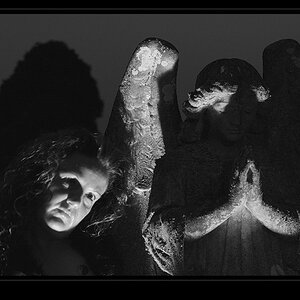
I have been trying for WEEKS (Months?, Years?) to successfully replace a background. I FINALLY got one I am mostly happy with! Hopefully I can do it again when I want to. The tutorial I used only half worked, so this was half a tutorial from phlern, and half clicking buttons until I got something I could use. Surly it will get easier with practice? Original background was black.
So go ahead and rip it apart now. ;-)

15021773144_fc0a38367b_o.jpg
 
I think it looks good. What did your other back ground look like? it would be good to see comparison.
 
I think it works fairly well; you've definitely done a good job creating the mask as all your hair seems to look right, and this background doesn't fight with any of the lighting you've used. Does it hold up as well in colour?
 
I think it works fairly well; you've definitely done a good job creating the mask as all your hair seems to look right, and this background doesn't fight with any of the lighting you've used. Does it hold up as well in colour?
No, I dont think that it does. I tried to use a filter to try and match the color of the background light, but it isn't perfect. In the future, I plan to choose a background before I create the shot and hopefully it will look more cohesive. As it stands, I threw this together after the fact as a means to practice my sorely lacking masking skills.
15456495818_1f76c616b1_o.jpg
 
I think it's terrific, but then you had me seeing two suns where there were only streetlights, so don't take my word for much. :D

Even if the skin tones matched up to the color of the lighting better, I think I'd still prefer the B&W image here. It's just a striking image.
I still pretty much stink at masking, especially around hair.
 
Yeah I think the black and white works and you did a good job masking. The color version I feel does not as much as far as color goes. You would need to warm up your skin tones to match the background color.
 
That's a bloody good job! Separating black hair from a black background is nigh-on impossible. In fact, I'm a little bit stumped as to how you did it so well!
 
That's a bloody good job! Separating black hair from a black background is nigh-on impossible. In fact, I'm a little bit stumped as to how you did it so well!
Check out phlerns video on background replacement, but I will try to explain. I went into the channels panel and chose the color channel with the most contrast. (Red in this case) brought up levels to make it more contrasty, and made the selection in the channels panel, then moved the selection over to the main panel. Actually the hair was the easiest part (for me) It was learning the pen tool for the rest of the body that was my biggest hurdle. ;-)
 
Yeah I think the black and white works and you did a good job masking. The color version I feel does not as much as far as color goes. You would need to warm up your skin tones to match the background color.
Yeah, I only did a quick attempt at color matching. It was always meant to be b&w so I didn't focus on it. Only posted it in response to tirediron's question really.
 
That's a bloody good job! Separating black hair from a black background is nigh-on impossible. In fact, I'm a little bit stumped as to how you did it so well!
Check out phlerns video on background replacement, but I will try to explain. I went into the channels panel and chose the color channel with the most contrast. (Red in this case) brought up levels to make it more contrasty, and made the selection in the channels panel, then moved the selection over to the main panel. Actually the hair was the easiest part (for me) It was learning the pen tool for the rest of the body that was my biggest hurdle. ;-)

Yes, the pen tool is a tricky one to master at first, but once you master it, you'll never use any other selection tool!

I'm still surprised even if you used the channels panel, since the colour of the hair and the colour of the background are so closely matched - I figured you'd have trouble separating them. Its a very good job either way.
 
Yeah, this is really well done, nice job.

I agree the color version looks a bit off but I'm wondering if you could just fix that by adding a hue/saturation layer, reducing the saturation, then masking out the subject so it only affects the background.
 
That's a bloody good job! Separating black hair from a black background is nigh-on impossible. In fact, I'm a little bit stumped as to how you did it so well!
Check out phlerns video on background replacement, but I will try to explain. I went into the channels panel and chose the color channel with the most contrast. (Red in this case) brought up levels to make it more contrasty, and made the selection in the channels panel, then moved the selection over to the main panel. Actually the hair was the easiest part (for me) It was learning the pen tool for the rest of the body that was my biggest hurdle. ;-)

Yes, the pen tool is a tricky one to master at first, but once you master it, you'll never use any other selection tool!

I'm still surprised even if you used the channels panel, since the colour of the hair and the colour of the background are so closely matched - I figured you'd have trouble separating them. Its a very good job either way.
thank you!

Yeah, this is really well done, nice job.

I agree the color version looks a bit off but I'm wondering if you could just fix that by adding a hue/saturation layer, reducing the saturation, then masking out the subject so it only affects the background.
I tried making me match the background, never thought to reverse it! Brilliant idea,
 
You can correct for colour to match other layers in your image by highlighted the layer you want to alter, then going to Image > Adjustments > Match Colour

In the bottom half of the resulting window, chose the name of your image as the "source", then select the layer you want to match to and "poof!" your layer will be a rough match and you can refine it with the colour intensity, luminance, and fade sliders.
 
It looks good, both B&W and color. If anything, I see what might be an ever-so-slight dark halo/shadow where your right arm crosses the light - just below your wrist.
 

Create an account or login to comment

You must be a member in order to leave a comment

Create account

Create an account on our community. It's easy!

Log in

Already have an account? Log in here.

Back
Top Bottom