What's new

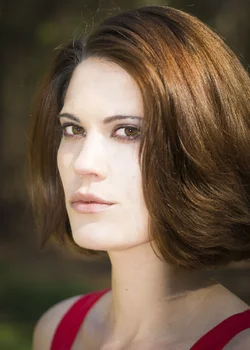
First time model on a first time TFP C&C please

Do you have the originals? I'd like to take a stab at editing these.
 
Here, I got her dress to stop bleeding and bumped the exposure a bit. Any better?

satb2.jpg
 
Using a reflector is easier because you can meter the exposure with your camera. It is just more pain in the ass because you will need an assistant. If not used correctly, you can blind your subject and make them squint.

I personally rather use a flash. I do not use an assistant. It is all me. Many people hate dappled sun, but I love it. Just put the sun behind the subject. It will give you that not very intense rim light. Here is the step I take...

1. Find where the sun is.. I almost always put the sun somewhat behind the subject.
2. Find interesting background that will complement #1
3. Composition


Most people worry about #3 first.

Here is a sample of dappled sun from the back + flash + decent background. You notice the sun gives that subtle rim light on the hair and the body.

546920_466390980050341_2145940116_n.jpg


397355_463018487054257_1786162851_n.jpg


546491_450108661678573_1217541775_n.jpg


Now this is what it looks like if you use full sun (not filtered/dappled by the leaves) + flash BUT you still use a dark background.

p476057319-4.jpg


This one is full low sun, flash, but the background is not dark. Remember, the more powerfull the sun behind the subject, the more powerful your flash needs to be. You kinda need to put the sun somewhat to the side from behind or you will get flaring.

p1034966115-4.jpg


Or you can wait until the sun is really low and put the sun exactly behind them so no flaring.

p273735708-4.jpg


I personally like #1 and #2 scenario. That is always what I try to accomplish. I almost never put the sun in front of the subject. Sometimes I put the sun from the side and put flash on the other side but that is very rare. Good luck! It can only get better from here.

 
Here, I got her dress to stop bleeding and bumped the exposure a bit. Any better?

no. You are going to have to blow out some of the other elements to match the highlight quality that you want on the face.
 
Using a reflector is easier because you can meter the exposure with your camera. It is just more pain in the ass because you will need an assistant. If not used correctly, you can blind your subject and make them squint.

I personally rather use a flash. I do not use an assistant. It is all me. Many people hate dappled sun, but I love it. Just put the sun behind the subject. It will give you that not very intense rim light. Here is the step I take...

1. Find where the sun is.. I almost always put the sun somewhat behind the subject.
2. Find interesting background that will complement #1
3. Composition


Most people worry about #3 first.

Here is a sample of dappled sun from the back + flash + decent background. You notice the sun gives that subtle rim light on the hair and the body.


I personally like #1 and #2 scenario. That is always what I try to accomplish. I almost never put the sun in front of the subject. Sometimes I put the sun from the side and put flash on the other side but that is very rare. Good luck! It can only get better from here.

Thanks, Robin. I am dropping my manual flash and going with the SB-800 with TTL. Should that help me in these situations? Yesterday, I either under flashed or over flashed with my manual flash, and I had to do a lot of make up work in lightroom. It was also my first time using a flash. Give me good sun and no flash and I'll know how to set my camera settings, but put that flash on there, I was all over the place :(
 
Last edited:
Here, I got her dress to stop bleeding and bumped the exposure a bit. Any better?

no. You are going to have to blow out some of the other elements to match the highlight quality that you want on the face.

Forgive my green and ignorance, but I'm not sure I understand what you mean by blow out. Do I need to increase the exposure on the elements that surrounds her?
 
No, I would use manual flash and manual camera setting.
 
Sadly the color is just too far gone.

$ladyfield.webp$for runnah.webp
 
Sadly the color is just too far gone.

View attachment 69557View attachment 69558

I linked you to an original up top. Can you PP that for me and let me know what you did? I know the original is blown out, but the best I can do now is attempt to fix it after, right? and learn from it. And I don't understand what you did there.
 
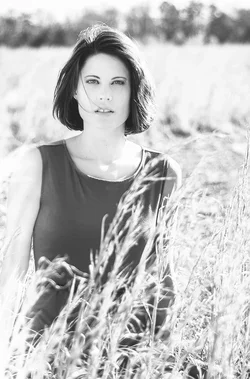
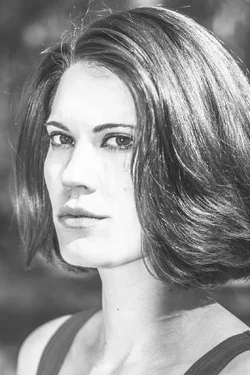
The problem is that you have that hard shadow on the face which is hard to remove and have it look natural. That is why I did the BW version. I will try to do this to the color version but not sure about how it will come out.
 
The problem is that you have that hard shadow on the face which is hard to remove and have it look natural. That is why I did the BW version. I will try to do this to the color version but not sure about how it will come out.

Is there something that you did that I didn't that blew them out like that? I'm trying to grasp it here.

Oh, you were getting the faces to lighten up, right?

bw.jpg
 
Last edited:
Mostly on camera. Nothing really special in post. Just global adjustments.
 
I worked this one pretty hard and I think it shows. This was mostly a basic levels adjust, selective dodging, skin smoothing, blending and air brushing.

$for runnah (1).webp
 

Create an account or login to comment

You must be a member in order to leave a comment

Create account

Create an account on our community. It's easy!

Log in

Already have an account? Log in here.
Back
Top Bottom