What's new

First time using the adjustment brush

DerekMellott

TPF Noob!
Joined
Sep 28, 2010
Messages
156
Reaction score
0
Location
Alberta
Can others edit my Photos
Photos OK to edit
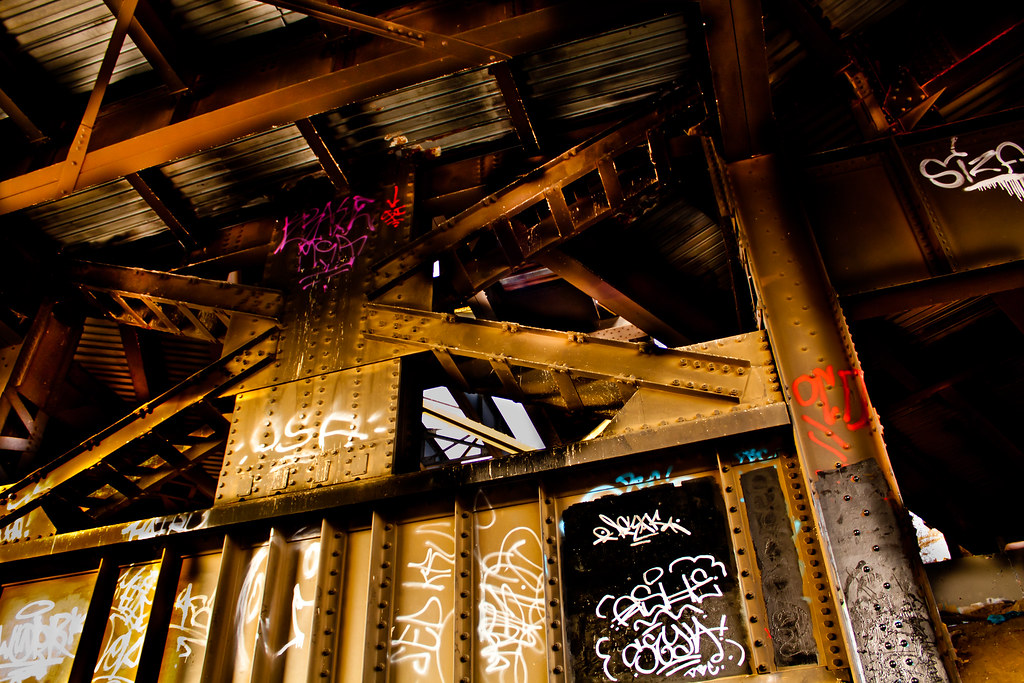
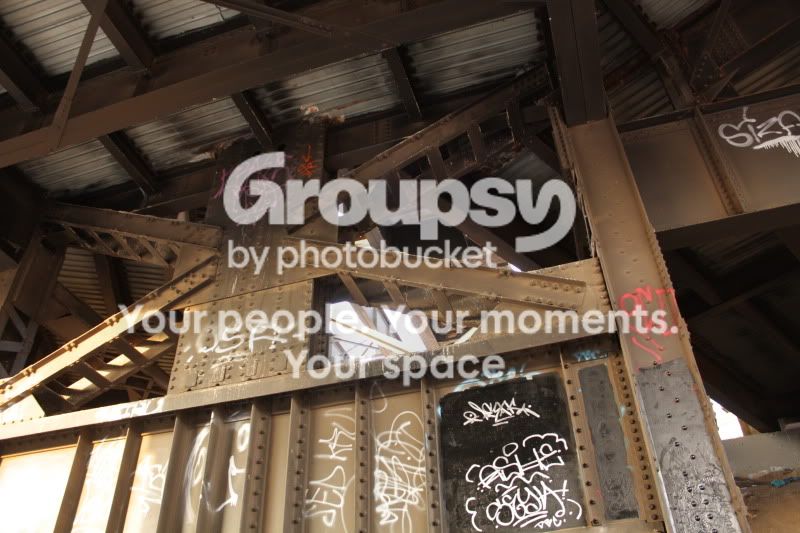
Decided to play around with the adjustment brush in lightroom 3

Before
IMG_4365.jpg


After

5215863449_e35efafb49_b.jpg

http://farm6.static.flickr.com/5208/5215863449_e35efafb49_b.jpg
 
I like it, the pink and red in the middlish looks strange to me though.
 
you know how you can tell it's been edited and thus fake?

because the brightness of the lettering is consistent while the metal's brightness changes. this is most evident in the pink
 
you know how you can tell it's been edited and thus fake?

because the brightness of the lettering is consistent while the metal's brightness changes. this is most evident in the pink

Fake? This isn't journalism. What do you mean fake? It is very obviously a heavily edited photo, I posted the original so you could see the edits. What is fake?
 
you know how you can tell it's been edited and thus fake?

because the brightness of the lettering is consistent while the metal's brightness changes. this is most evident in the pink

Fake? This isn't journalism. What do you mean fake? It is very obviously a heavily edited photo, I posted the original so you could see the edits. What is fake?

assume you hadn't posted the other one

you asked for critique, to me the scene looks faked because of the mixed exposures. the type of edits you did could also be done by painting in some of the items in the computer. in general the biggest sign that a photo was faked it because the exposures appear to be mixed in ways that don't happen in real life.
 
First off, thank you for taking the time to view and comment on my photo. The point of what I did was not to make it look "real" if I wanted that I would have left it alone. I wanted it to look grungy and high contrast. I know this isn't an "HDR" photo but you would critique one saying that it doesn't look that way in real life.

I am colour blind (red green) and often do not notice high red/pink levels. I will desatureate those colours a bit and post it again.

Again thank you for your input.
 
Derek, I admire that you still despite you being color blind, STILL gave this a shot! This is actually quite a remarkable photo. There is no real green in this photo so don't worry about that, the right beam with what looks like OCD underlined twice, is red. Not too saturated I like it. The top left is very magenta looking and I quite like it myself I would take the saturation maybe down just a hair, if not at all.
Hope this helps.
 
First off, thank you for taking the time to view and comment on my photo. The point of what I did was not to make it look "real" if I wanted that I would have left it alone. I wanted it to look grungy and high contrast. I know this isn't an "HDR" photo but you would critique one saying that it doesn't look that way in real life.

I am colour blind (red green) and often do not notice high red/pink levels. I will desatureate those colours a bit and post it again.

Again thank you for your input.


It is good to ask for comments, especially being color blind.

I think taking the saturation down a little will help it. But, if your intent is to make it stand out due to saturation, maybe just leave it be.
 
Thanks for the feedback!

It's frustrating being a fan of photography with impaired colour vision, I often have to ask my wife for colour help. This is the main reason I don't take pictures of people, skin tone is impossible. There is always b&w.
 
First off, thank you for taking the time to view and comment on my photo. The point of what I did was not to make it look "real" if I wanted that I would have left it alone. I wanted it to look grungy and high contrast. I know this isn't an "HDR" photo but you would critique one saying that it doesn't look that way in real life.

I am colour blind (red green) and often do not notice high red/pink levels. I will desatureate those colours a bit and post it again.

Again thank you for your input.

I'm just saying it looks like a tone mapped HDR photo. Color blind or not, that's something you should be able to tell. Look at the girder in the top right of the X. In the original the lighting is fairly flat and in the second the highlights are brought out from the shadow much more than in the original.
 
First off, thank you for taking the time to view and comment on my photo. The point of what I did was not to make it look "real" if I wanted that I would have left it alone. I wanted it to look grungy and high contrast. I know this isn't an "HDR" photo but you would critique one saying that it doesn't look that way in real life.

I am colour blind (red green) and often do not notice high red/pink levels. I will desatureate those colours a bit and post it again.

Again thank you for your input.

I'm just saying it looks like a tone mapped HDR photo. Color blind or not, that's something you should be able to tell. Look at the girder in the top right of the X. In the original the lighting is fairly flat and in the second the highlights are brought out from the shadow much more than in the original.

I wrote all that before I saw your comment. I was going for the HDR look with out the HDR process. Yes, color blind or not I can see contrast.

Nothing in my reply was in reply to you, it does look like HDR I do agree.
 
you might want to start using color histograms and learn what they mean. you can eye drop a color and bring it up on the histogram
 

Create an account or login to comment

You must be a member in order to leave a comment

Create account

Create an account on our community. It's easy!

Log in

Already have an account? Log in here.

Back
Top Bottom