What's new

Fly stacked

Twannie1980

TPF Noob!
Joined
Mar 16, 2014
Messages
25
Reaction score
22
Location
Belgium
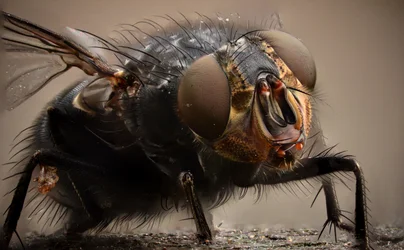
Focus stack on a fly.
Anyone got more experience in focus stacking super macro? Tips are very welcome!!

grtz,
Anthony
$Fly.webp
 
Nice shot. I'll be looking for this guy this summer :playball:
 
Did you do the automatic focus stack in Photoshop or did you mask it yourself? How many images did you use to stack?
 
67 images auto aligned and focus stacked by photoshop CS6.
Was having some trouble focusing the borders when stacking...so i had to crop the image afterwards
 
cs6. i don't know anything about that. But i really like the photo. Not to into macro (budget probably cant afford it right now) but i find it interesting. some of the stuff you guys post, like this, you cant really see well with the naked eye, well this sure gives me a different perspective of a fly! And again, i really like the photo!!
 
Please tell me how to take 67 exposures of a fly. I managed to pull off 3.
 
You've got to have a tripod and a still subject. Was they fly dead? Also, what aperture were you shooting at? I try to go as high as possible to increase the amount that is in focus, but that also means you need some pretty strong light.
 
Sometimes you find a fly that is near death, just sitting in the sun and only moving a bit when you really push it.
This one was like that. So a perfect model.
That's how I was able to get 67 shots.
My setting were: Iso 160 f 6.3 t125 in overcast sunlight; Camera: Nikon D7000 Tokina 100mm F2.8 macro with an inverted Nikon 50mm Prime f1,4. Tripod and mirror up function with remote.
 
why are some of the areas still grey? or blurred?
 
That is a wicked cool shot(s). So you move the focus plane minutely with each successive shot until you've panned the depth of the subject??
 
The blurry areas would suggest that either:

1) There are frames missing, this is where the photographer has taken two shots too far apart and the depth of field has failed to cover the whole subject in a smooth transition.

2) The software had difficulty blending the images and it appears like there's a fault when there isn't.

Unless you've a LOT of time for something like this software is used to stack. You could try Zerine Stacker, Helicon Focus or Combine ZP (freeware the last one). Those would give you more choice and sometimes a few adjustments or even using a different stacking program can shift from failed to successful stacks.

Sometimes in a larger number of stacks it helps to process them in patches - say do 10 at a time and then combine the 7 stacked shots into one at the end.
 
I think it's because of the focus stacking in photoshop...all my stacked photos have this around the edges
Maybe I should try the patches idea :-)
 
Around the edges of the whole frame you'll get blur - because the first shot and the last will be framed differently. The shot taken furthest away (typically first) will show more frame than the shot taken closest (normally last). As a result there are edge areas where the software will run out of data to merge. So cropping the edges is always needed.

In this case though the shown errors are likely the software or a missed layer of detail.
 
just very slowly move your focus to cover the entire fly and take a lot of pictures. Always work with remote and mirror up function or it will get unfocused really fast...( as I discovered :-)
 

Create an account or login to comment

You must be a member in order to leave a comment

Create account

Create an account on our community. It's easy!

Log in

Already have an account? Log in here.

New Topics

Back
Top Bottom