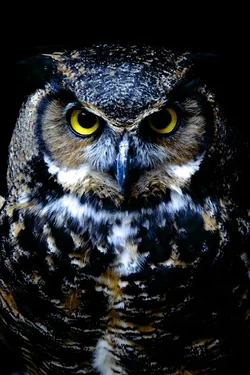
T Tyguy35 No longer a newbie, moving up! Joined Dec 7, 2013 Messages 208 Reaction score 38 Location Canada Can others edit my Photos Photos OK to edit May 3, 2014 #1 Caught this guy hanging out my first owl.
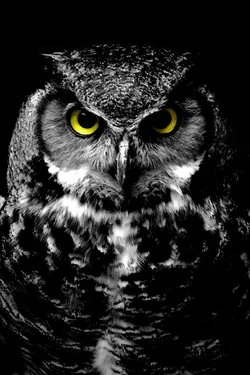
T Tyguy35 No longer a newbie, moving up! Joined Dec 7, 2013 Messages 208 Reaction score 38 Location Canada Can others edit my Photos Photos OK to edit May 3, 2014 Thread Starter 🔹 #2 Now that I see them together side by side I like the idea of that onto one print. How do I combine them into one photo side by side like that?
Now that I see them together side by side I like the idea of that onto one print. How do I combine them into one photo side by side like that?
Raj_55555 Indian God of Photography Supporting Member 📸 Joined Apr 14, 2013 Messages 2,677 Reaction score 2,044 Location India Can others edit my Photos Photos OK to edit May 4, 2014 #3 Use Photoshop, and place it just like you've here. But honestly, I feel the first one has a little too much blue in it. Otherwise awesome shot, and I prefer the B/W.
Use Photoshop, and place it just like you've here. But honestly, I feel the first one has a little too much blue in it. Otherwise awesome shot, and I prefer the B/W.
baturn TPF Supporters Supporting Member 📸 Joined Oct 2, 2008 Messages 7,218 Reaction score 3,078 Location Vancouver Island Can others edit my Photos Photos OK to edit May 4, 2014 #4 What Raj said, plus it shouldn't be too hard to fix in post.
T Tyguy35 No longer a newbie, moving up! Joined Dec 7, 2013 Messages 208 Reaction score 38 Location Canada Can others edit my Photos Photos OK to edit May 4, 2014 Thread Starter 🔹 #5 The blue is because it was dark and I had to use my flash unforunately.
wyogirl Oh crop! Joined Jun 18, 2013 Messages 1,593 Reaction score 611 Location South West Wyoming Can others edit my Photos Photos OK to edit May 4, 2014 #6 Tyguy35 said: The blue is because it was dark and I had to use my flash unforunately. Click to expand... Just reduce the blues in post... then use the color version.
Tyguy35 said: The blue is because it was dark and I had to use my flash unforunately. Click to expand... Just reduce the blues in post... then use the color version.
DarkShadow Birdographer Supporting Member 📸 Joined Mar 24, 2013 Messages 8,796 Reaction score 4,892 Location Connecticut Can others edit my Photos Photos NOT OK to edit May 4, 2014 #7 If you can get owl left look like owl right otherwise owl on right looks much better to me and would do a single Print.
If you can get owl left look like owl right otherwise owl on right looks much better to me and would do a single Print.
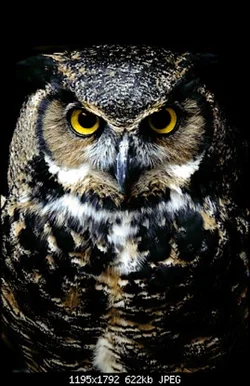
wyogirl Oh crop! Joined Jun 18, 2013 Messages 1,593 Reaction score 611 Location South West Wyoming Can others edit my Photos Photos OK to edit May 4, 2014 #8 Here's my quick edit... no blues.
T Tyguy35 No longer a newbie, moving up! Joined Dec 7, 2013 Messages 208 Reaction score 38 Location Canada Can others edit my Photos Photos OK to edit May 4, 2014 Thread Starter 🔹 #9 That does look much better. What do you mean make it look like the owl on the right? It's the same picture.
That does look much better. What do you mean make it look like the owl on the right? It's the same picture.
SCraig Been spending a lot of time on here! Joined Nov 12, 2011 Messages 6,474 Reaction score 2,451 Location Nashville, TN Can others edit my Photos Photos NOT OK to edit May 4, 2014 #10 ANYTHING but selective coloring ;(
BillM TPF Supporters Supporting Member 📸 Joined Jan 10, 2014 Messages 3,166 Reaction score 1,920 Location Hanson MA Can others edit my Photos Photos NOT OK to edit May 4, 2014 #11 Beautiful edit Amanda :thumbup:
DarkShadow Birdographer Supporting Member 📸 Joined Mar 24, 2013 Messages 8,796 Reaction score 4,892 Location Connecticut Can others edit my Photos Photos NOT OK to edit May 4, 2014 #12 SCraig said: ANYTHING but selective coloring ;( Click to expand... Amen