What's new

Having trouble with RAW files

  • Thread Starter Thread Starter laurenvictoria
  • Start date Start date
L

laurenvictoria

Guest
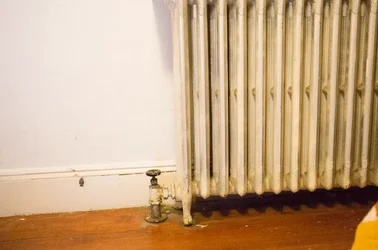
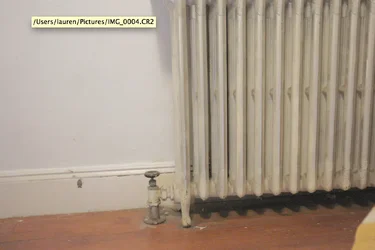
When i take a photo it looks cool and grey and flat

but when i open it on my computer its more orange on contrasty

why is this?

posted some screenshots
 

Attachments

  • Screen Shot 2014-09-21 at 10.09.14 PM.webp
    Screen Shot 2014-09-21 at 10.09.14 PM.webp
    146.8 KB · Views: 206
  • Screen Shot 2014-09-21 at 10.08.57 PM.webp
    Screen Shot 2014-09-21 at 10.08.57 PM.webp
    45.3 KB · Views: 172
Well, that's backwards to the way it usually works.
The camera adds the settings used into the file. Some software looks at the settings and configures the initial conversion from raw using those settings. Perhaps another package does not.

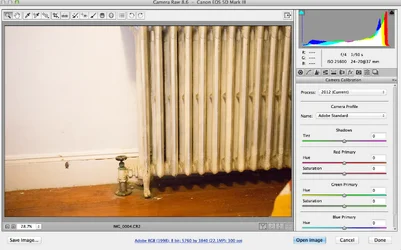
It would help if you told us what software you were using and how it is configured. I shot an entire engagement session with 2 cameras. I decided I wanted a yellow look from late day sun, so I told ACR to open everything with a Shade white balance. Everything it showed me, until I reset it, was opened with Shade.
 
hmm

does this help?
 

Attachments

  • Screen Shot 2014-09-21 at 10.27.03 PM.webp
    Screen Shot 2014-09-21 at 10.27.03 PM.webp
    218.9 KB · Views: 185
Last edited by a moderator:
When opening, the camera profile of Adobe Standard is the default profile, which seems to be applying a very slight curves tweak,perhaps a bit warmer-than-default-Canon white balance, and a bit more saturation and vibrance than the straight out of camera image has, and so the images look a bit brighter and richer when opened in that software.

 
As others have said, the initial display is all about defaults. Don't worry about how it looks when you open it, just adjust the settings in the converter to make the image look the way you want it to look.
 
Why does it say '8-bit' at the bottom?

That is the way the file will be passed into Lightroom/Photoshop. That link on my system says: "ProPhoto RGB; 16 bit; <photo size>; 240 ppi"

16 bit editing works better for me than 8 bit editing and since I print with an Epson printer, I took Epson's advice and set up to use the ProPhoto colour space.

If you click the link, it will open a dialogue that lets you change the values.
 
You cannot see the Raw file on your camera's rear LCD.
What you see is a JPEG Basic thumbnail that is embedded in the Raw file for that purpose.
As mentioned, whatever your camera Picture Controls are set to get applied to that JPEG but not to the Raw file.
If you use a Nikon Raw converter like the View NX that is included with Nikon DSLRs then the Picture control settings will be applied to the Raw file when it is converted.

As Derrel mentions, ACR (Camera Raw/LR Develop module) uses an Adobe profile different from Nikon's profile.

I too have ACR set to ProPhoto RGB, 16-bit, <photo size>, 240 ppi (ACR = Adobe Camera Raw)
 

Create an account or login to comment

You must be a member in order to leave a comment

Create account

Create an account on our community. It's easy!

Log in

Already have an account? Log in here.

New Topics

Back
Top Bottom