What's new

Help! Color management issues!!!

Sarah23

TPF Noob!
Joined
Mar 3, 2008
Messages
716
Reaction score
0
Location
Oklahoma
Can others edit my Photos
Photos NOT OK to edit
What it looks like in PS:
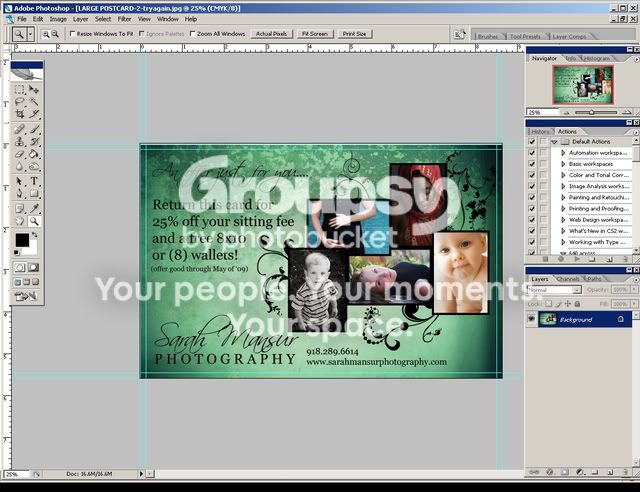
Colorexample-right.jpg


What it looks like in Windows Picture Viewer - Duller Colors then in PS:
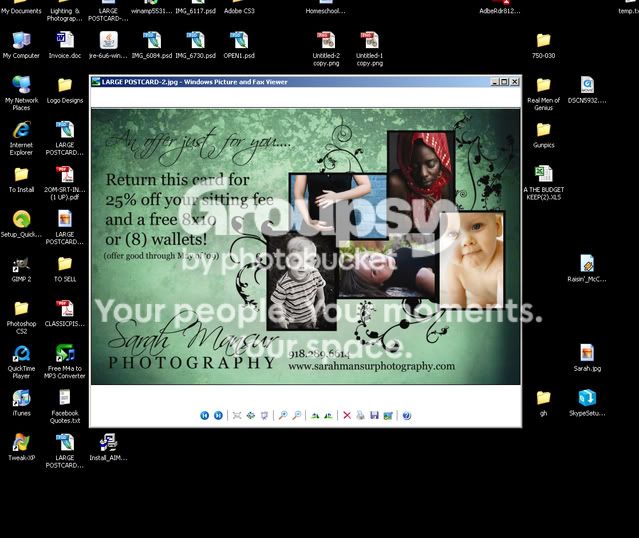
Colorexample-windows.jpg


What it looks like when uploaded...anywhere...insane color shift:
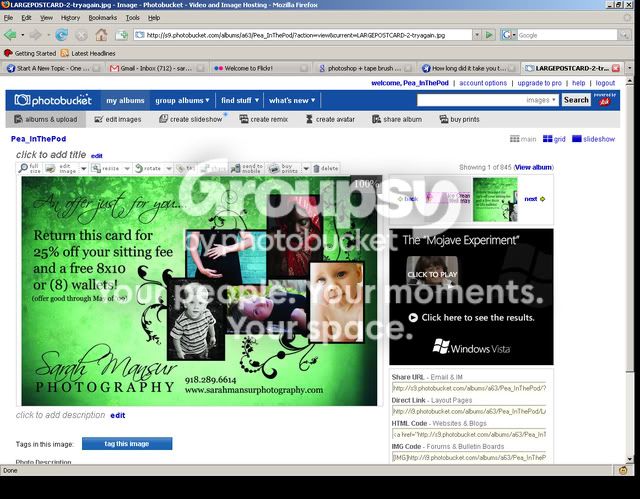
Colorexample.jpg


Color Management is set to sRGB

RGB Properties: Convert to working RGB

HELP!


-- Edited by SarahMansur at 19:13, 2008-08-06
 
I have heard of PB doing really funky things to color and sharpness.. but that is extreme!! Does it do that on flickr too??
 
yep...flickr too. Doesnt happen with anything else though...maybe it something weird with that file?
 
ah, I see you got your answer on ILP. I thought it might have something to do w/your colorspace but you had said you were working in rgb the whole way through. I can see now on your screenshot that it was worked in cmyk. That should fix the issue!
 
Whoa! That's odd! I swear photobucket always makes my photos look fuzzy and sometimes messes with the color but not to that extreme! Wow!
 
yep, got my answer, even thought I dont completely understand it. As long as they print right, I will be happy. :) Thanks!!!
 
As to why, colour conversion is not an accurate process. RGB -> CMYK is the least accurate of them all, that is why Photoshop (a colour managed application) and Windows picture and Fax viewer (also a colour managed application) give you a slightly different result, and your internet browser (not colour managed) a totally different one.
 
The printers are dealing regularly with CMYK. If you create pictures just for show on screen keep working in RGB workspace...
 

Create an account or login to comment

You must be a member in order to leave a comment

Create account

Create an account on our community. It's easy!

Log in

Already have an account? Log in here.

Back
Top Bottom