What's new

HELP! High School Volleyball

cjt_7

TPF Noob!
Joined
Apr 10, 2008
Messages
36
Reaction score
0
Can others edit my Photos
Photos OK to edit
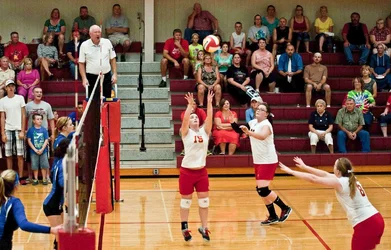
I am taking pictures of High School Volleyball games in low light gyms. I know I don't have the best equipment to do this, but would like any advice/critique on settings and where to stand to get best shots, etc.
I am using a Nikon D5000 and I just purchased a Sigma 70-200mm f/2.8 APO EX DG HSM OS FLD Zoom Lens for Nikon with a Zeikos digital multi coated UV protector filter and the lens hood (do I need the filter and the hood?) thinking that would solve all of my problems haha. Well, I am still struggling. I don't zoom much to keep aperture wide open but still am not getting shots like I expected. If I can't get great shots, then I will need advice on post processing with Elements 9. I usually shoot RAW so I can fix the photos. I think these are "gray" as well as dark and blurry. I am trying to focus using the AE-AF Lock button instead of the shutter pushed half way down, but this is new to me, so I will need much practice. I am also using a monopod (most of the time). Should I be able to get decent photos with the equipment I have or should I return the Sigma lens...I don't want to keep it if it isn't going to work for me. I basically take pictures of high school sports (because that is where my children are).
Pictures are in my gallery and settings are written under the pictures: Volleyball Sept 19, 2013 - The Photo Forum Photo Gallery

Another question..what should the settings be with this lens if I am taking pictures of a football game in the afternoon? We have a game at 4 this Saturday.

Thanks in advance for any help you can give.
 
why are you using an expensive 70-200 as a 70mm prime?
 
If I zoom at all in our gym, then the pictures are very, very dark! Maybe I'm thinking wrong or doing something else wrong? Please help. lol I am so ready for some advice. I read forums and suggestions and I try to follow what they are suggesting but I'm sure there are other factors that play into this that I am not knowing about.
 
yeah, they seem pretty dark even at 1600. Is the gym very dimly lit?
 
I looked at them and they seemed dark, so I selected two at random and pulled them into Lightroom, and there is PLENTY of adjustment potential to lighten the images up. Not sure why they look so,so dark...like this shot...it looked REALLY dark in your upload of it, but all I did was add exposure in software, and it's relatively clean, and bright...

$DSC_3374JPG_brightened.webp

One thought I have is that maybe you have your camera's LCD monitor set wildly "off" in terms of brightness, OR maybe are editing the images on a computer that has the screen brightness cranked way too high, and are thus improperly evaluating the correct exposure or the correct processing adjustments the images need, or perhaps a bit of both.
 
Your exposure problem doesn't have anything to do with zooming your lens in and out. The 70-200 is a constant 2.8, so the exposure is going to be the same (if you use the same shutter speed) at 70 or 200. I'm pretty sure that your exposure problem is related to using shutter priority. You have your shutter at around 1/400 and an iso of 1250-1600, and this combination isn't bright enough to use an aperture of 2.8. In the auto mode you're using, with the settings you've set, you're camera would really like to set an aperture of like 1.2 or something. However, you're lens will only go to 2.8, so it makes an underexposed image. I would suggest kicking your ISO up to at least 3200, and you'll probably be able to get something useable.
 
Ditch the filter first off. Shoot at a higher iso, 500th 2.8. Take it from there. If the exposure looks doesn't look right drop the shutter speed to 400th, at 3200 in most gyms you should be ok. Once you have an exposure you can use, then work on the action.
 
Thanks for the responses. I have learned more today, I didn't realize that the 2.8 is constant, so that is good to know. I don't feel like the gym is terribly dark. I'm afraid if I increase the ISO to 3200 it will be extremely noisy, but I will certainly give it a try. I will check my camera manual to see how to change settings on LCD and check computer settings. Someone here in town told me to take the filter off, so I will try that also. So, you think 3200 will be ok after editing? Not sure I know the best way to reduce that in Elements, I just import the RAW image, use auto to adjust exposure, brightness, etc and then fine tune the sliders there, then increase the luminance under noise reduction. Anything else I should be doing? Again, I appreciate the answers!
 
Thanks for the responses. I have learned more today, I didn't realize that the 2.8 is constant, so that is good to know. I don't feel like the gym is terribly dark. I'm afraid if I increase the ISO to 3200 it will be extremely noisy, but I will certainly give it a try. I will check my camera manual to see how to change settings on LCD and check computer settings. Someone here in town told me to take the filter off, so I will try that also. So, you think 3200 will be ok after editing? Not sure I know the best way to reduce that in Elements, I just import the RAW image, use auto to adjust exposure, brightness, etc and then fine tune the sliders there, then increase the luminance under noise reduction. Anything else I should be doing? Again, I appreciate the answers!

Well...judging by the uploaded photos I saw, you are simply not adjusting the images to the appropriate brightness level in software. Your photo shown above was very dark when I downloaded it from the TPF Gallery page, but it was very easy to adjust to the brightness as shown above. So...it seems like you've got an issue, maybe with your computer. Are you working on a laptop? Or maybe a poorly un-calibrated monitor with the brightness level cranked wayyyyy up?
 
I am actually working on an iMac but never thought about calibration. I read up on that some last night. The best way is to by something else to calibrate it? Is there a better way to fix noise from high risk in elements than just the luminance slider?
 

Create an account or login to comment

You must be a member in order to leave a comment

Create account

Create an account on our community. It's easy!

Log in

Already have an account? Log in here.

Back
Top Bottom