What's new

Help me understand exposure

thunderkyss

TPF Noob!
Joined
Sep 23, 2010
Messages
172
Reaction score
11
Location
Texas
Can others edit my Photos
Photos OK to edit
Still learning. You guys have been wonderful so far & I appreciate it. Next question, exposure.

So I've got my camera in M mode, studying the affect of the aperture settings. I took a series of photos, from the largest to the smallest aperture setting I could get away with until I thought the image was too dark. 17 photos in all from f3.5 to f22. I selected a few of them to post here where I believe the images transfer from overexposure to under. Thought I'd get your opinions to see if I'm seeing what I think I'm seeing.


I've got 5 photos before this one, that I think are overexposed. I think this one is also overexposed a bit.
1...
FStop005_zpsf43bce0f.jpg


I think this one is the least overexposed, maybe slightly under exposed.

2...
FStop006_zpsf33a7cdd.jpg


From here I think they're all under exposed, but thought I'd add them in case I'm a little off.
3...
FStop007_zps5df26296.jpg


4...
FStop008_zps8cbf2b22.jpg


So, what do you think?

 
you're using flash? Is the flash on manual too?

I wouldn't say the first one is overexposed, I would say it just has harsh on camera flash. Also, this isn't really a scene that's going to be easy to say that X is overexposed and y is underexposed, because there aren't any key tones that necessarily 'should' be in any exposure zone.
 
Don't guess at it, use your camera. The display on the rear has a histogram display, use it. It also has a display that will show blown highlights. Use it.

All three of those have AREAS of underexposure and AREAS of overexposure. As a whole none are overexposed and only the last one slightly underexposed.
 
you're using flash? Is the flash on manual too?

I wouldn't say the first one is overexposed, I would say it just has harsh on camera flash.

Thanks for your reply. So I'm looking at this "exposure" thing all wrong?


Don't guess at it, use your camera. The display on the rear has a histogram display, use it. It also has a display that will show blown highlights. Use it.

All three of those have AREAS of underexposure and AREAS of overexposure. As a whole none are overexposed and only the last one slightly underexposed.

You just blew my mind. Yes, I have the histogram display. No, I don't know what I'm looking at when I look at it. Time for more reading.

blown highlights..... ok, I think I know what you mean.

Areas of overexposure..... again, probably due to the harsh flash?
 
It seems that you have this idea that there is a such thing as a 'correct' exposure in all situations. That there's one setting that's exactly right and the rest of the settings are all wrong.

You have to think in terms of zones of the photo to zones of the grey scale. Where do you want various items in the grey scale? Are there objects in the photo that have a limited range that they can be acceptably exposed at (human skin, and grass for example have a fairly narrow range of acceptable exposures.

How I go about exposure is to find my key object, figure out what it's key tone is. That's one fault of your pictures above, there isn't a key object. It's a picture of junk. How does that effect exposure? Because you have nothing that you can say 'this needs to be exposed this way, it's most important.' When you've identified your key tone, you then identify your high and low tones that need to retain detail.

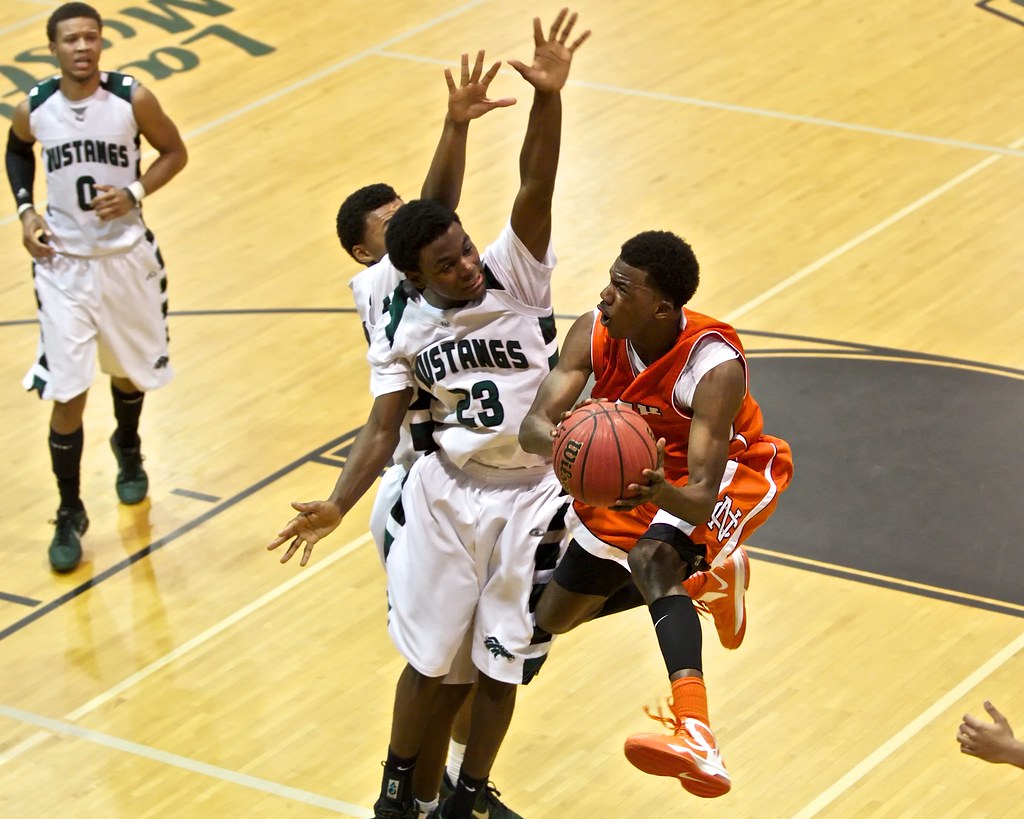
Take for instance this shot:


IMG_3872 by franklinrabon, on Flickr

The key tones were the players skin. Faces drive basketball photography. Most of them were african american, so I knew I needed those exposed roughly a half stop below middle grey. However, I also needed to not clip the bright white jerseys and not lose detail in black hair. what I found was to expose the faces just right I was a little too close to sometimes clipping the jerseys when they were in direct light, so I had to compromise just a bit. I shot the faces about 1/3 stop darker than I'd have ideally liked, to avoid any possible clipping issues on the jerseys when they were in direct light. Here there was no 'right' exposure. There were just compromises. I knew I'd probably need to dodge faces in post in most shots where they weren't looking up. That's okay, it's better than having blown jerseys devoid of detail.

In your picture, you're complicating matters by having flash. The areas close to the flash are very bright. The red bag has a completely blown red channel. The areas further away are underexposed. This is due to the inverse square law. Essentially the objects that are eight feet away are exposed like you shot then at f/11 while the objects two feet away are exposed like you shot them at f/4. With such a wide variation in exposure, the idea of the 'correct exposure' without specifying a subject is completely incoherent.

So, to answer your question, there isn't a right or wrong exposure in any of these pictures, because there is no way of figuring out what should be exposed in a certain way. If the red bag is the key, then they're all overexposed. If the white box is the key, they're all underexposed.
 
What fjrabon said. It's wonderful that you're taking an interest in exposure like this but you're picking some very difficult subjects to work with. Simplify your shots. A simple subject such as a toy figure or something simple against a plain background. Lots of people practice with their kid's toys. Your example has every kind of color from 2 feet to 12 feet and it's going to make it very hard for you to see anything because they are all going to react to the light differently.
 
Hi, i was in the same situation.

I watched this video to understand how to use my in camera histogram.


Goodluck
 
Last edited by a moderator:
You can't learn exposure using the flash, because the flash changes the exposure.

Try setting a toy under a bright table lamp or two and repeating your experiment w/o the flash.

ALSO, if you're seeing JPG's, it is hard to compare because some cameras try to "fix" the exposure when rendering the JPG.
 
I agree with fjrabon that you have to pick a specific item from all the clutter to play with exposure. Invest in a flash as well if you already have not because that will help a lot indoors, it was a recommendation given to me recently and it has helped.
 
It seems that you have this idea that there is a such thing as a 'correct' exposure in all situations. That there's one setting that's exactly right and the rest of the settings are all wrong.
Not exactly, but you're right, I've got the wrong idea all together.
So, to answer your question, there isn't a right or wrong exposure in any of these pictures, because there is no way of figuring out what should be exposed in a certain way. If the red bag is the key, then they're all overexposed. If the white box is the key, they're all underexposed.

Great post, thank you. I've learned a lot.
 
Thanks for all the info on histograms guys.
 
Sometimes the more you learn, the more you get confused, and the more you realize you don't know. You don't know what you don't know. So many variable affect exposure and light, where do you begin to learn what is the proper settings?
 
Sometimes the more you learn, the more you get confused, and the more you realize you don't know. You don't know what you don't know. So many variable affect exposure and light, where do you begin to learn what is the proper settings?


You need to learn how:
Aperture controls not only the amount of light that is passed through the lens, but how it affects DOF, vignetting, sharpness (diffraction), bokeh...
Shutter speed is not only a matter of 'how long' the shutter is open, but affects both camera and subject movement...
ISO, which determines the noise level in the final image...

Then you get into things like how aperture and shutter speed will need to be different for various focal lengths.

After that it's on to flash synch, white balance, filters......


One of the best-kept secrets of TPF is this.
 
spam? probably.
 

Create an account or login to comment

You must be a member in order to leave a comment

Create account

Create an account on our community. It's easy!

Log in

Already have an account? Log in here.

New Topics

Back
Top Bottom