What's new

help printing pictures

jjb4

TPF Noob!
Joined
Jul 28, 2011
Messages
14
Reaction score
0
Location
NJ
I have the Canon Pixma 9000 II printer. I have been taking shots of wildlife, rabbits, birds etc. The photos look great on my lab top when I organize them in Photoshop Elements 9 but when I print them all the colors seem to have been drained from the photos leaving me with photos that look like they were taken in the 1800s I cannot for the life of me figure out what I did. Attached is one I took today the green grass comes out brown when printed as does the colors of the duck's throat and the purple marking on it's wing.
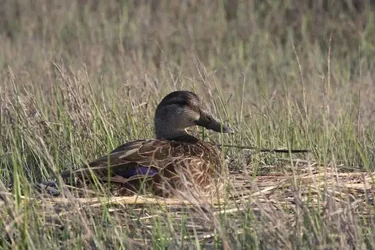


$duckweb.webp
 
I dont know anything about that printer but i would put it on a memery card or stick or whatever and take it too a reputable printing place and see if its the same result, then you could at least narrow it down to if its the printers issue or whatnot.
 
Gotta be in the print dialogue settings and/or type of paper you're printing on, I would think, assuming you're printing directly out of PS Elements.

Using photo paper? Print settings set to use photo paper and best printing? Printer handles color or Photoshop handles color?

The colors are rather muted on my calibrated monitor here. I mean, I can still tell green from brown, but if they appear vibrant on yours, you may need to calibrate your monitor to get a better idea what you should be expecting from the printer.
 

Create an account or login to comment

You must be a member in order to leave a comment

Create account

Create an account on our community. It's easy!

Log in

Already have an account? Log in here.

Back
Top Bottom