What's new

Help with my photography facebook page?

TheNevadanStig

No longer a newbie, moving up!
Joined
Feb 18, 2014
Messages
693
Reaction score
597
Location
Reno, NV
Can others edit my Photos
Photos OK to edit
Sorry in advance if this is in the wrong section. I didn't know where else to stick it.

I am having a strange problem with my Facebook page. People have been messaging me about not being able to tag my photos - the option doesnt even seem to be there. It's all there on my end, and everything is turned on and set to public. I can do it from my personal page. I can do it just fine from my wifes page as well, who is not an admin or anything else like that. Yet the option doesn't even seem to be there for others.
Kind of a big deal for me right now, I had a huge shoot of a professional kayak tour, and these are pro athletes trying to tag others with a potential reach of thousands and thousands of people.

:grumpy:
 
I have two fb pages with two different fb account, and I'm able to set who can tag my photos and else. I think it's in general settings but I'll check in detail if you want. Just started my computer ;)
 
Anyone else have any ideas?
 
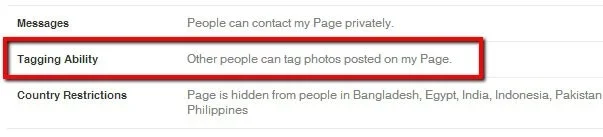
Only thing I can think of is making sure that you have this option turned on.

$2014-05-15_1054.webp
 
Hmmm, I'm really not sure, if you're certain you do have the tagging option set.
I did go try it, and find that if I go to your page, the tagging option is simply not there for me, so it does suggest that SOMETHING is off in the settings.

On my photography page, I intentionally have the tagging option set so that only Page Admins (namely, me) can tag people. I've temporarily changed that option, so if you get a chance, go to my page and see if the tagging option is there for you. (Page link in sig)
 
Is it a personal page or a business page?

Not a business page per say, but people-photgrapher. Not a personal page either though.


I just figured it out thanks to Sharon! I did not have the option at first, but after LIKING the page I did! So I need to make sure the people have actually liked the page I guess.
I wish I could triple like that post Sharon! This is going to help me out BIG TIME!!!!
 
Is it a personal page or a business page?

Not a business page per say, but people-photgrapher. Not a personal page either though.


I just figured it out thanks to Sharon! I did not have the option at first, but after LIKING the page I did! So I need to make sure the people have actually liked the page I guess.
I wish I could triple like that post Sharon! This is going to help me out BIG TIME!!!!


Ah ha!! Yep, I did the same on yours, and now have the tagging option! That's good to know, so I helped myself too!
 
Is it a personal page or a business page?

Not a business page per say, but people-photgrapher. Not a personal page either though.


I just figured it out thanks to Sharon! I did not have the option at first, but after LIKING the page I did! So I need to make sure the people have actually liked the page I guess.
I wish I could triple like that post Sharon! This is going to help me out BIG TIME!!!!


Ah ha!! Yep, I did the same on yours, and now have the tagging option! That's good to know, so I helped myself too!

It was so frustrating! I was trying to google and most of the info out there are for older versions, and since Facebook likes to change everything around every 3 1/2 hours, had become obsolete. Then I was reading about how a few accounts are just glitched, and they are working to fix it, I was worried mine was one of the glitched ones. Nothing like a photography page that has glitched photo options. I was almost at the point of trying to unpublish or delete the page and start again.
 

Create an account or login to comment

You must be a member in order to leave a comment

Create account

Create an account on our community. It's easy!

Log in

Already have an account? Log in here.

Back
Top Bottom