What's new

Hi! I'm new to this site, looking for honest critiques.

Schocker

TPF Noob!
Joined
Aug 1, 2014
Messages
6
Reaction score
1
Location
PA
Can others edit my Photos
Photos OK to edit
Thanks! :)
 

Attachments

  • $IMG_5456.webp
    $IMG_5456.webp
    848.9 KB · Views: 184
  • $IMG_5456.webp
    $IMG_5456.webp
    883 KB · Views: 172
  • $IMG_7592.webp
    $IMG_7592.webp
    756.2 KB · Views: 133
  • $IMG_6193.webp
    $IMG_6193.webp
    543.4 KB · Views: 145
  • $IMG_7014.webp
    $IMG_7014.webp
    1.2 MB · Views: 180
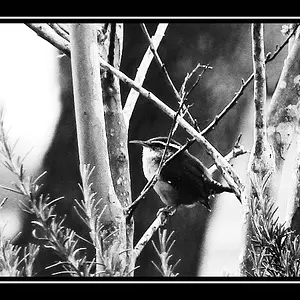
You did say honest, correct? Somebody will say the dogs are cute, but the last 3 photographs are ordinary snapshots. The one of the kid, however, proves you put some thought into it.
It has interest, but the focus is off. It could be focus on the kid wide open or it could be a small aperture with everything in focus. You seem to be in the middle somewhere. But you're thinking.
 
I agree with keyseddie about last 3.

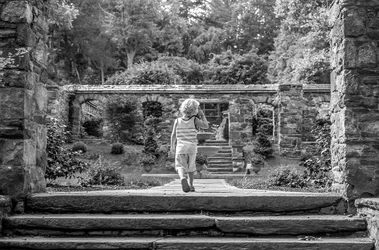
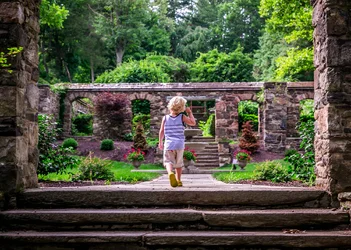
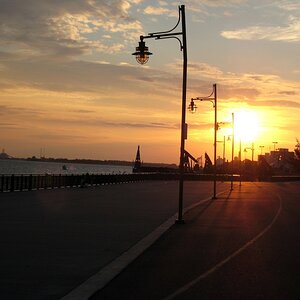
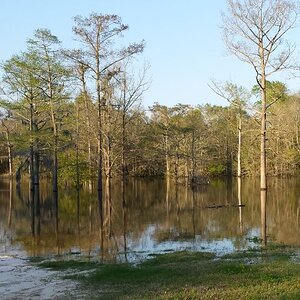
The main problems with the first two is that the saturation has been turned up and the background is really interfering with the main subject.
By shooting at 4.5 the background is a bit too much in focus.
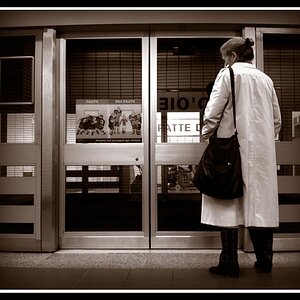
I think toning down the background in color and focus allows the figure to stand out more.

HKaORu.jpg


r37hcF.jpg
 
I really like Lew's edits of the first two. He hit the nail on the head with the over saturation imo.

I certainly like the first two, and the 4th. I am not a huge fan of the dog pictures simply because I've seen bajillions.
 
I LOVE this! Can you explain how you did it? Thank you so much.
 
And also, the critiques that would be most helpful to me are not so much the subjects (dogs, etc), but the composition, how to improve the sharpness, focus, and bokah, etc. I love the changes you made to my image. Thanks!
 
Lew hit the nail on the head. The only other thing I can say about the first two is that they need to be leveled.
 
And also, the critiques that would be most helpful to me are not so much the subjects (dogs, etc), but the composition, how to improve the sharpness, focus, and bokah, etc. I love the changes you made to my image. Thanks!

Much of successfully explaining depends on how much you know.

Do you understand the exposure triangle?
Do you understand relationship of aperture to depth of field?
Do you understand the terms brightness, contrast, dynamic range, white balance?

Do you use any post-processing software? If yes, what and how much do you know?
Do you know what a layer is? a layer mask? dodging/burning?

I and others are happy to point you towards good sources of info so you can understand the process.
#1 and #2 are both very good starts.


Lew
 
Do you understand the exposure triangle? Yes but still new to it all and experimenting a lot.. been shooting in Manual or Aperture Priority mode.
Do you understand relationship of aperture to depth of field? Yes
Do you understand the terms brightness, contrast, dynamic range, white balance? Studying but still a lot to learn

Do you use any post-processing software? If yes, what and how much do you know? So far just Lightroom, and still a newbie and anxious to learn more
Do you know what a layer is? a layer mask? dodging/burning? Nope!

I know I have a ton to learn and would love any helpful info you can share! Thank you.
Deb

 
You might look at the online calculator at DOFmaster.com so you can understand the change in DOF at various distances .
In a situation like this, I would shoot as close to wide open as I could so that the background is really OOF because of the real chance that it would intrude on the image.
If this was a raw file, it was saturated too much, if this was a jpeg, your settings are too intense, I think.
In very bright overhead sun, there is inherent harshness in the light and sometimes the images don't look extremely sharp, perhaps because of diffraction along edges. This is sharp enough.

Bokeh is a factor that is inherent to the lens and there is nothing you can do about it.

I use PS not LR because I want to be able to try different things, hold onto changes and alter them.
In PS, I copied the figure onto a new layer.
I also copied the foreground and sides that I wanted to stay in focus onto a new layer.
Then I darkened and reduced contrast on the background, slightly defocused the background.
Darkened the foreground and the sides very slightly.
Sharpened the figure,
Sharpened the sides and foreground a bit.
Merged everything together.
Converted to BW (with a bit of sepia)
(the layers are a bit misleading because I merged several, not anticipating using the file, but you get teh idea.)

I couldn't do this easily and accurately in steps in LR so someone else who knows LR better than I will have to walk you through it.

mPk8PK.jpg
 
In regards composition, the first shot is a natural, the situation presented itself. You captured the foreground to give the image depth and, in this case, centering the subject worked well because the scene was essentially symmetrical. Lovely shot, a bit of mystery.

The other three didn't have much opportunity to work out well.
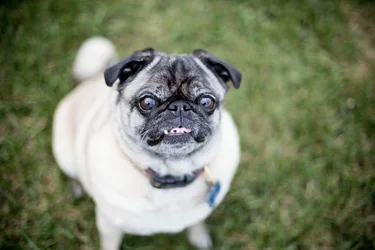
Shoting down at dogs or children is typical, shows nothing and usually never makes a good picture.
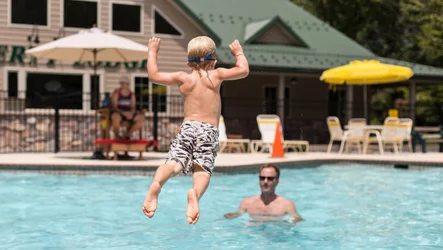
Child jumping into pool, opportunity shot but there's way too much empty space, the father has no expression, the image is flat in affect.
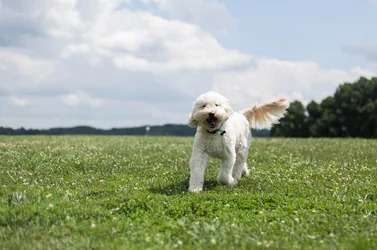
The last, the dog, lots of empty space, nothing really of interest.

The viewer must know what you want us to look at, there must be something interesting that you are showing, otherwise it's just a record.
 
You mentioned that you use Lightroom which is amazing! :) You could reduce the greens & oranges a little bit in the saturation panel. Just go all the way down to grey, then slide to up (to the right again) to slowly determine how much saturation on those colors would be a great fit for this image. I would do it for you, but I said I wouldn't use my PC this weekend so that my brain could take a break from Photoshop & Document writing. lol Luckily, it's an extremely simple fix. :)
 
LOVE the last dog shot. Is that I goldendoodle I spy? You've gotten a lot of great pointers already, not a whole lot I can add really. But I will say on the last shot I'd deepen the blue in the sky, mostly because the dog's fur blends into it. I think you were a bit too far from the dog, but I still think it's a cute shot :).
 
I like them. Though the white balance seems a bit off and the photos feels over processed
 

Create an account or login to comment

You must be a member in order to leave a comment

Create account

Create an account on our community. It's easy!

Log in

Already have an account? Log in here.

New Topics

Back
Top Bottom