What's new

High key cat portraits

jake337

Been spending a lot of time on here!
Joined
Jun 3, 2010
Messages
4,274
Reaction score
1,245
Location
minnesota
Can others edit my Photos
Photos OK to edit
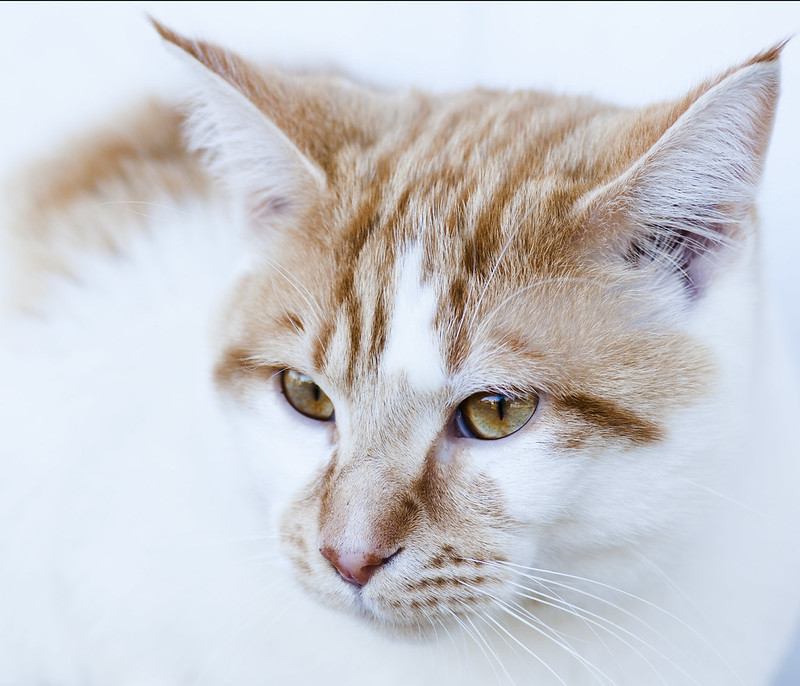
Or are they technically not high key? Damn, they seem to have a blue tint to them after uploading to flickr.


6891729458_116bfec0dc_c.jpg


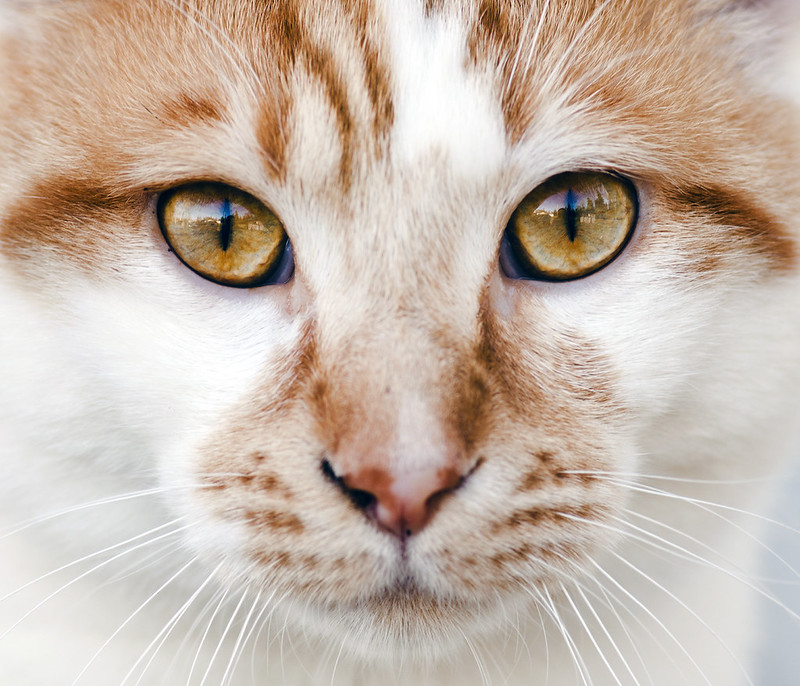
6891729230_56f9796029_c.jpg
 
They seem a bit underexposed and yes, even on my uncalibrated, crappy laptop they do look a bit blue. heh
 
They seem fairly "high key" to me, as they are surprisingly much lighter than your usual cat portrait would be, though I can't say whether these really-really are high key. But they seem to have a blue tint, indeed, but the reflections in the cat's eyes look like these have been taken outdoors with a blue sky, so that may account for that (but I'm not seeing them on my regular monitor).
Did you plan for these to be the way they are?
 
Second image is great... but is this high enough to be called high key?

Regards :D
 
Second image is great... but is this high enough to be called high key?

Regards :D

Thanks, Yeah the second one doesn't really fit high key. I thought the first might though.
 
Or are they technically not high key?
High key is usually when you match bright clothing/accessories to a bright background...so that the mode contrasts from the clothing and background. So I guess if we say that you matched the background to the white parts of the cat, we could call it high key. But just because it's mostly bright, doesn't really make it high key IMO.
 
Or are they technically not high key?
High key is usually when you match bright clothing/accessories to a bright background...so that the mode contrasts from the clothing and background. So I guess if we say that you matched the background to the white parts of the cat, we could call it high key. But just because it's mostly bright, doesn't really make it high key IMO.

Thanks for the clarification. So I would need the white hair to still be defined over a white background? Honestly, I was just trying to go for as close to clipped highlights as possible.
 
Your monitor at home must have a bit of a warm bias to it, because the cat shots (and the curry shot you linked to) both look too cool to me. Is there a way to adjust the temperature on your home screen? As a helpful point of reference, you can use the background on the forum to sort of "calibrate" your images. The background behind this text (and around your photos) is white, so the white in your photos should appear seamless with the background.

I particularly like the second shot, but it would have been more effective with a smaller aperture to get he cat's nose in focus as well.
 
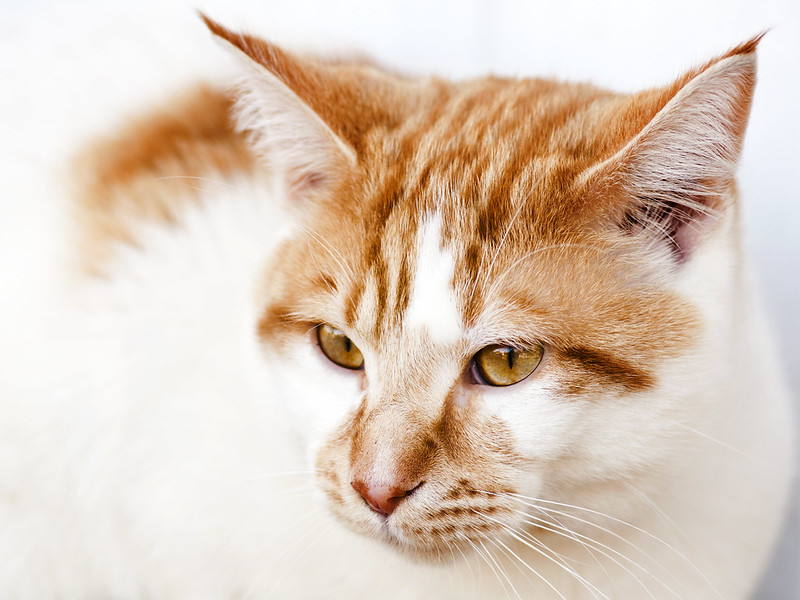
Just a quick retry. WB a bit better in this one?

I'm going to retry #1 when I get back from the grocery store.


6894519544_5f648eb17b_c.jpg
 
Looks good to me now. I'm a sucker for cats though and seldom see a cat shot that I don't like. Regardless of what people think cats can be very expressive if one knows what to look for, and that can plainly be seen in your second shot (and the touched-up shot). I think it would have been better with a bit more DOF so the nose was in focus, but it's really hard to notice the nose because of those gorgeous eyes.

 
Looks good to me now. I'm a sucker for cats though and seldom see a cat shot that I don't like. Regardless of what people think cats can be very expressive if one knows what to look for, and that can plainly be seen in your second shot (and the touched-up shot). I think it would have been better with a bit more DOF so the nose was in focus, but it's really hard to notice the nose because of those gorgeous eyes.

I agree on the DOF. I wish I had bumped up the ISO and stopped down to F8.
 
First shot revised.

7040899025_c3c2b8be91_c.jpg

​
 

Create an account or login to comment

You must be a member in order to leave a comment

Create account

Create an account on our community. It's easy!

Log in

Already have an account? Log in here.

New Topics

Back
Top Bottom