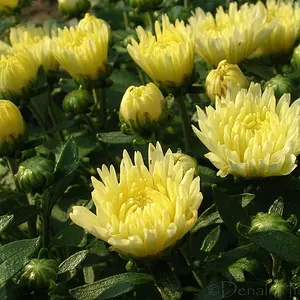
Hey there guys! I have a question for Photoshop users. How can I create a border like I see in the following image:
Métalique moustique on Flickr - Photo Sharing!
I just love this style border, but I have no idea how to do this. Any help MUCH appreciated, and thank you in advance! :thumbup:
Métalique moustique on Flickr - Photo Sharing!
I just love this style border, but I have no idea how to do this. Any help MUCH appreciated, and thank you in advance! :thumbup:




![[No title]](/data/xfmg/thumbnail/34/34591-00eecceb873550182f83f33a45a9460c.jpg?1734165580)
![[No title]](/data/xfmg/thumbnail/32/32177-3a3d923fa1584c6ef7d6602aaa24fbc6.jpg?1734161047)
![[No title]](/data/xfmg/thumbnail/32/32714-c30959d32073fa735ae7520dd978cd3b.jpg?1734162336)

![[No title]](/data/xfmg/thumbnail/31/31746-12607d714ca2713b95250821c881aea9.jpg?1734160460)
![[No title]](/data/xfmg/thumbnail/42/42015-c5cdef195e2aab7b272f0c03437c42c4.jpg?1734176396)