What's new

How do I make this better?

iPhoto17

TPF Noob!
Joined
Jul 1, 2009
Messages
637
Reaction score
27
Location
cornelius, NC
Can others edit my Photos
Photos NOT OK to edit
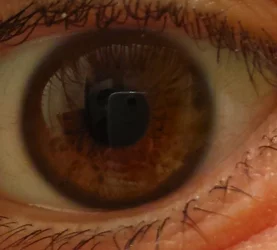
The first is done with my Nikon D3000 with the 35mm prime and the second is done with my Galaxy S4 phone, obviously I would like to get closer which I would assume I get a higher megapixel camera to be able to zoom in more in post processing vs getting a lens with a closer focal distance, how to get rid of reflections

I will allow edits for this one to see what you guys can do to help if you decide to.

Nikon D3000 35mm
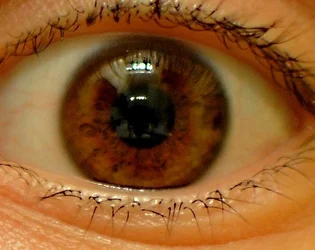
$eye.webp

Galaxy S4
$eye2.webp
 
I think mainly you need more light. Stop it down a little, depth of field appears to be very shallow. Put camera on tripod, sit subject in chair, focus manually.

I wouldn't bother editing this...
 
It was kind of hard to focus since I was the subject, the camera is on a tripod, It was at 1.8 so it cant go down any farther, ill just lengthen the shutter speed.....i cant even get it to focus on my eye anymore, ill try to get someone to be a subject
 
Last edited:
Look up "Diffused light" or "soft light". Get someone to pose for you... even a pet.

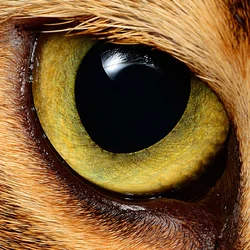
I assume you want something like this? Shot with a macro lens, and the R1C1 Flashes listed below... with a DIY diffuser.

$Koko-Eye.webp

Most of us agree you need some highlight in the eye... to add some life and sparkle. No highlight at all looks dead!
 
I can attempt to try to get one of my dogs to stay still while I hold a camera close to their eye, I can try my 200mm and not spook them away
 
I can attempt to try to get one of my dogs to stay still while I hold a camera close to their eye, I can try my 200mm and not spook them away

Use Spot focus.. I think your body will do that?
 
Yeah, I have spot focus on the D3000, works wonders
 
You might also have a white-balance problem. Try to adjust that to eliminate what seems to be a yellow tint. This is especially apparent when you compare your DSLR image to your phone image, interestingly seems like your phone did a better job at controlling this.
 
Yes, the phone has amazing auto white balance and custom white balance options, it's one of the more advanced cameras i have seen a phone so far
 

Create an account or login to comment

You must be a member in order to leave a comment

Create account

Create an account on our community. It's easy!

Log in

Already have an account? Log in here.

Back
Top Bottom