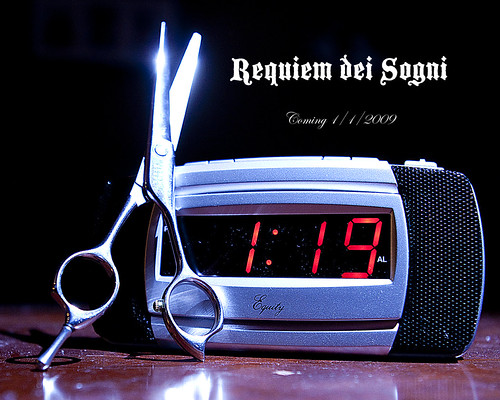
You need an exposure that renders the LED display properly, and an exposure that renders the housing adequately, with no distracting reflections on the screen, so light the product accordingly. Establish the exact camera/lens position and angle on a tripod, and illuminate the product with your lights. The tripod is to maintain a precise point of view so that the reflections caused by the lighting source are not distracting,and that the LED's screen area does not have an image-killing highlight from the softbox face. A tripod-mounted camera locked down tight will also allow multiple exposures with the exact registration of the image.
Use the correct aperture for your lighting on the housing, and use a shutter speed that is slow enough to allow the LED to register appropriately. You might find that an elevated ISO setting will give you the right density on the LED display. This is the old-school way to shoot this in one exposure, in-camera. If you can black out your studio, you can also shoot this in two exposures, one that is done in the dark with JUST the LED display, creating an exposure of that at say f/11 or f/13 at 2 seconds at ISO 200 (guesstimate) and then creating a second exposure with the LCD actually turned off, and illuminating the housing with flash or continuous lighting, and then blending the two exposures. Again, this is the old-school method of doing it, as it was done in the pre-Photoshop era.






![[No title]](/data/xfmg/thumbnail/42/42493-2665d3a35f26795cc783aeb77329a032.jpg?1734177012)
![[No title]](/data/xfmg/thumbnail/34/34040-14af4007923299ad46d35fc110d0faad.jpg?1734164446)

![[No title]](/data/xfmg/thumbnail/33/33495-c9bffdaa44506a6169a2faff5c7e086e.jpg?1734163607)
![[No title]](/data/xfmg/thumbnail/40/40308-f92e28f094216c151f3ad1fd7453c99b.jpg?1734174716)




![[No title]](/data/xfmg/thumbnail/42/42492-60144191c917c21139f8acd72f6ba090.jpg?1734177011)