What's new

How's her color??

TamiAz

Been spending a lot of time on here!
Joined
Sep 26, 2011
Messages
1,004
Reaction score
524
Location
Arizona
Can others edit my Photos
Photos OK to edit
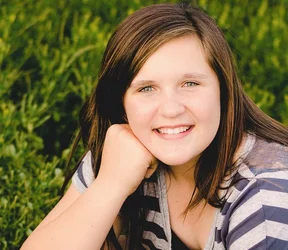
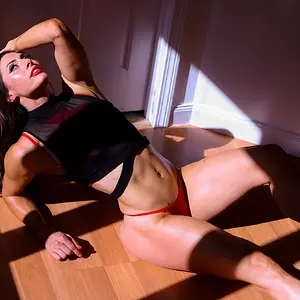
Does her color look ok? I'm really struggling with white balance and getting skin tones correct. I'm getting rather frustrated with the whole editing part of photography..Thank you!

7111423485_28410c3035_z.jpg
 
A little yellow on my end. I could be wrong. It can be my phone. What are you using for editing?
 
A little yellow on my end. I could be wrong. What are you using for editing?

Thank you!! I'm using Lightroom.. I'm uncalibrated and I think that's part of my problem. I have a new monitor and calibrator on the way so I'm hoping that will help.
 
TamiAz said:
Lightroom.. I'm uncalibrated and that's part of my problem. I have a new monitor and calibrator on the way so I'm hoping that will help.

It will. However, it would drive you insane to edit without calibrating. I'd hold off. You can use the dropper to set a reference though. But like I said, I would wait till the new monitor and calibration kit come in.
 
$7111423485_28410c3035_z.webpAgreed--the flesh tones have a bit too much yellow in them, and the saturation level is a bit too high. Not by a "lot", but enough to notice that the skin does not look "quite" right. here is a really quick stab at it using just the "Variations" command in Photoshop. THe original JPEG I had to work with was not the best source; see that blocked up area in her hair, right above her hand??? That indicates that the contrast is too high, and the saturation is also a bit too high. Color-correction from small, web-sized JPEGs is not an easy task...the raw file is always,always preferable to do the C-C work on.
 
View attachment 7010Agreed--the flesh tones have a bit too much yellow in them, and the saturation level is a bit too high. Not by a "lot", but enough to notice that the skin does not look "quite" right. here is a really quick stab at it using just the "Variations" command in Photoshop. THe original JPEG I had to work with was not the best source; see that blocked up area in her hair, right above her hand??? That indicates that the contrast is too high, and the saturation is also a bit too high. Color-correction from small, web-sized JPEGs is not an easy task...the raw file is always,always preferable to do the C-C work on.

Thank you..Now that I see your edit, I can see mine does have more yellow in it. I was playing around with a LR preset and it does have a lot of contrast. When you edit a picture, do you eyeball the color or do use numbers to help?
 
This looks over-exposed and strangely flat to me.
Note the blanched places on her cheeks. forehead and chin.
There is little or no micro-texture in her skin.

If this was done using fill-flash, it looks too much to me.
I would leave it and reshoot it.
 
Yeah a bit over exposed. I would try playing with the curves while adjusting the raw or change to a grayscale and you could probably get it to pop some more.
 
I "eyeball" the color somewhat, but with that said, I first make adjustments to white balance and exposure, as well as black point value, then curves. I use the histogram as a guide to the exposure and shadow values. That all gets me color that is pretty close to where it ought to be. I use the Selective Color adjustment tool in PS to alleviate color casts. There must be 30 different approaches to editing images, and they are somewhat dependent upon the editing software and the tool set that each application has; for example, I learned to edit before the "clarity" tool was invented, and also before the highlight/shadow tool was invented...so, my approach to adjusting images does not typically feature a "clarity slider" being used.
 
Color OK, but looks a little too burnt out on my end.
 
If you didn't calibrate your monitor, don't bother with colours as they are most likely all wrong or you can check your RGB values
 
however, from my side a nice capture.....the variations in colour in portraits are necessary a part depending on many factors at the time of exposing, besides what sensor catches on a particular model......RGB values may help as said by ghache.
 
Thanks for the feedback. A couple of you said the picture was overexposed, but when I look at the histogram it doesn't show any clipping. When something is overexposed the histogram should show clipping, right?

oops..nevermind. I went back to my original file and it does show some clipping, but I was able to fix it with my recovery slider.
 
Last edited:
TamiAz said:
Thanks for the feedback. A couple of you said the picture was overexposed, but when I look at the histogram it doesn't show any clipping. When something is overexposed the histogram should show clipping, right?

oops..nevermind. I went back to my original file and it does show some clipping.

I may be wrong but I think a photo can still be overexposed without clipping. Maybe just slightly. But I dunno for sure.

I was just thinking of that whole ETTR (exposing to the right). Exposing to the right without blowing highlights and then bringing down exposure in post. Maybe it's not technically overexposure...
 
in my opinion, in overexposed picture the highlight are burnt out....but not in this case.lol.
 

Create an account or login to comment

You must be a member in order to leave a comment

Create account

Create an account on our community. It's easy!

Log in

Already have an account? Log in here.

New Topics

Back
Top Bottom