What's new

HS Sports poster for client CC

Ryan L

TPF Noob!
Joined
Apr 20, 2010
Messages
1,321
Reaction score
89
Location
Shelbyville, MI
Can others edit my Photos
Photos OK to edit
So after taking a short hiatus from here, I need some C&C and where better than good ol' TPF!

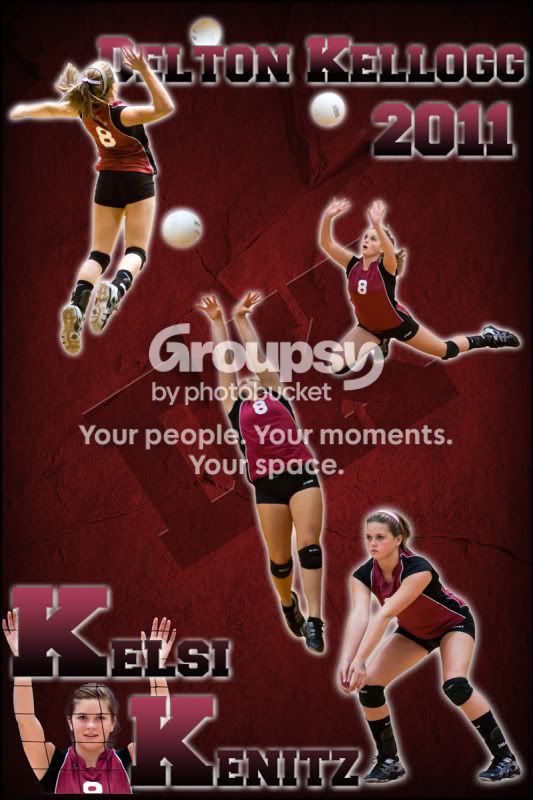
So a client asked me to make a sports poster for her daughter for Xmas. Never really made a large poster (20x30), just curious what people thought of it. I may have went a little overboard, I am trying to see if you think its too busy or not. I am asking more from a graphic arts perspective to critique, as I am no graphic arts major, just toying with it. Thanks
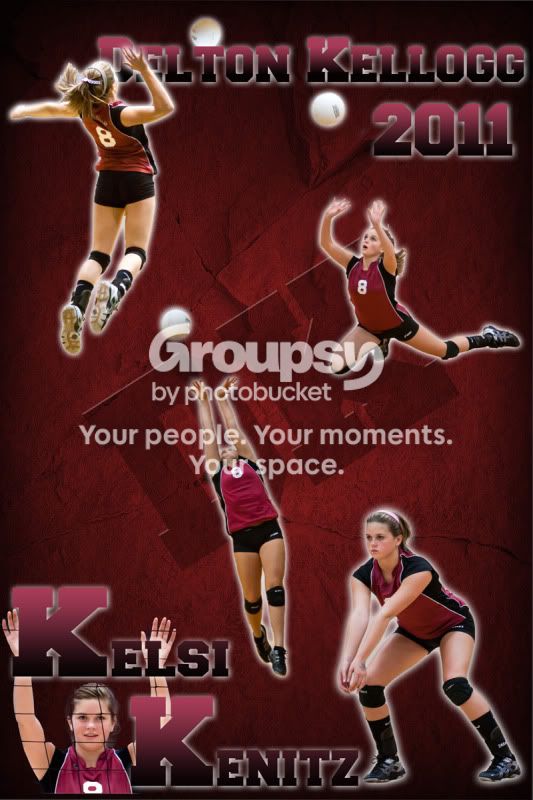
Kelsi2TPF.jpg
 
I think it looks good.
 
I would like it more if you would have added a black "stroke" layer effect to the font.

Or same thing as above but two layers:
1st layer white stroke and no other effects
2nd layer underneath black stroke and outer glow the way you have it here.

I think that would give the font a lot more punch!

Also I would try to pick one of the shots to be the biggest one near the center of the poster and then gradually align smaller shots around it. Just a thought.
 
Good volleyball shots..bump, set, spike...net...number 8...school name...player's name...nice three-color harmony...I bet they like the poster.
 
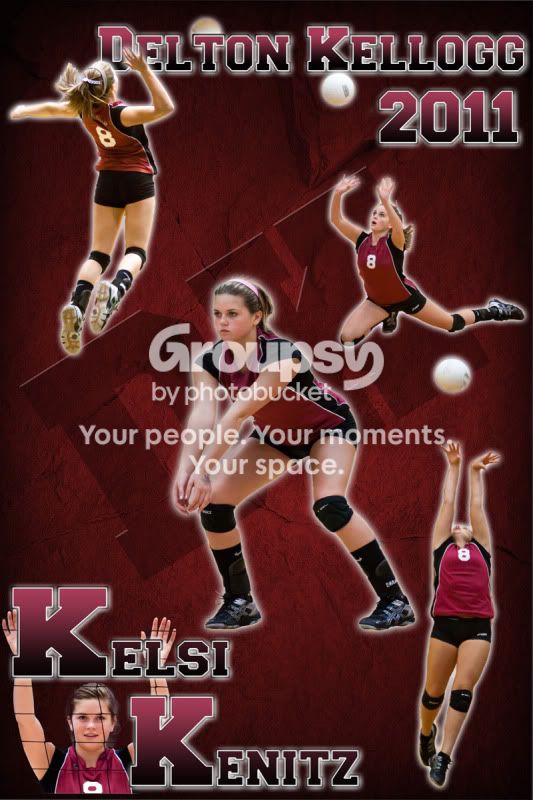
I think a stroke does look better on the text. I added a 10px black outer stroke, with a 1px inner white stroke. Kinda has a 3D look to it (Probably cant see it at this resolution very well), good idea. I tried to make one a little bigger, but I didnt care for the arrangement I would have had to make, although I did increase the middle one a bit.


@Derrel, Thanks for the comments. I tried to incorporate a range of hits on it.

Kelsi2TPF2.jpg
 
Is that the schools logo? To me it seems to lack signs of the school, but maybe that's not a bad thing.
 
It's a lot of background and a little of the shots. Otherwise? I think the design looks great.
 
I think a stroke does look better on the text. I added a 10px black outer stroke, with a 1px inner white stroke. Kinda has a 3D look to it (Probably cant see it at this resolution very well), good idea.

I'm glad you like the suggestion. You're right I can't really see it at this resolution. However I would have used a 40 or 50 pixel thick stroke to get real strong. Just for my taste :)
 
I'd suggest picking one shot to be the "hero image" (probably the one of her setting up for the dig shot, because you can see her face), and making that one as big as possible on the poster and then surround the other images around, if you indeed want to have all of the images in there...

I think the background is great btw..

Here's an example of what I mean with the "hero image"
tombrady.jpg
 
Last edited:
Great start but I concur with c pass. Make one dominate over the others
 
@Shooter

Well not really a school logo, its their name. They print their name in all sorts of fonts. The mascott is a panther, but couldnt find one I liked that was close enough to that school.

Ok I changed it a little, changed the center image and changed the direction of the set so it didnt clash with the rest of the photos. Added a "little" more stroke. I think this may be it, if not I think its going to have to do. I am only being paid for a poster here.

I know it looks like I can go bigger on the center image, and I can, but I am trying not to cover the center DK which is what the school abbreviation for Delton Kellogg. Also, I dont want the image on the right to look like her knee is going into the back of the center image.

Kelsi2TPF3.jpg
 

Create an account or login to comment

You must be a member in order to leave a comment

Create account

Create an account on our community. It's easy!

Log in

Already have an account? Log in here.

Back
Top Bottom