What's new

I will c&c your work for you. Beginners welcomed

Ahh been a while since the last of these - great to see you braving another go at it Dwayne! :)

And I think I will show another image - had some good input on this already, but I would be eager for your views as well:

4282925848_4fa91c0d68.jpg

large version
http://farm5.static.flickr.com/4069/4282925848_5c45d8bc7d_o.jpg

good

-cool ladybug
-great comp (subject placed to 1/3 rule)
-great detail and tack sharp
-exposure is right on
-very good contrast and well lit subject

nit

-orange/red color spot could use a boost (personal preference)

-top 1/3 of the paper BG could be darken a tad to enhance the already
natural ND effect that is there

tweak

-added a tad of selective color saturation to just the orange/red color spot

-darken (burn) the top 1/3 of the photo to enhance the natural ND effect
that is already there

-no USM (sharpening) needed

Hope this helps and thanks for posting.

Take care,
Dwayne Oakes

p112301719.jpg
 
Last edited:
Oops there is a pane of glass in that window, looking at it 100% crop.
Almost looks like an optical illusion, owell it does not matter the key is
reflections are prime elements in photography to enhance and should be
searched out in a scene.

Take care,
Dwayne Oakes
 
Dwayne, is this posted in landscape and cityscape because that is the genre of pictures you will critique, or can we post things other than landscape... just wondering before i post one. thanks!
 
Dwayne, is this posted in landscape and cityscape because that is the genre of pictures you will critique, or can we post things other than landscape... just wondering before i post one. thanks!

Hi Jackie,

All subjects welcomed, this will give everyone a chance to get a photo in
for c&c.

Take care,
Dwayne Oakes
 
I guess I'll get in on this.

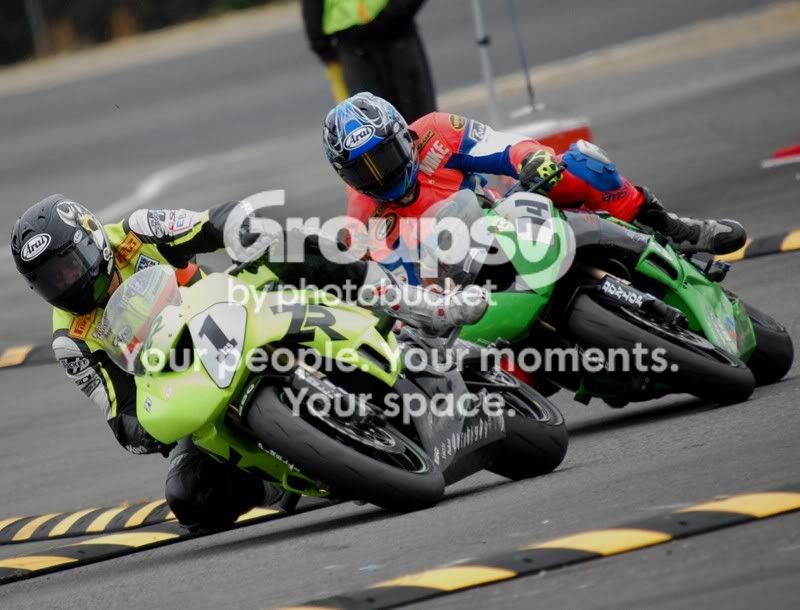
DSC_0190-1.jpg

good

-great sport shot (freeze action)
-very nice DOF
-exposure is right on
-the tight comp works well here
-good contrast and detail

nit

-to much clutter at the top of the photo (distraction)
-the colors are good but could use a boost (personal preference)

tweak

-cropped the top of the photo off to get rid of some clutter
-healed out the rest of the clutter at the top of the photo

-added a tad of global color saturation
-added a tad of global contrast

-lighten (dodge) rider #1 face (the enhance stare)

-desaturated the the bright yellow area above rider #74 helment
-added a tad of global USM (sharpening)

-healed out any marks on the pavement in the FG

Hope this helps and thanks for posting.

Take care,
Dwayne Oakes

p98724835-3.jpg
 
Ahh Dwayne - sorry I missed the update earlier!
Many thanks for the input and the suggested editing changes!

Some very interesting things said, and quite a contrast in some ways to other views I have had on the image. The slight contrast boost has been mentioned by others and I find it the easist thing to agree to on my end - interesting how with your edit even just boosting it for the red spot seems to lift the whole insect itself.
The aspect of the shot though is where I have had the most difference - with many suggesting a closer crop of the insect and removal of more of either the back or foreground areas. I have to say myself that I considered removing a little from the left and top areas to bring the insect more "into line" as it were.
Meanwhile the idea of increasing the darkness of the upper areas was never suggested before (and infact I have had more say that it appears underexposed - though I have put that partly down to differences in computer screens and in the background used to veiw the image on - since the shot appears brighter on a darker background (eg photoshop) than in places like flickr where its a white background.
 
Thanks for being willing to share your skills Dwayne.
Here is one I would like to have you work on. This seemed like it had possibilities but I can't figure out what to do. Can't wait to see what you do.

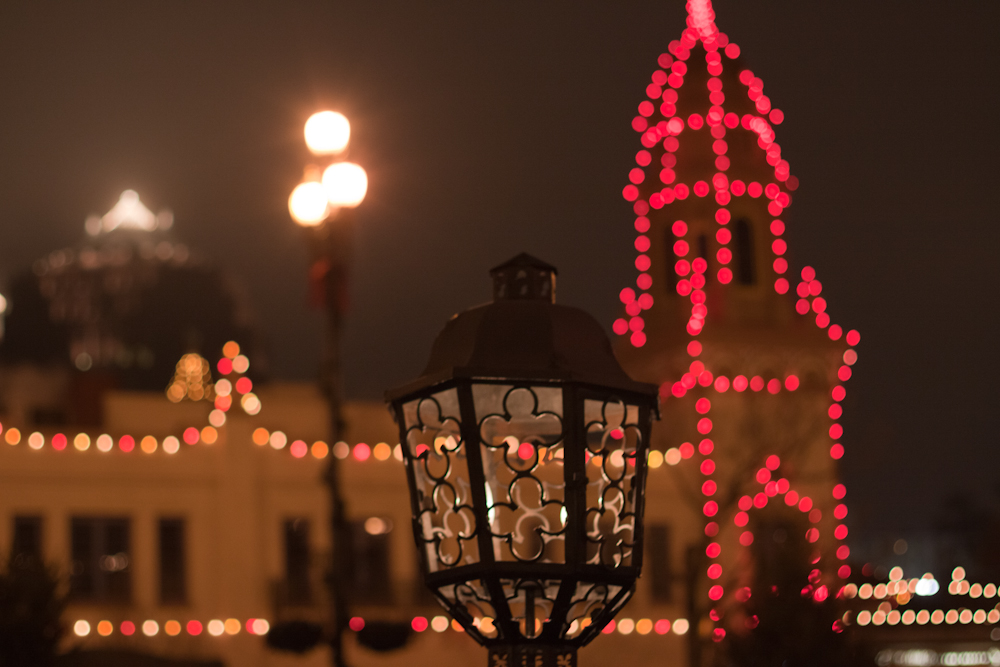
4305350482_9cb131b5ed_o.jpg


Keith

Thanks for the comments Keith and no problem I am glad I can help.

good

-cool out of focus (DOF) lights (you can do a abstracts with those)
-good exposure
-good colors
-low noise

nit

-the center in-focus lamp is not doing much for the photo (to large
to get rid of and heal out)

tweak

-cropped the photo vertically to make a (light abstract)

-used the midtone slider in (levels) to darken the photo a tad so the
lights stand out more

-added a tad of global contrast

-lighten (dodge) some of the lights, bottom far left white, bottom far right
red, orange cluster in the center and the top left tower

-put the photo through NR software anyway to clean it up a tad

Hope this helps and thanks for posting.

Take care,
Dwayne Oakes

p20441626.jpg
 
Wow thanks Dwayne.

That also gives me a little bit of an idea of what to use in PS to help my own pics look better.
 
Thanks Dwayne! I really struggle with the out of focus concept and how to make it work. I really appreciate your help.
Thanks again.
 
Thanks! I have a couple photos I'm going to use at my wedding this is one of them.
zogy7l.jpg

good

-very nice pose
-good contrast
-good detail
-exposure is good but subjects could use fill flash

nit

-the comp (the landmark building is competing as a subject and the eye wants
to go back and forth)

-subjects need fill flash to help reduce the shadows

tweak

-cropped the photo to get rid of the landmark building so there is only one
subject and placed the subjects to 1/3 rule

-switched the photo to black and white to give the photo artistic flare
and to get rid of the snapshot look (personal choice)

-lighten (dodge) the subjects to make a fill flash effect to get rid
of some shadows

-added selective gaussian blur around the photo to add
artistic flare (personal choice)

-put the photo through NR software to smooth the photo out a tad

-added a tad of global contrast
-moved the midtone and whitepoint sliders in (levels) to set final exposure

-healed out the two people on the far right on the shoreline

Hope this helps and thanks for posting.

Take care,
Dwayne Oakes

p784790900-3.jpg
 
Last edited:
^^that pictures looks great.
 
I don't mean to be greedy but I'm going to go ahead and post my second one.
Thanks a bunch Dwayne! What program do you use?
3025soi.jpg

I use these two software programs for all of my work.

Nikon | Imaging Products | CaptureNX2

Imagenomic - Imagination at Shutter Speed

So the pp on this photo would be the same as the last one so they
would make a matching set.

good

-the classic pose
-the center comp works well here
-great sidelight
-good contrast and detail
-exposure is right on
-good highlight control

nit

-the photo has a tilt to the left (tough to fix as the dock is the problem
so a slight rotation is the best we you can do with this one)

tweak

-added slight CW rotation to take out some of the tilt using the
(straightening tool)

-switched the photo to black and white for artistic flare
(personal choice)

-lighten (dodge) the subjects to create a fill flash effect and reduce
any shadows

-added a tad of global USM (sharpening)
-added a tad of global contrast

-darkened (burn) the sky a tad to tone down its brightness

-added selective (gaussian blur) around the photo for artistic flare
(personal choice)

-used the midtone and whitepoint sliders in (levels) to set final exposure
-healed out the water stains on left subject's boots

Hope this helps and thanks for posting.

Take care,
Dwayne Oakes

p653177633-3.jpg
 
Last edited:
this is a great idea dwayne, thank you i appreciate it.
this shot was taken at upper canada village, a mid summer day
but no sun which i feel is lacking in this image.

how would you add some 'sunny' quality to this shot?

thanks again.
wim

butterfly2.jpg
 
Out standing Dwayne! Thank you so much, my wife will love these!
We wanted them to be black and white for the wedding so you covered that well for us. Of course that is if you will allow us to use your edited copies at our wedding.
Thanks Again!
 

Create an account or login to comment

You must be a member in order to leave a comment

Create account

Create an account on our community. It's easy!

Log in

Already have an account? Log in here.

Back
Top Bottom