What's new

Is there anyway to save this picture besides HDR?

jdong217

TPF Noob!
Joined
Aug 12, 2011
Messages
150
Reaction score
9
Can others edit my Photos
Photos OK to edit
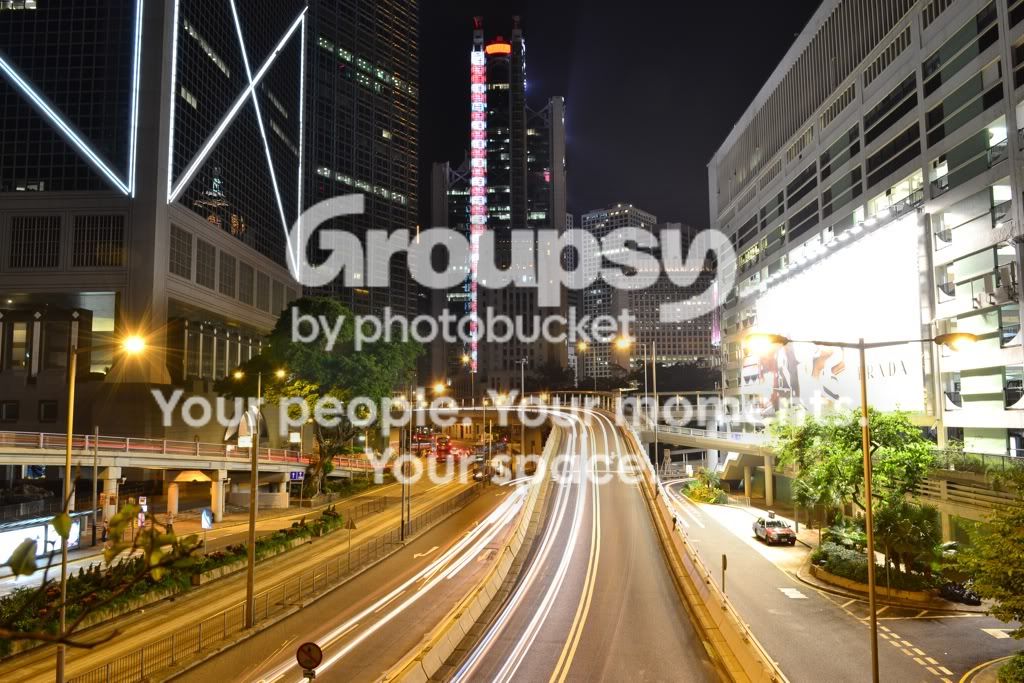
I really want to back and left buildings at the exposure they're at now, but the billboard on the right is just way too bright. Getting the billboard at a good exposure means everything else is way too dark.
file-107.jpg
 
There's no way to recover any details in the billboard....it's pure white. Trying to bring it down will only turn it a sick gray.

You might be able to reshoot it, and bracket a set of bracketed frames. But instead of defaulting to HDR, you might find a single frame that can be PP'd into acceptable results. It all depends on the dynamic range of the scene and how well your sensor captures that range. It will also depend on how well your camera firmware and post software handle noise at those exposure times.

HDR might be difficult to pull off with the moving street traffic and 8 sec. exposure times. I doubt any software's Anti-Ghosting is gonna overcome that.
 
what about graduated ND filter while shooting ?
 
shoot multiple exposures, then import into photoshop and use layer masks to show only the parts you like from each photo
 
I took LOTS of exposures of this shot but I think I just need to sit down and learn how to properly use ps because I have no idea how to use layer masks haha
 
If you send me the files of the photo above, and one where the bilboard is properly exposed, I'll have a go at editing it. I've got nothing better to do until football comes on at 1. DDanserphotography@gmail.com is my email address if you're interested.
 
^^ Thanks I will send now.

And I have a grad ND but it's equally split down the center for horizons
 
what about graduated ND filter while shooting ?

Unless the ND is sized & shaped for the blown-out areas, it won't do much good.

Right. I mean, you could try re-shooting and manually covering up that section of the photo with a black card or something for varying times. Just like dodging/burning (the old darkroom version) but in camera. It's a long shot though.
 
Just add a new billboard! :D Or you could be even more clever, and put your logo on it!


lol.jpg
 
Layering multiples will work... so would loading the ones you've got into an HDR program, so long as you had the camera on a tripod and the view hasn't changed at all. Nothing special about HDR software that says you have to have shot the pics in a continuous bracket.... you can take 20 different shots on a tripod and pick the ones you want... load them into Photomatix and balance everything out.

This only works because you're using a long exposure... HDR shots of a highway trying to capture moving cars obviously wouldn't work... and if that taxi has moved in any of the shots, it will appear as a ghosted image once loaded in.
 
I've tried HDR and the taxi hasn't moved, but the result is hideous in photoshop. I'll post it when I get a chance. I'll definitely read up on layers though
 
You can shoot film ;)
 
Given that you're using long exposure times, you can shoot at low ISO and underexpose. If you shoot below 200 ISO, you can compensate up by 2-3 stops before seeing any grain at the size of the picture above. Then you expose so that the billboard is at the upper limit and then, in PS, you compensate exposure on the rest of the photo.

Ciao!
 
You can always crop the building on the right out.

By the way, how did you took this picture? Is there a bridge that you're standing on or are you floating in the mid-air (hopefully not)?
 

Create an account or login to comment

You must be a member in order to leave a comment

Create account

Create an account on our community. It's easy!

Log in

Already have an account? Log in here.

Back
Top Bottom