What's new

Let me have it Part II

GeorgieGirl

No longer a newbie, moving up!
Joined
Nov 5, 2010
Messages
2,469
Reaction score
325
Can others edit my Photos
Photos NOT OK to edit
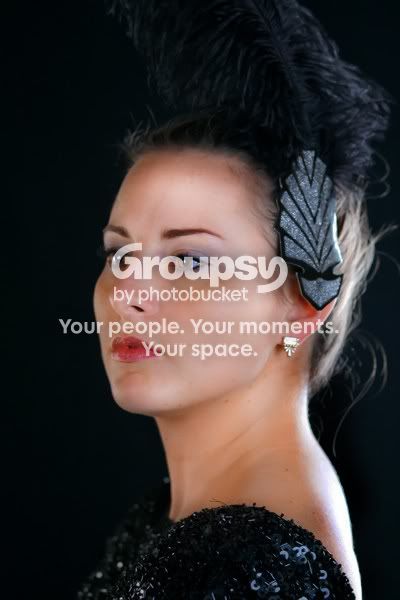
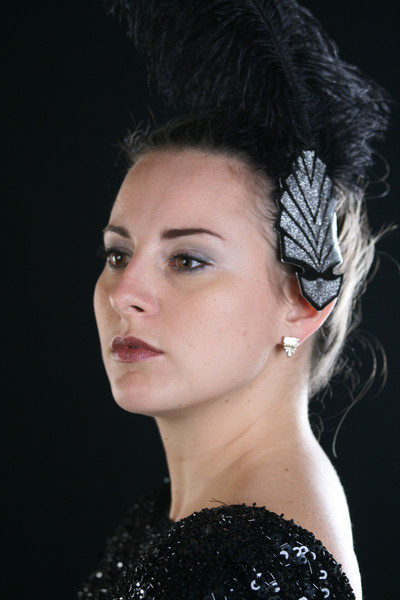
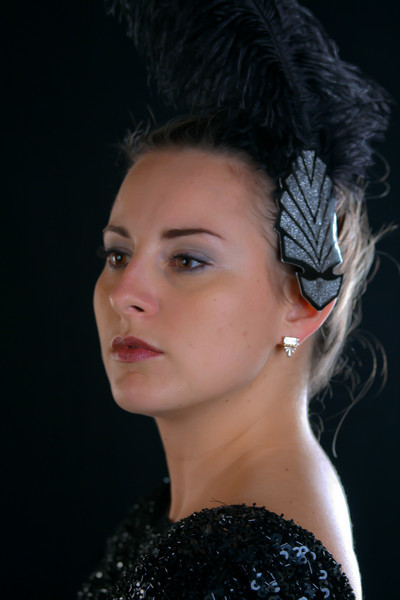
I have done some work in Lightroom on this one. I gained some positive information on my first photo posted a couple of weeks ago and would appreciate some feedback on this one too. It might be rendered a bit too soft, but let me know. Appreciate the comments. Thanks!


1098621165_Bxhd8-L.jpg
 
i like the lighting. what was your set up? the photo kinda has a classic feel but with a modern twist.
 
I have done some work in Lightroom on this one. I gained some positive information on my first photo posted a couple of weeks ago and would appreciate some feedback on this one too. It might be rendered a bit too soft, but let me know. Appreciate the comments. Thanks!


1098621165_Bxhd8-L.jpg


I like it! I think it is a little too soft overall though. Maybe you can just use the adjustment brush and soften select areas and leaving the eyes, dress, hair and feather alone. I like the lighting, the pose and the mood.
 
Her back looks blown out. There's too much light coming from the right hand side, and not enough fill light to sculpt her face and nose. The blown highlights on her back are really killing it for me.
 
x2 on the hot spot on her back. Super distracting.
 
needs something like this. Soory this is just some crappy photo shop I did in 2 minutes. But your face is too under exposed. You needed some flash or light in front of her as well. Her face is underexposed and makes the picture look dull. I think you needed to move that light you have more behind her so you didn't get the hotspot on the back. Sorry for the negative comments

1098621165_Bxhd8-L.jpg
 
Last edited:
Thanks! I knew about the hot spot, what was done was done, there was not much to do about it. In my toning it down I might have darkened it too much. I am not very good at editing, so I appreciate the efforts to work on it. I like the ways it was opened up.

Burgo - What were the photoshop adjustments you performed so I can start to see what was done and can be done? Thanks for doing this! Its an amazing difference.

The lighting setup was a soft box camera right, a small strip subject rear and right as noted and a reflector subject left for fill.

This was a 'Halloween costume'. I would have liked a little spray of light filling the plume just a tiny bit or to adjust it out and of course less of the light at her back, but I still would have liked an edge of light there. I have since purchased ND gels, diffusers, grids and learned how to set the lights differently, so its bound to get better.

A positive lesson in this C&C is that everyone is seeing the same things including me before I posted it, so that gives me greater confidence. :thumbup:

This was the original.

1098947875_2andw-L.jpg
 
Last edited:
I have done some work in Lightroom on this one. I gained some positive information on my first photo posted a couple of weeks ago and would appreciate some feedback on this one too. It might be rendered a bit too soft, but let me know. Appreciate the comments. Thanks!


1098621165_Bxhd8-L.jpg

I like the shot. Nice pose and interesting props. The light on the right is a good reason many will shoot in RAW format. It helps when you need to correct a pic. I think it is less noticeable when the face has better exposure:
jf0ejl
 
Burgo - What were the photoshop adjustments you performed so I can start to see what was done and can be done? Thanks for doing this! Its an amazing difference.

I just used the dodge tool to light the face, the burn tool on the shadows, I used the sharpen tool on the eyes (probably a bit too much looking at it now but meh it was a quicky), and finally had the sponge set to saturate at 7% and went over the eyes & lips and skin to put some colour back in it.

that's about it if I remember correctly.
 
Burgo - What were the photoshop adjustments you performed so I can start to see what was done and can be done? Thanks for doing this! Its an amazing difference.

I just used the dodge tool to light the face, the burn tool on the shadows, I used the sharpen tool on the eyes (probably a bit too much looking at it now but meh it was a quicky), and finally had the sponge set to saturate at 7% and went over the eyes & lips and skin to put some colour back in it.

that's about it if I remember correctly.

Thank You! I like the way it came out. It looks really luminous.:thumbup:
 
I like the shot. Nice pose and interesting props. The light on the right is a good reason many will shoot in RAW format. It helps when you need to correct a pic. I think it is less noticeable when the face has better exposure:

Thank You! I have not shot in RAW at all and I do want to try it. I am not very good at pp but I suppose I should try it a bit more to get better out it. I like your edits, you were able to get the plume opened up and I think it makes a huge difference.
 
Thank You! I have not shot in RAW at all and I do want to try it. I am not very good at pp but I suppose I should try it a bit more to get better out it. I like your edits, you were able to get the plume opened up and I think it makes a huge difference.

No problem. I am glad you like the edit. I know a lot of people find my need to edit annoying, but I really do it for practice, not because I think people's images are bad. I repost to the forums because, honestly, I get more feedback on edits I do for other people than any images I may put up. I like hearing when people hate an edit just as much as when they like it because it generally means I have missed something or pushed a pp too far.

Cheers and keep shooting.
 

Create an account or login to comment

You must be a member in order to leave a comment

Create account

Create an account on our community. It's easy!

Log in

Already have an account? Log in here.

Back
Top Bottom