What's new

Looking for some CC

itsjustme

TPF Noob!
Joined
Oct 30, 2011
Messages
4
Reaction score
0
Can others edit my Photos
Photos OK to edit
I'm ready to get some feedback from people who are NOT family or friends so I thought I would throw a few of my photo's out here to see what you all think so I know where I need to improve. Thanks in advance!

1)
CY365-Day2.jpg


2)
CY365-Day6.jpg


3)
CY365-Day32.jpg


4)
CY365-Day21.jpg


5)
CY365-Day23.jpg
 
C&C per req:

1. Nice shot, good expression. A touch hot on the exposure though. I think this oculd have been dialed back about 1/3 stop and the WB seems a little too warm to me.

2. Some odd colour casts going on here. I'm also not fond of hte partly cropped people. I think this would have been a LOT stronger with one or two less people, and no cropped torsos.

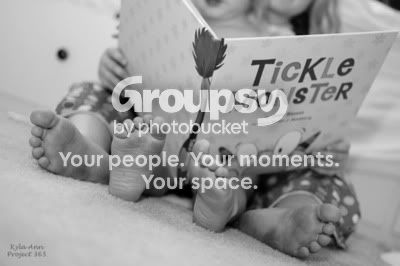
3. I like the idea here, but I think it would have been even more effective had the book been held higher and the faces completely blocked. Your monochrome conversion is a little too mid-tone rich, and would benefit from a slight contrast boost. What is the black spot image left?

4. Nicely captured; again a slightly over-exposed, and maybe the red channel could be dialed back just a hair as well. Watch your backgrounds; the picture frame and furniture are adding a number of distracting elements that compete for the eye's attention.

5. I think this one needs to be leveled, and the crop on the RH side seems a bit awkward.

Overall, they're not bad at all. A few minor areas where they could be improved. Keep shooting, keep posting.

Just my $00.02 worth - your mileage may vary.

~John

 
Thanks for the feedback tirediron! Definitely helps to see what I need to work on.

1) This was warmed so much in PP. Maybe too much editing?
2) I completely agree about the cropped people. Unfortunately I couldn't get any higher to fit them all in. Can you explain color casts to me? Or direct me somewhere I can read more about it/how to prevent it?
3) The black spot is a knob on a drawer. I agree that it is distracting but admittedly, my photoshop skills are lacking and I'm not sure how to edit that out.
4 & 5) I have noticed that I tend to not pay enough attention to backgrounds and what I am cropping out. Something I am trying to be mindful of for future photos.

Thanks again! I really appreciate the feedback.
 
You're welcome.
1. Yes, I think maybe a little too much. Do you have a colour-corrected monitor to work from?
2. Colour casts are simply unwanted shades of colour; they can be caused by anything from the reflection of a coloured surface to the lighting hitting your lens a certain way. Cambridge in Colour has outstanding tutorials on almost all aspects of digital photography.
3. The easiest way to deal with this is by using the 'Clone' tool. Search YouTube for a host of tutorials on the subject.
 

Create an account or login to comment

You must be a member in order to leave a comment

Create account

Create an account on our community. It's easy!

Log in

Already have an account? Log in here.

Back
Top Bottom