What's new

Looking to avoid mistakes of the past. Camera Purchase.

mrwmnhtr

TPF Noob!
Joined
Oct 30, 2012
Messages
3
Reaction score
0
Hello Everyone,

I am looking to purchase a new camera and I wish to avoid a mistake I made once before. Which was purchasing an expensive camera that recorded images only at 72 ppi. I don't mind .jpg file types but any image captured at 72 ppi is a lousy photo. My current point and shoot has 6 "quality" setting but they are all 72 ppi. (When they said quality settings I thought that meant changing ppi, not just enlarging the image. I can do that with photoshop.) I have used other cameras that have captured .jpg images at 150 ppi and 300 ppi. Camera's that have the .raw option tend to be 30% to 50% higher in cost. I was looking at high end point and shoots or an entry level DSLR. OK to my question: How do I determine form the camera spec sheets what the cameras ppi output will be? This doesn't appear to be one of specs they offer.

I hope someone can enlighten me, please.

Randy
 
Cameras don't record at ANY DPI or PPI. The image is comprised of X amount of pixels by X amount of pixels. Your editing software determines how many pixels per inch.
3000x4000 pixels is still 3000x4000 pixels whether it's at 72 DPI/PPI or at 300 DPI/PPI or 3000 DPI/PPI.
There is no such thing as PPI in the camera.
I believe the default for all software may be 72 PPI, but that doesn't make your image any less quality. It just makes it 41 inches by 55 inches of loose pixels.
If you printed it at an 12x16 it would then be 250PPI. Still the same 3000x4000 pixels
 
Canon cameras seem to use a default of 72 PPI, but the PPI can be changed and the PPI only has meaning when an image will be printed. PPI is meaningless for electronic display.

It's 5th grade math - a 3000 x 2000 pixel image printed at 100 PPI will be a 30" x 20" print. 3000 pixels divided by 100 PPI = 30 inches (the pixels cancel), and 2000 pixels divided by 100 PPI = 20 inches.

The same 3000 x 2000 pixel image printed at 200 PPI will be a 15" by 10" print, and 3000 pixels divided by 72 PPI = 41.67 inches.
 
Pixels are slippery. They don't have any physical dimension because they don't exist in the real world. Pixels are a multi-dimensional representation of color, but not of space.

When we print something however, we need to assign a physical dimension to the pixel. PPI is essentially taking that spaceless representation of color and assigning it to a physical size. That size can be literally anything. If you have a 4 pixels arranged in a 2x2 pixel square, and assign a ppi of 1ppi, then the printed image will be 2x2", with each pixel representing a large physical space. If you had a 400x400 pixel image arrange into a 200x200 pixel square and printed it at 100ppi, you'd also have a 2x2" image, with each pixel representing a smaller physical space.

The human eye cannot reliably resolve anything smaller than 1/300", so printing at or above 300ppi, the individual pixels cannot be seen with the naked eye. 1/250" is often sufficient, and much below 1/200" the individual pixels will become much more visible. Below 1/100" the individual pixels become very visible.

But pixels themselves don't have any specific size. They can be represented as any size, but only when they are represented in the physical world. Because the image is entirely made up out of pixels, adjusting the ppi pitch will change the overall dimensions of the image.

This is not the same as "scaling" (bicubic, bilinear, lorenzo, etc) which will interpolate values between pixels, but rather changes the amount of physical space each pixel occupies.
 
I'm sorry to be so dense But I'm not understanding this. Let me explain the process I go through. I took my camera and I took 6 photos of the same object from the location I only changed the quality settings to each of the 6 setting options. When I upload them to my computer it shows 5 different sizes, as you would expect. I then open all 6 in Photoshop and check the Image Size and all 6 have different physical dimensions and all have a Resolution of 72ppi. I take my girlfriends camera and take a photo from the same location of the same object, upload to my computer, open in Photoshop and it shows a resolution of 150ppi. And obviously a much much better photo than mine. Photoshop doesn't change the Resolution through the act of opening an image. The Image resolution is what it is. I have used other cameras that through the same process produces photos with a resolution of 300ppi. What accounts for the difference in the resolution between the cameras?

If I'm looking to buy a camera that has 4000 x 3000 resolution and the final image size is 55.5" x 41.6" it's resolution is 72ppi. Now if the final image size is 13.3" x 10" the resolution would be 300ppi. Changing the "quality" setting on my camera changed the size but not the resolution. Camera sellers specs don't state what the final image size is compared to its resolution. Do you see what I'm not understanding? Did I need to change a setting on my camera that I don't know about? I'm just confused.
(I realize I can change the resolution of the image before printing but it really doesn't make it a more detailed or clearer image, it just appears that way.)
I hope this makes my question more clear.
Thank you for your help.
 
Last edited:
The PPi resolution is read only by the printer when you come to print - for display on a computer is has no effect on the image quality at all. You can see this for yourself easily if you go into photoshop and manually change the ppi value for your photos. Try it and you should see utterly no difference what so ever*

It might also help if you specify what make and model your camera is


*if you view at any size, unless you are selecting the view "at print size". This is because the ppi will be part of the printing process and, as explained above, will affect how big the photo is displayed.
 
The pixel dimensions are the image resolution, not the PPI. The PPI only defines print size as a function of the pixel dimensions (resolution).

As I tried to show in post #4, the PPI can be changed post process to control the print size for any given pixel resolution.

For electronic display, the PPI is totally and utterly meaningless.
 
One big problem is that the word "pixel" refers to serval things. Sensor pixels are the individual photoreceptor site on a camera sensor; a monitor pixel refers to the individual light emitting element on a screen; image pixels refers to the individual set of value(s) that make up the array of integer sets that describe an image file. Monitor and Sensor pixels are more like printer "dots" than image "pixels". Pixel is a portmanteau of "picture element", and like "dots, sensor and monitor elements do not contain any information by themselves about a specific image.

An interesting point though, when I was in college there was no distinction between ppi and dpi, and the term "dot" and "pixel" were used interchangeably. The idea of ppi being a distinct concept is relatively new.
 
I'm sorry to be so dense But I'm not understanding this. Let me explain the process I go through. I took my camera and I took 6 photos of the same object from the location I only changed the quality settings to each of the 6 setting options. When I upload them to my computer it shows 5 different sizes, as you would expect. I then open all 6 in Photoshop and check the Image Size and all 6 have different physical dimensions and all have a Resolution of 72ppi. I take my girlfriends camera and take a photo from the same location of the same object, upload to my computer, open in Photoshop and it shows a resolution of 150ppi. And obviously a much much better photo than mine. Photoshop doesn't change the Resolution through the act of opening an image. The Image resolution is what it is. I have used other cameras that through the same process produces photos with a resolution of 300ppi. What accounts for the difference in the resolution between the cameras?

If I'm looking to buy a camera that has 4000 x 3000 resolution and the final image size is 55.5" x 41.6" it's resolution is 72ppi. Now if the final image size is 13.3" x 10" the resolution would be 300ppi. Changing the "quality" setting on my camera changed the size but not the resolution. Camera sellers specs don't state what the final image size is compared to its resolution. Do you see what I'm not understanding? Did I need to change a setting on my camera that I don't know about? I'm just confused.
(I realize I can change the resolution of the image before printing but it really doesn't make it a more detailed or clearer image, it just appears that way.)
I hope this makes my question more clear.
Thank you for your help.
CAMERA resolution has NOTHING to do with DPI/PPI. The camera shoots the image at the size of the sensor. Our hypothetical sensor here has been 3000 pixels by 4000 pixels. The image is always that many pixels. Regardless of how you divide it. Dividing it into PPI/DPI is done when you print or edit. It has nothing to do with the image quality settings on your camera. That changes the OVERALL recording quality and will actually decrease it, but it won't change your PPI or DPI.
THe detail is there. Period. Take a photo of something with your camera. Then print that image as an 8x10. It will be fine.
What camera do you own? And what software are you using?
 
@ MLeeK

I use Photoshop CS5. Here are the 3 cameras.

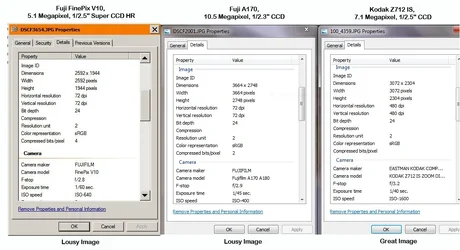
Fuji FinePix V10, 5.1 Megapixel, 1/2.5" Super CCD HR

Fuji A170, 10.5 Megapixel, 1/2.3" CCD

Kodak Z712 IS, 7.1 Megapixel, 1/2.5" CCD

Please see attachment.

These are the property sheets of 3 photos taken with 3 different cameras. These property sheets are taken from the images while still ON the memory card. You can clearly see that it states that the two Fuji cameras have 72 dpi of Horizontal and Vertical Resolution. The Kodak has 480 dpi Horizontal and Vertical Resolution. The Fuji V10 and the Kodak have the same size sensors. The images from the Fuji's are lousy the images from the Kodak are great.

I do not understand why you keep saying that dpi/ppi doesn't make a difference when it clearly makes a difference to the image. If it didn't make difference why would anyone buy a $1000 camera?

If dpi/ppi has nothing to do with image quality then why does the Kodak have a different resolution and take much better photos than either of the Fuji's?

Thank you for your patients.

Randy
 

Attachments

  • $camera properties.webp
    $camera properties.webp
    94.5 KB · Views: 180
You are not understanding the method for figuring the image size, the only numbers you need to be concerned about are outlined in red......... most often an image is printed at 300dpi (or ppi for the image file), do the math. Take your height and witdth and divide them by 300 for each of the images, that will tell you what your native image size would be , when you do this you will see that the images are pretty comparable in size. When you view them on the screen you are going to see a difference in quality if you are looking at an image at 100% at 72ppi than one at 480 ppi because you are looking at different settings. You need to open up your mind and forget about the ppi for a bit when comparing things to understand it.

404463750.jpg
 
randy - you can set the dpi (ppi) pitch value to anything without changing the image itself. This value is an instruction to the printer telling it how large the individual pixels should be represented in physical space. It has nothing to do with the pixels themselves, only their physical representation. Remember, pixels have no physical dimension until they are represented in physical space.

If you don't understand this concept, say something.

The fuji sets the ppi to 72, so called "screen resolution", by default. In fact, it's likely that the camera doesn't set this value at all, rather the software resorts to the 72ppi value in it's absence. In contrast, the kodak sets the ppi to 480. But this has nothing to do with the image itself, it's more a property of the file. It is done out of convenience for the user.

Why? The Kodak is set up so that when you press "print" it automatically fits within a 5x7" frame and doesn't spew out page after page of tiled, pixely garbage, or scaled down pixely garbage depending on the printer setting. The Fuji, otoh, uses the industry standard 72ppi default, or the software does if no value is presented. If you had a printer large enough, simply pressing "print" on the fuji 10mp camera without defining first the ppi, the printed image would be 50x38" with visible 1/72" pixels, the Kodak with the smaller resolution printed directly out of camera would be 6 1/2" x 5" with very microscopic 1/480" pixels. However, you can set the kodak's ppi pitch to anything, and to get a 50" wide image using that camera the pitch would need to be set even lower than the fuji, resulting in even larger pixels as the kodak has slightly fewer physical light sensing elements, commonly and confusingly referred to as "pixels" as well.

I feel fairly confident that not only a $1000 camera's file value would have a default ppi of 72, but also a $10,000 camera would as well. For one thing, ppi becomes much more complicated and specific when dealing with offset reproduction, so predetermining the ppi pitch is kind of counter productive.
 
Last edited:
@ MLeeK

I use Photoshop CS5. Here are the 3 cameras.

Fuji FinePix V10, 5.1 Megapixel, 1/2.5" Super CCD HR

Fuji A170, 10.5 Megapixel, 1/2.3" CCD

Kodak Z712 IS, 7.1 Megapixel, 1/2.5" CCD

Please see attachment.

These are the property sheets of 3 photos taken with 3 different cameras. These property sheets are taken from the images while still ON the memory card. You can clearly see that it states that the two Fuji cameras have 72 dpi of Horizontal and Vertical Resolution. The Kodak has 480 dpi Horizontal and Vertical Resolution. The Fuji V10 and the Kodak have the same size sensors. The images from the Fuji's are lousy the images from the Kodak are great.

I do not understand why you keep saying that dpi/ppi doesn't make a difference when it clearly makes a difference to the image. If it didn't make difference why would anyone buy a $1000 camera?

If dpi/ppi has nothing to do with image quality then why does the Kodak have a different resolution and take much better photos than either of the Fuji's?

Thank you for your patients.

Randy
I have the V712 here somewhere and I know it's capable of beautiful images that are high quality. You are just getting hung up on the numbers and confusing them. The dimension numbers (3072x2304 on the Kodak) are all that matters. You can slice and dice it in any number you want. Evidently the one from the kodak you have here you have perhaps cropped or something because it's at 480 DPI. Which makes it 6.4 inches by 4.8 inches. HOWEVER that same image at 300 DPI is 10.24 inches by 7.68. Ignore the 72. It's totally irrelevant. Pretend it's not even there. Just divide those numbers above by the size you want to print. When you crop do not set your DPI/PPI at all. CS5 then crops to the ratio you are trying to fit it in, but does not change the number of pixels at all.
 
Randy, this sounds like a photoshop problem more than a camera problem.

If you are in fact getting different figures with different cameras (not doubting, just trying to be concise) when you upload them- beyond what you would expect from different sensor sizes- you may have CS5 set to capture images from the camera in question a certain way that doesn't occur when you're opening images from other cameras.

I honestly have no idea how this might have occurred but why not try resetting everything to default in CS5 and starting over with your tests?


hth
 

Create an account or login to comment

You must be a member in order to leave a comment

Create account

Create an account on our community. It's easy!

Log in

Already have an account? Log in here.

New Topics

Back
Top Bottom