What's new

Model Shoot for C&C

margosoriginals

TPF Noob!
Joined
Aug 20, 2011
Messages
117
Reaction score
12
Location
Ohio
Can others edit my Photos
Photos OK to edit
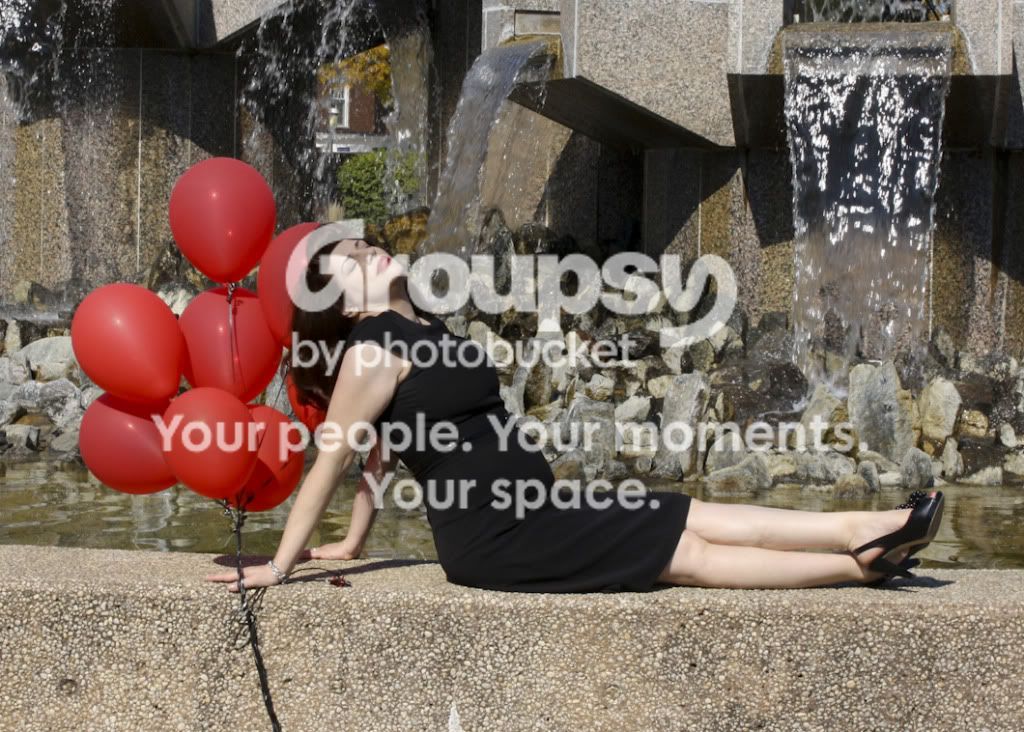
I photographed a model yesterday. The only time she could meet me was at noon, and as you can see, it was a bright sunny day. To make matters worse, her skin was white as porcelain, so I really had a hard time with this shoot. I was supposed to have my friend there with a reflector, but she couldn't make it. Any comments, or helpful advise would be greatly appreciated!

695.jpg


850bw.jpg
 
My suggestion would be to use a larger aperture next time.
 
It seems like some of her skin is blown out, perhaps due to her wearing a black dress+sun, but I would suggest maybe making #1 a B&W to see if you can then play with the exposure a bit to make it not so blown.

#2 I would say to go in for a much closer crop, the fountain in the background to me is really nothing more than distracting. Aside from that though, to me at least, the post just isn't flattering for her at all. Unless this is a maternity shoot, then ignore part two of this CC and just pay attention to the crop portion! *waves hands*

I'm still a newb, so take it for what it is =)
 
Haha Jace I see what you're saying... I need to look out for those unflattering poses.
 
Oh, and I agree on the wider aperture on the first one especially, so you can get a nice blurred background!
 
I am doing another shoot today at 4 with a different model, so hopefully the lighting situation will be more conducive. Any posing suggestions? The girl I am shooting today is a lot thinner, and not as fair skinned.
 
In #1 you could have used your popup flash for fill lighting.

If you have to shoot at mid-day or in direct sunlight, and you have no light modifiers, like diffusion panels or reflectors, use open shade.

Place your model near the edge of the shade, and use the bright open sky as your main light. You can use light from the camera's built-in flash at a lower than full power manual setting, or a reflector, to help separate your model from the background.

A wide aperture is not always the answer for getting a blurred background (shallow depth-of-field), because there are 3 other factors that also affect DOF: lens focal length, focus point distance from the camera, and focus point distance to the background.

Post the color version of #2 and I'll do a B&W edit for you.

What editing applications do you have available?
 
In #1 you could have used your popup flash for fill lighting.

If you have to shoot at mid-day or in direct sunlight, and you have no light modifiers, like diffusion panels or reflectors, use open shade.

Place your model near the edge of the shade, and use the bright open sky as your main light. You can use light from the camera's built-in flash at a lower than full power manual setting, or a reflector, to help separate your model from the background.

A wide aperture is not always the answer for getting a blurred background (shallow depth-of-field), because there are 3 other factors that also affect DOF: lens focal length, focus point distance from the camera, and focus point distance to the background.

Post the color version of #2 and I'll do a B&W edit for you.

What editing applications do you have available?

Thank you! I did try to use a wider aperture, but it was really blown out. I have an canon 85mm f/1.8 lens that I used. I did use a speedlight flash (canon 320-EX), on top of my camera. The lens is great for blurring the background, but I have to stand so far back from the subject, I find it hard to get the shot that I want, especially indoors. I have photoshop CS5, and will be getting light room soon. Below is the color version, and cropped as suggested by Jace.

850cropped.jpg
 
I was going through and found a few that I did in the shade. This was in a parking deck. Any better?

794.jpg
 
Since you have CS5, you already have the same edit rendering engine Lightroom's Develope (editing) Module uses - ACR 6. In CS5 it's known as Camera Raw.

If you're not familiar with how to use all of Camera Raw's tools, features, and functions, this book will help: Real World Camera Raw with Adobe Photoshop CS5

CS5 also includes Bridge, which duplicates a lot of Lightroom's Library, Slideshow, Print, and Web Module functions, but Bridge is a browser rather than a database manager.
 
KmH I like that crop a lot better. It looks a little bright to me, maybe just my monitor?
 

Create an account or login to comment

You must be a member in order to leave a comment

Create account

Create an account on our community. It's easy!

Log in

Already have an account? Log in here.

Back
Top Bottom