What's new

More kids

Aapoll

TPF Noob!
Joined
Oct 14, 2013
Messages
38
Reaction score
3
Location
Alberta
Can others edit my Photos
Photos OK to edit
$IMG_7846.webp$IMG_7896.webp$IMG_7946.webp

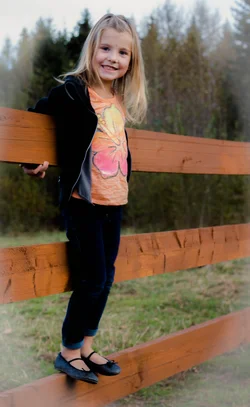
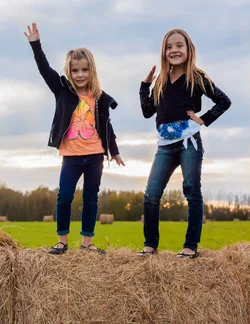
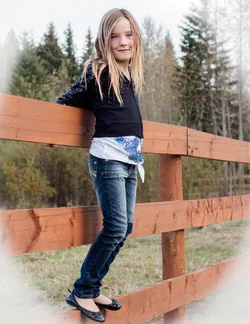
Just wondering how my exposure is, and inn the first two which vignette looks better. Any other CC is welcome as well
 
They look a bit under exposed and I personally would ax the vignetting.
 
hmm I seem to always be a bit under exposed. How do you change that when you shoot in AV mode and the camera does the rest? Should I just start shooting in full manual? I find my results are so inconsistent one photo to the next, even if all the settings are the same that the thought of shooting in manual mode scares me.

 
I see that you had your flash turned off, and maybe these would be a bit better with some fill flash.

I prefer the white vignette over the gray one, but either way, the v. tends to distract the eye so I don't use it myself.

Definitely the third needs more light. Try this again using your BI flash on "fill".
 
Cool thanks. I probably won't get a mulligan on these pictures but great advice for the future
 
hmm I seem to always be a bit under exposed. How do you change that when you shoot in AV mode and the camera does the rest? Should I just start shooting in full manual? I find my results are so inconsistent one photo to the next, even if all the settings are the same that the thought of shooting in manual mode scares me.

The camera is trying to produce an image that is AVERAGED out to a medium gray. The sky is bright, so the camera DECREASES exposure to "even it out". You can use the exposure compensation feature to give it just a little more exposure. Or even better, use flash. Strange as it may seem at first, when shooting in bright sunlight, you need MORE light in the shadow areas.
 
I do have an off camera flash but find I always over expose. How does one set an off camera flash to just work as a fill flash?
 
I do have an off camera flash but find I always over expose. How does one set an off camera flash to just work as a fill flash?

That will depend on what kind of flash you have. If you have one that will work its magic with your camera and self-adjust, then just set it and your camera to iTTL. The flash sends out some preliminary flash(es) and the camera "reads" the light then the flash adjusts the power to make a good exposure.

If your flash will not do that, then you are in manual mode. Set the camera to "manual", and set the flash to some power setting that you think will make a good exposure. Check the exposure. If the flash is too bright, turn the power down and shoot again. If it is not enough, well, you know, adjust it upwards to some setting and try again. Eventually you will know where the ballpark settings will be just from experience.

By the way, since you mentioned "off camera", I presume you have a way to position the flash, (a light stand) and some way to trigger it (cable, optical, or radio trigger).
 
It might help to use spot metering instead of matrix. You can then expose for the skin instead of the whole picture. Also, I agree about nixing the vignette.
 
I'd like #1 sans reverse-vingette and a bit warmed up.

#2 looks underexposed and oversaturated; compare it to #1 (look at the fence and trees).

#3 is under. I'd leave the BG as is and just bring out the girls.
 
okay seems a bit like flat light so maybe that is one of the problems but agree a bit underexposed....and also agree with the saturation comment. And in all honesty.....the vignette NEEDS to go!
 

Create an account or login to comment

You must be a member in order to leave a comment

Create account

Create an account on our community. It's easy!

Log in

Already have an account? Log in here.

Back
Top Bottom