Manual shooting is NOT that hard. It requires one more step than a program mode.
It is daunting at first.
I will try to give you the basics.
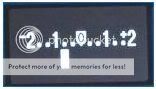
This is your light meter.
It can be found on the back of your cam and in the viewfinder.
So here is your rundown of the steps you shoud take when taking a manual exposure.
Asses your light situation, to set your ISO.
Is it darker indoor lighting...Raise your ISO
Is it bright lighting? Lower your ISO
Use "evaluative metering" for now.
Ok, you assessed your light.
You are shooting a static object.
Now you make a creative choice for your capture. Select your DoF.
If you want shallow DoF, open up your aperture.
You want more depth, more in focus, close it down. Going all the way to f/22 is a little extreme in common situations. F/11 to F/18 is reasonable.
(this is a huge creative choice you make)
Now you need to set the shutter speed.
You need to change the shutter speed to get that white bar to zero. Then click your shutter!
Easy peasy, no?
If you are shooting a moving object, and you want to stop the motion completely...
Asses the light, set the ISO
Set the shutter speed to something around 1/250 (this is dependent on the speed of the object you are shooting, faster speed, faster shutter speed)
Now you change the aperture until the white bar is at zero.
Easy peasy.
Of course there are many combinations and desired effects you can achieve. But whatever you are shooting, you are trying to get the meter to zero, and your shutter speed above your focal length.
So, now you set you aperture to say f/11 but you can't get a good shutter speed to avoid camera shake? Raise your ISO until you can.
Say your aperture is wide open, but you can't get a high enough shutter speed? Raise your ISO.
To avoid camera shake (slightly OOF image) you need to set your shutter speed to AT LEAST the focal length of the lens you are using.
50mm? stay above 1/50 shutter speed.
250mm Stay above 1/250!
400mm Stay above 1/400
Often you cant get what yoou want, and you have to make choices. Raise your ISO and get more noise, or lower your shutter speed and risk OOF camera shake.
So again,
Static subject:
Set your ISO (generally, on location, you do this only once)
Select your DoF (aperture)
find the shutter speed that zeros the light meter.
Moving subject:
Set your ISO
Select your shutter speed (well above your focal length)
find the aperture that zeros the light meter.
Of course it gets more complicated. Zeroing the meter isn't always the best option. But this is exactly what the camera is choosing FOR YOU when in a program mode.
Shooting snow? The camera wants to make it gray instead of white, over expose it, according to the light meter.
Adding flash complicates matters a bit.
Now go take some pictures in complete manual! No flash!



 .
.