What's new

My bokeh is too sharp

Stormin_

TPF Noob!
Joined
Oct 23, 2014
Messages
11
Reaction score
1
Can others edit my Photos
Photos OK to edit
Hi everyone,

I hope bokeh is the right term to use (I've only just stumbled across the word).

Anyway I love shallow depth of field pictures, and as a result I recently got myself a Canon 50mm prime f1.8 for my 650D. I love it.

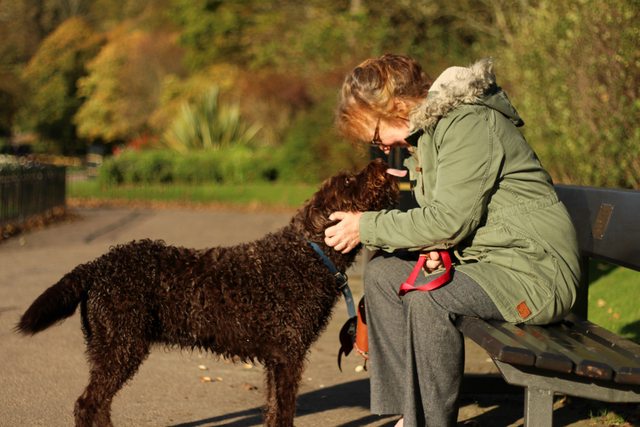
I've noticed however when shooting at large apertures, depending on how close the in-focus subject is, the bokeh polygons seem to generate bright 'edges' which gives a 'squiggly' effect to the OOF background rather than a nice soft extreme blur.

What I mean is depicted in the following image:

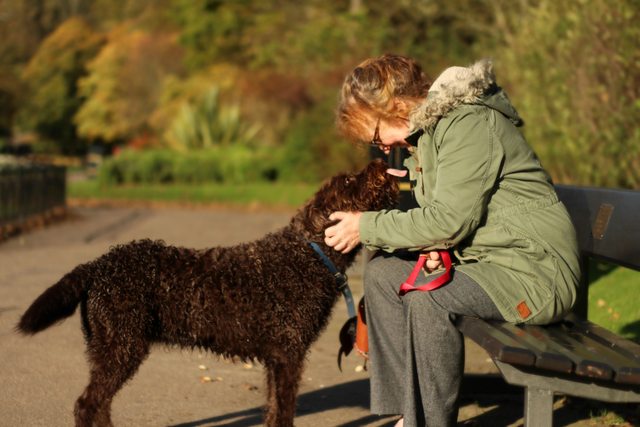
The type of background I am looking for I've managed to crudely imitate in PS:

Is this normal, or is it something I've just never noticed until I went up to f1.8? Biggest aperture I've used in the past is f3.5.
Is there some way to control this effect from the photographing side rather than post-processing?

Thanks in advance
 
Bokeh shape and texture is dependent on a few things. The number of aperture blades, number of elements in the lens and the quality of the glass. For example this is why people who are nutty about bokeh pay $2,000 for a prime lens.

Also there are the non lens elements. Things like the relationship between your distance to the subject, the aperture setting and how close the object you are focusing on is in relation to the camera.

Now I think some of the issue you are seeing is due to the quality of the lens. It is by no means a bad lens but it's also not one of the super expensive ones I was talking about. Secondly if you were doing a headshot of the subject and the Dof was short you get more bokeh.

So try to take some shots at 1.8 with subjects that are as close and they can be while still in minimum focus range. That will give you an idea of the bokeh abilities of your lens.
 
Hi everyone,

I hope bokeh is the right term to use (I've only just stumbled across the word).

Anyway I love shallow depth of field pictures, and as a result I recently got myself a Canon 50mm prime f1.8 for my 650D. I love it.

I've noticed however when shooting at large apertures, depending on how close the in-focus subject is, the bokeh polygons seem to generate bright 'edges' which gives a 'squiggly' effect to the OOF background rather than a nice soft extreme blur.

What I mean is depicted in the following image:


The type of background I am looking for I've managed to crudely imitate in PS:


Is this normal, or is it something I've just never noticed until I went up to f1.8? Biggest aperture I've used in the past is f3.5.
Is there some way to control this effect from the photographing side rather than post-processing?

Thanks in advance


I like to call that kind of Bokeh "nervous" bokeh. It's not smooth, it has rather sharp edges, etc. Something like that is a character of the lens--some produce beautiful creamy bokeh, others produce sharp/nervous bokeh, and others in between. Assuming you have the nifty fifty (the "cheaper" 50mm), it has 5 NON rounded aperture blades. Creamy buttery bokeh is more likely to occur on lenses with ROUNDED aperture blades, and more of them. For example, many higher end lenses have 9 blades with rounded edges, which is a huge help to creating nice bokeh. But those lenses are also excessively expensive. That being said, I've found my 50 1.8G ($220) creates some rather nice bokeh wide open, and somewhat heptagonal shaped bokeh when stopped down (7 rounded blades) and it wasn't that expensive.

Hope that helps!
Jake
 
you love shallow dof so much that your entire frame is pretty much out of focus.

you must shoot with a longer lens to achieve what you're after, or get closer to your subjects and further from any BG.

youre also using a lens that's not known for quality bokeh.
 
Last edited:
I hope bokeh is the right term to use (I've only just stumbled across the word).

I've noticed however when shooting at large apertures, depending on how close the in-focus subject is, the bokeh polygons seem to generate bright 'edges' which gives a 'squiggly' effect to the OOF background rather than a nice soft extreme blur.

Is there some way to control this effect from the photographing side rather than post-processing?

Greetings! The term "bokeh" actually refers to the quality of the blur, not the blur itself.

Therefore, "bokeh polygons" would not be appropriate, because polygons in the blur would mean "not bokeh", if I may generate a new term.

To answer your question; yes, use a longer lens, and one that is known for its smoothness of blur, and keep your subject a good distance from the background, and use wide apertures.
 
The brighter edges result from optical aberrations in that lens.

The bokeh polygons are caused by the lens aperture blades forming a 5 sided aperture that is nowhere close to being round.
Canon's EF 50 mm f.1.8 II is an inexpensive lens that has decent optics but low, low build quality. The low build quality is what causes the lens to deliver about the most harsh, distracting looking bokeh available from a camera maker's lens.
The 5, straight aperture blades also have sharp edges, straight and sharp edged being factors that contribute to the bokeh quality issue.
Curved aperture blades make a closer to round aperture, and rounded aperture blade edges contribute to giving better results and lenses that deliver pleasing bokeh generally have 9 aperture blades.

The lens has some other issues too.
Auto focus is inconsistent in low light using wide apertures.
If dropped, even onto relatively soft surfaces like grass, the lens breaks around it's diameter into to 2 large can't-be-repaired pieces.

DoF is adjustable, bokeh is not adjustable.
Above some of the things that affect depth-of-field (DoF), like point of focus distance and lens aperture setting were mentioned.
And, many new to photography don't know that while related, bokeh and DoF are not the same thing.
If you want to change the bokeh you have to use a lens that has different optics, number and shape of aperture blades, and other internal construction.
 
Last edited:
If you look into a lens you should see the space in the center of the blades and may see the kind of shape you're getting in the backgrounds; with a lens with more blades you'd probably see a more rounded space. I think the bokeh is mostly the quality of how smooth or choppy the background looks (I've been a photographer for years but bokeh is something that's more recently been talked about that I know of, and seems to be made too much of sometimes.)

Eventually you might consider upgrading to a better quality lens, even used could be an option, but before doing that I'd keep working on developing your skills, for example so you don't frame shots with feet cropped off. The color and quality look nice and it seems like you captured a moment nicely.
 
I owned the Canon 50mm f/1.8 EF-II lens for a while. It had what I refer to as "nervous" or "hashy" bokeh, and what some others call "jittery". On some types of subject matter, like the scene in the original post, with a lot of foliage, and very strong, crisp, directional sunlight which helps define objects in a three-dimensional way due to the crisp lighting and shadows, the nervous, hashy, jittery bokeh effect can be very easily seen. Subject matter, distance from camera to focus point, and distance from the focused point to the background, as well as the f/stop used--ALL of those things enter into how a lens renders a particular background. The OP's shot is a prime example of a background and lighting that looks BAD when shot with that lens. But not all scenes are the same!

Heres' a 50mm f/1.8 EF-II lens shot, made at f/10. Notice that on seamless paper, there's no objectionable bokeh hashy-ness!
63461399.Tz6Itvz6._MG_2451_AsShot_1000x.webp


If you were shooting that lens at, say, the beach, where the objects are mostly smooth, large, blocks of single texture things, the nervous, or "jittery" nature of the 50/1.8 EF-II's typical background rendering would not be so noticeable; crisply-lighted, three-dimensional foliage/shrubbery/gardens/arboretums are some of the MOST-demanding places for lenses that have poor bokeh. Flat,low-contrast subjects, and flat, low-contrast lighting, and smooth-surfaced backgrounds will minimize the nervous bokeh. Things like tree branches, stems, stalks, and so on can greatly exaggerate bad bokeh.
 
Depth of field is determined by focal length, aperture and focusing distance
 
I own the Nikon 50mm 1.8G lens. This lens has been touted as one of the best quality "cheap" 50mm lens available today from any manufacturer. As others have stated here the more aperture blades you have, and whether they're rounded or flat makes a huge difference. My Nikon 50mm 1.8 has 7 rounded aperture blades and if used correctly with regards to subject distance as other people mentioned above, can produce a very pleasant "bokeh". However with that said longer focal length lenses (80mm and up) with a fast aperture will give even better results.

Here's a photo taken with my Nikon 50mm 1.8G wide open.
DSC_7733.jpg


Now here's a photo taken with my Nikon 85mm 1.8G lens, (also wide open at 1.8). Notice how much more the background is blurred?
DSC_0349_2.jpg


And just for reference to show how even longer focal lengths can give you even better "bokeh" here's a portrait I took with my 80-200 2.8 lens wide open at 2.8. The background is completely blown out, and indiscernible.
DSC_8627.jpg
 
Save up and buy the relatively cheap 85mm f/1.8.

You'll be incredibly glad you did.
 
A smooth and buttery background (and nice bokeh) is a lot more attainable on an 85mm lens (longer length helps to isolate the subject).

85 1.8G (yes, Nikon, but you get the idea) at f2.5 on a crop sensor body (D7000):
Coming Full Circle by f_one_eight, on Flickr

Again f2.5 with the 85 1.8G on the D7000:
White on White by f_one_eight, on Flickr


And for what it's worth, bokeh is more... attainable on full-frame sensors. To get similar framing as you had with a crop sensor you end up being closer to your subject, and that closeness helps blow out the background.

16mm @f4 on the D800 (there's bokeh because the plane of focus was at the closest it could focus, which is about 2in from the lens' front element):
The Net by f_one_eight, on Flickr

Nikon's cheap 50mm 1.8G at f1.8 on FX:
Mystery Box! by f_one_eight, on Flickr


So, while knowing you have a good lens is important, it's all about how close your subject is and what your f stop is. Shooting with a 50mil from 20 feet away and a f1.8 aperture will not really give you the buttery background you want. You either need to move the subject closer, or get a longer lens. And make sure whatever you get has 7 or 9 ROUNDED aperture blades. That makes a world of difference.

Cheers!
Jake
 
Thanks for all the advice so far, you are all brilliant. I have much more understanding of this now (if you saw my welcome post you'll see I'm sort of new to 'proper' photography).

Just to clarify a couple things quickly...

- the lens I have is indeed the inexpensive 'nifty fifty', about £70-£80

- I'm fine with the shape of the bokeh and the amount of blur, it was just the bright white edges I wasn't happy with. They are most noticeable on the bushes on the right hand side of the first picture.

- the photo was a really quick reactionary shot as I turned round (that dog was hyperactive) so naturally not the most perfectly framed or focused I know, but the moment is there at least :) now that the cropped feet have been mentioned, it really jumps out at me so I'll keep that in mind


Thanks for all the examples; they were very helpful in illustrating the differences. As an aside... D-B-J that picture 'The Net' is amazing.

Also I can indeed get a non-harsh background being closer to the subject as you say, seen here:


To intercept before it gets commented on :) the sun glare was intentional, the tilted frame was not (back pressed up against a strangers car o_O). Do you think the image would have been better if it was horizontal? I may try straightening it to see what it looks like.


Anyway I will look in to investing in a lens with more appropriate aperture blades for the effect I'm after. Rounded and more blades. Until then I'll have to use Photoshop to edit any image I think it has detriment to.


Thank you everyone :)
 
- I'm fine with the shape of the bokeh and the amount of blur, it was just the bright white edges I wasn't happy with. They are most noticeable on the bushes on the right hand side of the first picture.
for those edges (if I understood well what you mean), which can be seen also in your bike picture, the likely responsible is the optical scheme that has been designed for slightly over-correcting spherical aberrations. No matter how many blades you have.
More expensive lenses may have more refined optical schemes that give a smoother appearance to out of focus areas.
Here (among other places) you can find an explanation: On Bokeh
 

Create an account or login to comment

You must be a member in order to leave a comment

Create account

Create an account on our community. It's easy!

Log in

Already have an account? Log in here.

Back
Top Bottom