Snakeguy101
TPF Noob!
- Joined
- Dec 5, 2010
- Messages
- 717
- Reaction score
- 63
- Location
- Gainesville
- Can others edit my Photos
- Photos OK to edit
I took these photos a few months ago while in the Grand canyon but just got around to trying to stitch them together. This is my first attempt at making a panorama in photoshop and it is one of the only panoramas that I have attempted. The camera was handheld so the horizon is not quite level but I could not figure out how to fix it, any ideas? Also which version do you prefer- Color or black and white?
Thanks
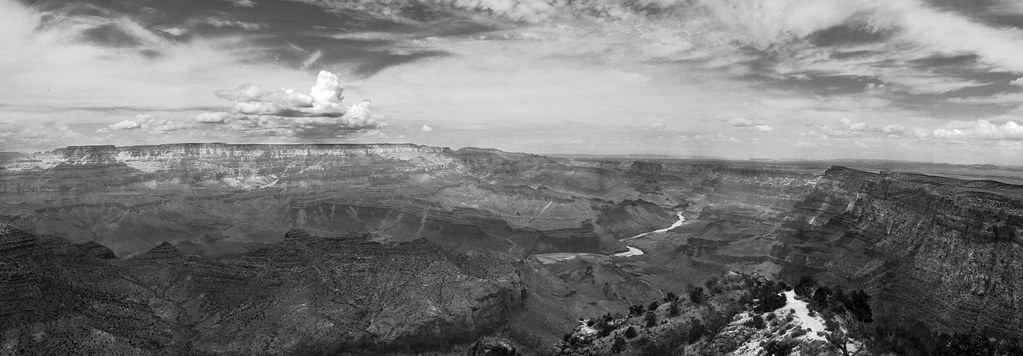
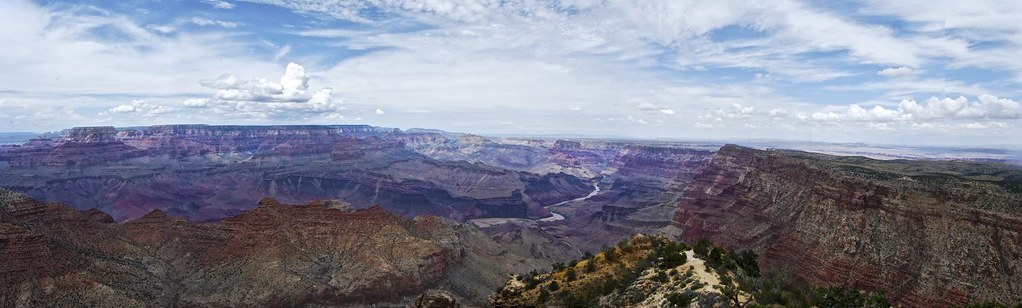
Thanks


![[No title]](/data/xfmg/thumbnail/32/32947-11daccca0ca979c310e3963ceb9d01d8.jpg?1734162797)

![[No title]](/data/xfmg/thumbnail/31/31014-6b1a572624824b852f5adaf3594767af.jpg?1734159093)
![[No title]](/data/xfmg/thumbnail/31/31018-a537939c7ad9fc1126461101c651a8a0.jpg?1734159105)