What's new

My niece...C&C please

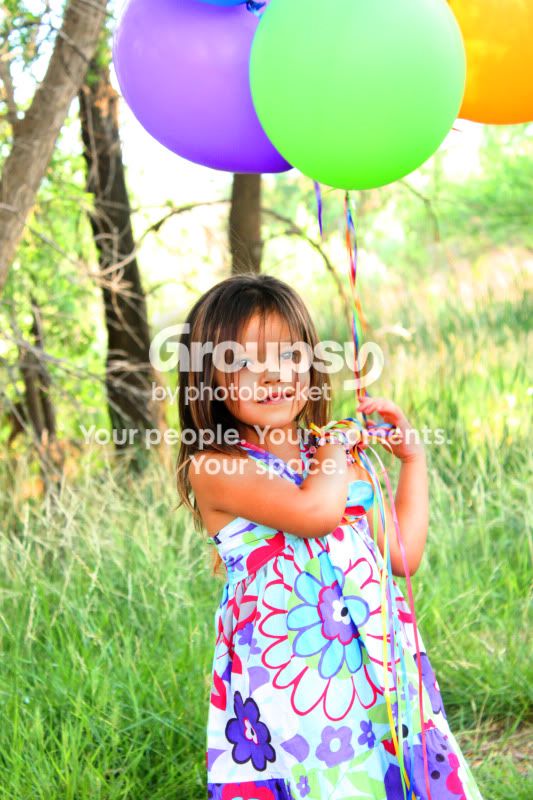
Her hair is super cute, little rocker. :) Cute girl, first batch of photos is adorable...snapshot-ish..but cute! Number 2 in the first set is a winner.

Thanks! She is definitely a little rocker lol and I LOVE IT!
 
Here are some from today
I still feel like these are soft pictures... I'm really not sure how to change this... they were the sharpest out of the group and I was switching between manual and AP...suggestions?

You just gotta play with the settings and figure out which is best for your camera, lens, and lighting condition. I may be talking out of my a*s here but some lenses can be slow in focusing which make the more difficult to take pictures of moving objects. You need to watch that focus light and give it a second to focus correctly. Also watch your focus area.

yea I played awhile... I think it was harder tho since she's a kid and wanted to move and play... I'll have to get an adult to practice on
 
Here are some from today
1
bellaboo191copy.jpg

2
bellaboo204copy.jpg

3
bellaboo209copy.jpg


I still feel like these are soft pictures... I'm really not sure how to change this... they were the sharpest out of the group and I was switching between manual and AP...suggestions?

I think your new set is better :) But am I the only one seeing a high saturation and an extreme orange color to her skin to all of her pics?
 
[/QUOTE]I think your new set is better :) But am I the only one seeing a high saturation and an extreme orange color to her skin to all of her pics?[/QUOTE]

I did saturate them because I really wanted the colors to pop... I guess I went a little overboard???? lol
 
I think your new set is better :) But am I the only one seeing a high saturation and an extreme orange color to her skin to all of her pics?
Definitely not the only one seeing orange!
 
What is your sharpening routine? Just about every digital image needs sharpened, and generally, the required sharpening is different based on what you want to do with them. For instance, you would sharpen more for print than you would for sharing on the web. Also, depending on how you are resizing your photos, you may need to resharpen after they have been resized since you are throwing away data during the image resizing process.

Basically, each image needs to be sharpened and sharpened differently based on the subject, what you are going to do with it, and how large the image is. I'm not saying that is going to fix your focus issues, but it should at least let you know what is a focus issue and what is a sharpening issue.

 
I think your new set is better :) But am I the only one seeing a high saturation and an extreme orange color to her skin to all of her pics?[/QUOTE]

I did saturate them because I really wanted the colors to pop... I guess I went a little overboard???? lol[/QUOTE]

haha...yes. Instead of doing it to the whole picture, maybe just do it selectively? Maybe just to the balloons and her dress if you want the colors to pop. But be careful though not to go overboard because when colors start becoming neonish or cartoonish I think you should stop... even before that. Also even the slightest amount of over saturation on skin is not a good look.
 
What is your sharpening routine? Just about every digital image needs sharpened, and generally, the required sharpening is different based on what you want to do with them. For instance, you would sharpen more for print than you would for sharing on the web. Also, depending on how you are resizing your photos, you may need to resharpen after they have been resized since you are throwing away data during the image resizing process.

Basically, each image needs to be sharpened and sharpened differently based on the subject, what you are going to do with it, and how large the image is. I'm not saying that is going to fix your focus issues, but it should at least let you know what is a focus issue and what is a sharpening issue.

I honestly don't really have a rountine. To be honest when I try and sharpen them I feel like they get really grainy I guess since I don't know much about it... Is there a place that I can start where I won't get this problem? Say for a picture like these?
 
Sabrina I'll try that. I have never done it without the whole picture being applied to the process so I will experiment with that! Thanks!
 
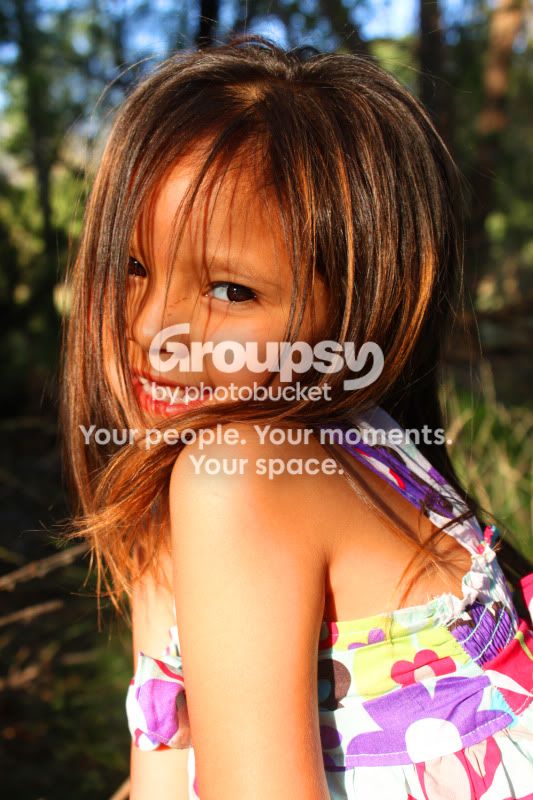
Hi amandalee. Thanks for that compliment at the Light & Dark theme. I was going through your posts and found that your second set here are the most recent photos that you've posted. Of the second group of photos, number 3 is quite sharp. All three of the second batch are better because your lighting isn't as flat as in the first set. All three in the second set have catchlights in the eyes. And of course, kids are the most difficult of all portrait subjects!

When it comes to portraits, folks who make their living at it focus on the eyes. Your kit lens is actually quite a good lens. There really isn't any need to spend more at this time. It will take you quite a ways before you need to upgrade. It also has image stabilization, making it easier to achieve hand held, sharp shots.

Lighting is the key. #1 of your second set, has some great back light. Your composition is superb, her pose is excellent. You've either used fill flash or a reflector to get those catchlights and diminish the shadow from having the sun behind her. Superb job. When you focus, get the lens's focus point on her eyes, then keeping the shutter button halfway depressed, recompose the shot, and depress the button all the way to take the shot.

#3 of the second set is the best of all. You've really filled the frame with your subject. Spot on focus on her eyes. She has a really pleasing gamin-like expression and posture. The background is blurred perfectly to emphasize your subject.

Don't worry too much about saturation or color balance at this stage. Keep studying that exposure book, and remember to focus on eyes for portraits. And keep getting those catchlights!


__________
Cheers,
John
 
I had another thought regarding focus and sharpness.

I've come across some folks who haven't been introduced to how to properly hold their camera and press the shutter. I see you're in Texas. Please ignore this if you're experienced with firearms. Shooting with a camera and a firearm have many common points. If you shoot a gun well, you already know what I'm about to say.

Stable stance. Feet apart. Knees unlocked.

Left hand grips under the lens barrel with the heel of the hand up against the camera body.

Elbows in to grip your torso.

Pull the camera into your head a little, just like you'd pull a rifle into your shoulder. LOL, after shooting an entire soccer match, I'll have a slight indentation in my forehead from the camera.

Use your lens's center focus point, it's the most accurate when shooting hand held.

Keeping the shutter button halfway depressed to lock in that focus and exposure, recompose and then depress the button fully to shoot.

And just like with firearms, breath control is important. For increased steadiness, you should be gently exhaling during the focusing and when fully depressing the shutter button.


___________
My apologies if the above is old news!

John
 
In the first set I like the last one the best. As others said, some are a bit soft. Put your focus on the eyes and close down the aperture a bit perhaps?

I love all three photos in your second set. Sassy and adorable at the same time!
 
I agree with most of what everyone else has said. The seconds set is better than the first set, I felt the first set were a little flat. I also didn't like the feet cropped out of the first one in the first set. I think the over all thing is get the color fixed, they seem a little too orangey (I don't think that's a word). But I think the more you shoot the better you'll get.

And take my advice with a grain of salt. I've only been shooting for about 4 months myself.
 
Can you post your settings for each photo?

They are all very out of focus. Not sure why they are all that way and I'm wondering if it could be your settings.
 

Create an account or login to comment

You must be a member in order to leave a comment

Create account

Create an account on our community. It's easy!

Log in

Already have an account? Log in here.

New Topics

Back
Top Bottom