What's new

Need help, new to stars

BlkdOutGsxr

TPF Noob!
Joined
Apr 3, 2013
Messages
33
Reaction score
1
Location
Cedar Rapids, IA
Can others edit my Photos
Photos OK to edit
Hello all,
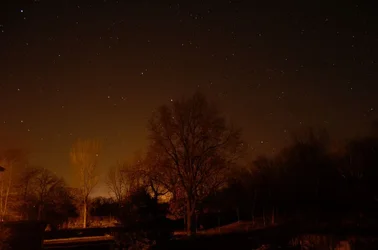
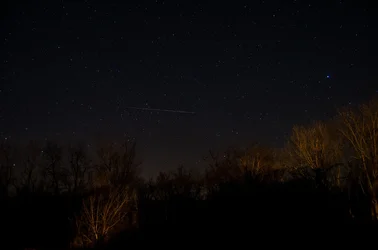
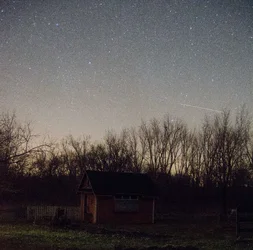
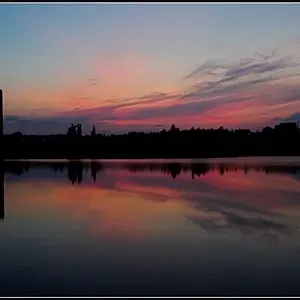
I finally got out with the new camera and decided to shoot some pictures of the stars. Here is a picture, I'd like you to tell me what it is I could do to get better photos, I know there is a lot :/

These were both shot at ISO800 F/3.5 @ 30 sec with a tripod and remote, If I remember correctly.
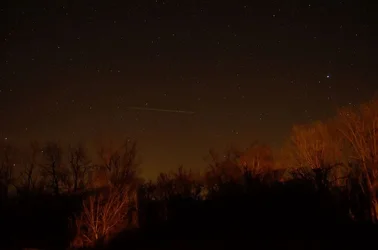
$DSC_0065 (2) (1024x678).webp

$DSC_0068 (1024x678).webp
 
Last edited:
Do you shoot in raw? If not, do so, the detail you can pull out of a raw file is incredible. The other thing I would change is the white balance, you can adjust it in the camera or if you shoot in raw, adjust it afterwards.

You captured a lot of stars though!
 
Skyglow is your enemy when you're shooting stars. Skyglow comes from reflection of ground lights from clouds, mist, fog, or dust in the air. Ideally, you'd want to be in an area where there is minimal light around you (and "around you" in this context could be 50 miles). Atmospheric conditions also play a role, with clarity of the atmosphere varying quite widely from clear night to clear night. Still another source of light is moon-glow, so the best deep sky shots are taken around the time of the new moon. In your images, there is also quite a bit of light reflected off the foreground, which may not be apparent when you're outside, but will accumulate when you use a long exposure.

Edit: This site may help you locate dark places "near" you. (http://www.jshine.net/astronomy/dark_sky/) Where I live, there's a 2-hour drive to get to a dark sky location. Also, as "theraven" noted, shooting in RAW allows you to pull a lot more information of of the image compared to shooting in JPG.
 
Last edited:
I did shoot in RAW, I have not processed the images yet though, just purchased Lightroom 4 with my student discount (Yay! :Fistpump: ) The images have nothing done to them other then compression for view on the forum, I'll try messing with the levels and white balance once I get LR installed. I hate the look of over processed images so I try to do as little of it as possible, though it looks like I should maybe just get better at it if I want to do night photography. I was pleasantly surprised with the images so far, it being my first time shooting the stars. I can't wait to get better and be able to take some images like others I have seen on the site! Thanks everyone for the input, I'll upload by post process images later today!

Edit: Oh and the light in the foreground was from the one streetlight that was in the area, I didn't figure out we could shut it off until I was leaving the site LoL, the place I shot from was in a low light pollution area, but it appears I was pulling it from towns pretty far away. Rural Iowa does have some benefits, there are lots of locations to choose from LoL.

Thanks again,
Thomas
 
Last edited:
Check out this article, it has lots of good information for you: http://www.thephotoforum.com/forum/articles-interest/276016-shooting-night-pictures-stars-stuff.html

Not familiar with the D5100, but I would think you could get away with increasing the ISO higher than 800 without creating too much noise. At a 30second exposure I can see that the stars are starting to run. I usually go for 13-20 seconds depending on my focal length.

Also, not sure if this is an option but if your camera has "Long Exposure Noise Reduction" in the options it is probably worth turning on. It will take a longer to take a picture because it will take two exposures, one with the shutter open and one with it closed and it subtracts the noise in the second image from the first.
 
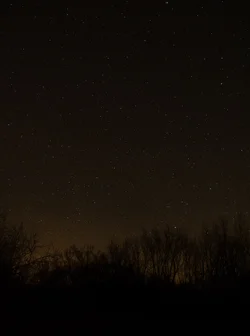
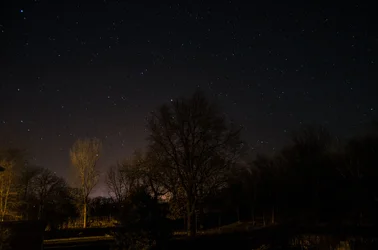
PostProcessing, I'm terrible at it but I thought I would share!
1
$DSC_0065.webp
2
$DSC_0083.webp
3
$DSC_0068.webp
4
$DSC_0080.webp
 
Last edited:
Create an account or login to comment

You must be a member in order to leave a comment

Create account

Create an account on our community. It's easy!

Log in

Already have an account? Log in here.

Back
Top Bottom