What's new

Need help with "ghost" lights

nlockerman

TPF Noob!
Joined
Jan 3, 2012
Messages
2
Reaction score
0
Can others edit my Photos
Photos NOT OK to edit
Hey

I'm using a Nikon D90 and recently put a Quantaray UV filter on my lens to take xmas pics.

See the attached image, which is straight from the camera - no photoshop-ing done.


I found that with the filters on, they pull the lights on the tree from behind us through a person, almost ghostlike.
If I took the filter off and the problem went away.

I was using the aperature priority and the camera was on a tripod for both pics.

Anyone ever experience this? Any ideas what is causing this?<br>

DSC_0936.JPG
 
Yes, many people have experienced this type of problem. Lower-quality filters--and even very GOOD-quality filters, can cause ghosting when shot toward bright light sources. When much of the image field is dark, these types of ghost images or flares are VERY noticeable. Even without a filter in front of the lens, many lenses will show ghosting or flares when shot directly toward multiple lights, such as Christmas time, or on birthday cake photos,and so on. When shooting right at bright light sources, removing any filters that are not 100 percent essential is considered standard operating procedure for experienced photographers.
 
Your lens is a lot tougher than you think; under almost all normal circumstances, a UV filter is only going to hurt the image. Unless you're shooting on the beach or some other place where your lens could be physically damaged, the UV filter is pretty much useless.
 
Hey

I'm using a Nikon D90 and recently put a Quantaray UV filter on my lens to take xmas pics.
What did you hope to accomplish by adding the filter to the lens?

As mentioned, the air gap and 2 added glasss surfaces allowed reflections of the bright points of light in the air gap, and the image sensor dutifully recorded the reflections. If you look closely, you can figure out which bright light made which greenish spot of reflection.

 
Last edited by a moderator:
Wow you all were not kidding when you said these lenses were durable. That's impressive! Im sure it was scratched due to all that but for the glass to hold sure says something.
 
That's the 50mm. It's much more compact and allows for heavier blows. Not all lenses are as dense. Try that with some with a larger surface area like an 18-105mm lens and I guarantee you will crack the glass. All that video shows is that the lens didn't crack. I'd like to see an image taken with that lens now.
 
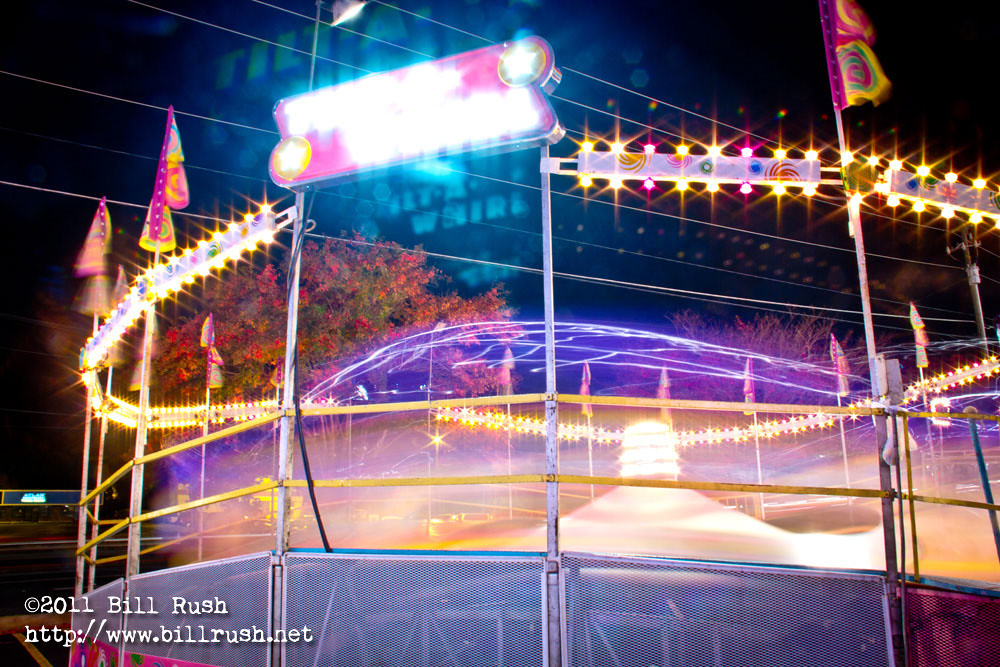
I've had that same thing happen to me, here's my best example of why I removed the UV filter. I never would've guessed until someone here pointed it out for me. Live & learn. :)


IMG_7404 by Bill Rush, on Flickr

Although, if you ask me it gives kind of a cool effect in the case of some photos. Not so much the laser pointer look you ended up with though...
 
Any ideas what is causing this?
Seriously? You haven't figured it out? You put the filter on, they show up. You take it off, they go away. Seems pretty clear to me what is causing it...

At least you thought to try taking the filter off - a lot of people don't.
 
Had the lens in the above video been a NIKON, the hammer would've shattered
bigthumb.gif
 

Create an account or login to comment

You must be a member in order to leave a comment

Create account

Create an account on our community. It's easy!

Log in

Already have an account? Log in here.

New Topics

Back
Top Bottom