What's new

Need help with taking people pictures, please.

uberwrx

TPF Noob!
Joined
Aug 17, 2012
Messages
16
Reaction score
0
Can others edit my Photos
Photos OK to edit
Hi. I recently purchased a Lumix GF1 w/ 20mm f/1.7 lens. This is my first time using a camera with manual controls and I have a lot to learn. I snapped a few indoor pics of my wife, and they turned out too dark. This was during daylight hours and I did not use flash. I used aperture-priority mode, and I believe ISO was 100.

Can someone give me advice on the best settings? Suppose I take a few pics in the evening with lamps on, and I'm about 6-10 feet away from my subject. Please let me know what adjustments I should make to the following settings:

- Aperture: 1.7 to 2.0?
- ISO: 400 or maybe 800 to compensate for weak indoor lighting?
- Shutter speed: 100th second?
- White balance: Tungsten?

I really want to be able to take people pictures like the ones on this web site: Panasonic Lumix GF1 Field Test — 16 Days in the Himalayas

Thanks for the advice. :thumbup:
 
You need more light.
You need to either get it by way of ISO or Shutter speed.
THIS will help you to get started on understanding on exposure and what each element does. Start on the first tutorial and just keep going from there.

In the evening with the lights on? At 1.7 you are probably going to be at ISO 2000 and a shutter speed of about 1/125
 
You can put it in P (program).. until you learn how to do otherwise. I would actually recommend using A (aperture priority).. but you need to learn the display, how to meter, when to use flash, etc.....

Don't be afraid to use the flash.... down the road, you can get a better flash, but for now use the built in if needed. LEARN THE METER! Definitely read the manual, watch any videos you can find, etc...
 
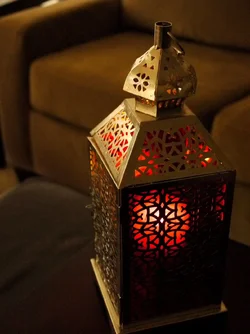
Thanks to both of you. Today I took a bunch of pictures of an object using Manual mode, and a couple turned out okay. I took the metering advice into account. Basically, I set aperture to what I wanted (usually 2.0), and then kept adjusting ISO and shutter speed until the meter was right around zero. In some cases, the settings were such that the camera shake symbol popped up, so some photos did have blurry edges. I guess a tripod would've helped in these cases, but for now I'm just learning. Am I kind of on the right track?

Attached is a photo I was relatively happy with, except that the left side of the candle holder is fuzzy. I wonder if a higher f-stop setting would have helped.

$P1010696.webp
 
That was a perfect exercise!!! You learned that you can't let your shutter speed be too low or you get blur! Keep going and you will learn lots more things too!
 
I will bump my iso up as high as it will go sometimes and I'm really amazed at how nice the image is even with some grain.
 
Yep the panasonic GF1 with the 20mm f1.7 is a good setup. Tho not the best Iso performer good up to about 200 and usable at 400 iso. Above that and noise will start to be noticeable. Some NR can be minimized in post.

CameraPanasonic DMC-G1
Exposure0.04 sec (1/25)
Aperturef/1.7
Focal Length20 mm
ISO Speed160


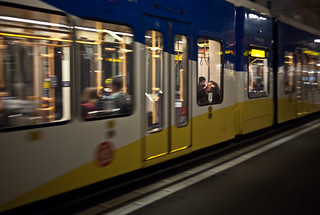
Heading Home,Kick Back for some Tunes by Orbmiser, on Flickr

CameraPanasonic DMC-G1
Exposure0.04 sec (1/25)
Aperturef/1.7
Focal Length20 mm
ISO Speed160

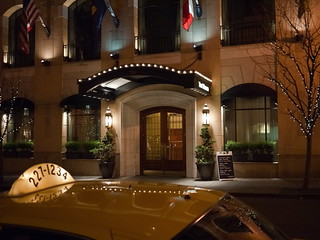
Hotel Night by Orbmiser, on Flickr

As you can see takes some practice and good holding & breathing technique to start getting sharp images handheld in lower light situations. As in example images I had to sacrificed shutter speed as wanted to keep the iso around 200 and was already at f1.7. So sometimes it's a balancing act with varying degrees of success based on familiarity with your camera & lens limitations and your practiced technique.

Tho only had the setup a short time. As wasn't performing at higher iso lower light situations to my satisfaction. Add monopod,tripod or flash will up the keeper rate and minimize noise. Critical to learn how the exposure triangle works Shutter/Aperture/Iso and nailing exposure to minimize noise.

Keep up the practice and learning!
.
 
The candle holder is a great way to practice! Just be sure to not set your ISO too high up, or grain will become a problem. I try to avoid anything over 400, but if it comes down to it, I can get away with 800.
 
You must use auto setting of flash .This will help you in getting perfect pictures through this if your camera lens sense darkness in surrounding area then it auto generate flash while clicking pictures
Perfect pictures, and auto popup flash.. really shouldn't be together in the same sentence. EVR
 
Hi All,

I'm back for more help on the same topic. We went out to the city yesterday and I snapped a bunch of shots of my wife. Some turned out nicely with a perfectly blurred background, while on others, the face was just too dark while the background was nicely lit. It was a nice sunny day. The photos were taken around 11 AM to 4 PM. Unfortunately I didn't pay enough attention to where she was situated in relation to the position of the sun overhead.

I used P mode, with a white balance setting of "sun". I mainly kept ISO low since it was sunny out (like 125), but I did jump it up to 800 and the face still turned out dark. The camera is set to multi-metering. Further, I tried using the flash, but it didn't help. In one photo, it just caused unflattering shininess on her face.

Any other ideas? I wish I could somehow increase exposure on just her face while keeping exposure levels the same for the background. I was able to improve some photos using Google Picasa (fill light), but I'd prefer to just get it right the first time.

Thanks once again for the advice. :)
 
uberwrx said:
Hi All,

I'm back for more help on the same topic. We went out to the city yesterday and I snapped a bunch of shots of my wife. Some turned out nicely with a perfectly blurred background, while on others, the face was just too dark while the background was nicely lit. It was a nice sunny day. The photos were taken around 11 AM to 4 PM. Unfortunately I didn't pay enough attention to where she was situated in relation to the position of the sun overhead.

I used P mode, with a white balance setting of "sun". I mainly kept ISO low since it was sunny out (like 125), but I did jump it up to 800 and the face still turned out dark. The camera is set to multi-metering. Further, I tried using the flash, but it didn't help. In one photo, it just caused unflattering shininess on her face.

Any other ideas? I wish I could somehow increase exposure on just her face while keeping exposure levels the same for the background. I was able to improve some photos using Google Picasa (fill light), but I'd prefer to just get it right the first time.

Thanks once again for the advice. :)

Have you read up on how your camera meters (reads the light) and the different metering modes. With the face dark/background light pictures you could've metered off the persons face to get a good exposure on the face and let the background do what it will. In P mode you'd probably just want to add some + exposure compensation. But, the background might blow out completely (all white). Flash would be the only other way to get both the subject and background perfectly exposed.
 
With [what I assume to be] relatively direct, overhead sun, it's going to be very difficult to 'get it right the first time' with your current equipment. Your camera's meter was being "fooled" by the bright light and not giving enough weight to the subject. If you have the option, spot-metering the face would have helped, however it would have caused the background to blow out.

You were on the right track using the flash, but a pop-up flash lacks the power to overcome bright sun, and when undiffused results in uflattering specular highlights.

If I have to shoot with overhead sun, I'll use at least one, and often two diffused strobes or speedlights to fill in.

Your best bet will be to look for open shade and/or pay close attention to the subject's orientation to the sun. While more/better equipment isn't a sure way to better images, this is one case where a more capable camera and equipment could have helped. Learning to work within the confines of your gear can be a good learning tool!
 
In my humble opinion. For indoor shots, you need a fast lens if flash is not possible. Although a slow shutter speed do allows more lights, most times this is not ideal unless the subject is still. Pump up your ISO, your photo will be grainy. So that is why fast lens are expensive. The cheapest way is to use flash and a defuser.
 
Share several of your people pictures in this forum or in Flickr. That way photographers can look at them and advice something more then just setting up settings.
Looking at your works will be the best way to give some advice
Take care!:)
 
You are on the right track. I agree that if you post more images you will get better feedback. I want to comment about the candle holder photo you posted. You mentioned the left side was blurry. You were shooting at 2.0 aperture if I remember correctly and that is a very shallow depth of field. That could be what you are seeing...the left of the candle holder was angled and therefore further away from the camera.

Shooting outdoors in the sunlight without a flash works great only if you don't care about having the background being over exposed. If you are trying to capture both the background and a person in the foreground and have them both exposed properly a flash or a reflector are the only way to go. A reflector is tough on a sunny day unless you are in the open shade. Then it works beautifully.

For what it's worth...
 

Create an account or login to comment

You must be a member in order to leave a comment

Create account

Create an account on our community. It's easy!

Log in

Already have an account? Log in here.

New Topics

Back
Top Bottom