What's new

New to photography and working with color in my photos in photoshop

cheriserandle

TPF Noob!
Joined
Sep 9, 2011
Messages
12
Reaction score
1
Location
Marietta, Georgia, United States
Can others edit my Photos
Photos OK to edit
Hi,

I'm new to photography and new to working with color in my photos in photoshop. I got my first camera just this past Tuesday. I never thought i would like photography but have so far enjoyed it.

But I'm trying to make my photos more interesting. I'm trying to find the best subjects, lighting, and color balances in photoshop. Here are the photos i have taken so far.
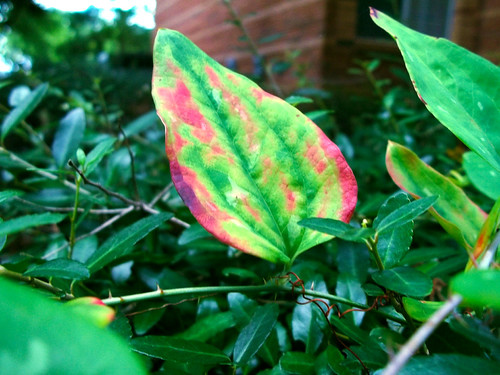

Leaf Changing Colors by Genius Central Ink, on Flickr
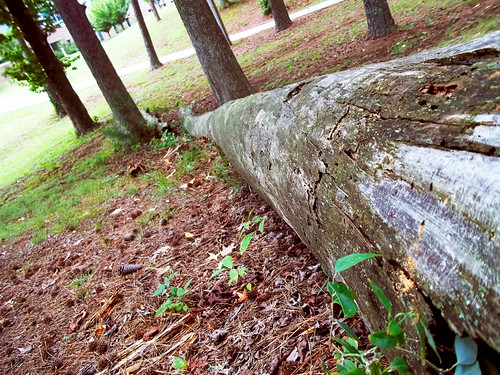

Tree Bark by Genius Central Ink, on Flickr
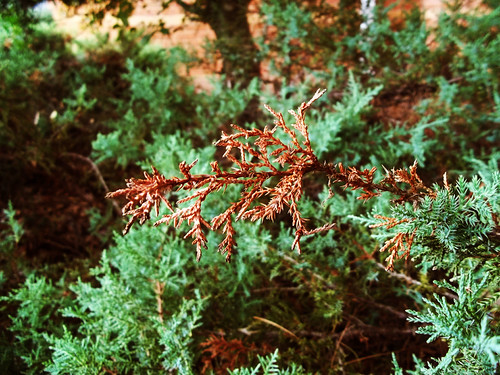

Red Leave Contrast 3 by Genius Central Ink, on Flickr
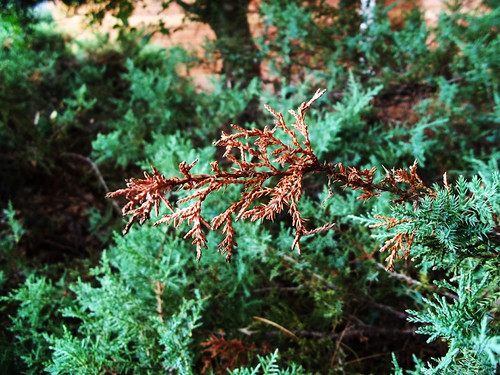

Red Leave Contrast 2 by Genius Central Ink, on Flickr


Otherwise just go here for my photos: Flickr: Genius Central Ink's Photostream
 
Last edited:
cheriserandle said:
Hi,

I'm new to photography and new to working with color in my photos in photoshop. I got my first camera just this past Tuesday. I never thought i would like photography but have so far enjoyed it.

But I'm trying to make my photos more interesting. I'm trying to find the best subjects, lighting, and color balances in photoshop. Here are the photos i have taken so far.

<a href="http://www.flickr.com/photos/cheriserandle/6131294020/" title="Leaf Changing Colors by Genius Central Ink, on Flickr"><img src="http://farm7.static.flickr.com/6066/6131294020_396d67a800.jpg" width="500" height="375" alt="Leaf Changing Colors"></a>

<a href="http://www.flickr.com/photos/cheriserandle/6131268220/" title="Tree Bark by Genius Central Ink, on Flickr"><img src="http://farm7.static.flickr.com/6065/6131268220_82b42db0eb.jpg" width="500" height="375" alt="Tree Bark"></a>

<a href="http://www.flickr.com/photos/cheriserandle/6131148424/" title="Red Leave Contrast 3 by Genius Central Ink, on Flickr"><img src="http://farm7.static.flickr.com/6064/6131148424_6f9cfa40cc.jpg" width="500" height="375" alt="Red Leave Contrast 3"></a>

<a href="http://www.flickr.com/photos/cheriserandle/6131148268/" title="Red Leave Contrast 2 by Genius Central Ink, on Flickr"><img src="http://farm7.static.flickr.com/6063/6131148268_5aa5ae2ec9.jpg" width="500" height="375" alt="Red Leave Contrast 2"></a>

By the way, I'm not sure why the files above are not working. I read the page about posting photos. So please someone tell me what i'm doing wrong.

Otherwise just go here for my photos: Flickr: Genius Central Ink's Photostream

Personally I'd leave Photoshop alone and learn how to get great images straight out of the camera. You've had your camera less than a week - not enough time to learn your camera let alone Photoshop too. None of the pictures are that interesting. The only colors I saw were green an brown.

Read up on composition, exposure, etc. Read through old threads on here. And keep shooting!

Also, when you do post on here - 1 or 2 images is enough. More than that and you will get inconsistent critique.
 
What tips do you suggest (or specific books, videos, or threads)? by the way, I only have a Kodak C183 right now and it's all i can afford. But i want to learn as much as i can about all sorts of photography, especially the basics.
 
"The photographers eye" is good book for composition, as well as "learning to see creatively". :thumbup:


Google "rule of thirds" and elements of design and composition.
 
A bit too much colour saturation. Dont worry we have all been there... well I have anyway. I got carried away with some crazy colours to begin with and im still a beginner so you can take what I say with a pinch of salt, but its very easy to get carried away with all the editing available. Just try and remember what you want your image to look like and try and achieve that with your photagraphy skills as much as possible and editing should just be a tweak :) There are loads of things online you can look at for free. Type in exposure triangle in google, look on youtube and the book everyone recommends is understanding exposure by brian peterson but I found the collins complete photography course more easy to understand as im dyslexic I hope that helps you :)
 
Hayley, I don't mean to counter you and your wine, but since cherise has a point and shoot with unknown controls, I think that it would be much more beneficial to study the art side of photography an learn about what makes a photo interesting, before she digs into stuff she may have no control over.
 
Hayley, I don't mean to counter you and your wine, but since cherise has a point and shoot with unknown controls, I think that it would be much more beneficial to study the art side of photography an learn about what makes a photo interesting, before she digs into stuff she may have no control over.

Absoluetly she should understand the creative side to photography, thats what im all about, I studied art and design, sorry i was only trying to help... and ive not had that much wine! it was a joke :)
 
Hayley, I don't mean to counter you and your wine, but since cherise has a point and shoot with unknown controls, I think that it would be much more beneficial to study the art side of photography an learn about what makes a photo interesting, before she digs into stuff she may have no control over.

Absoluetly she should understand the creative side to photography, thats what im all about, I studied art and design, sorry i was only trying to help... and ive not had that much wine! it was a joke :)

the wine was a joke from another post by the way and nothing about you cherise!
 
Learning to see creatively by Bryan Peterson is a helpful book as well. Also, search Flickr and see what images you like and why you like them. Read the threads on this forum
 

Create an account or login to comment

You must be a member in order to leave a comment

Create account

Create an account on our community. It's easy!

Log in

Already have an account? Log in here.

Back
Top Bottom