What's new

Ok my turn for critique on people photo's

rokvi

TPF Noob!
Joined
Nov 30, 2011
Messages
629
Reaction score
97
Location
Queensland
Can others edit my Photos
Photos OK to edit
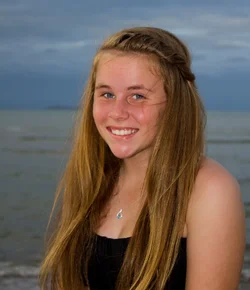
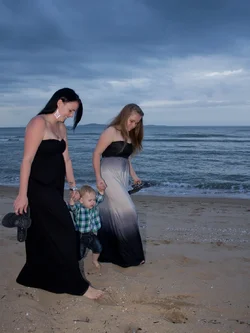
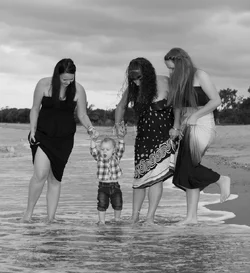
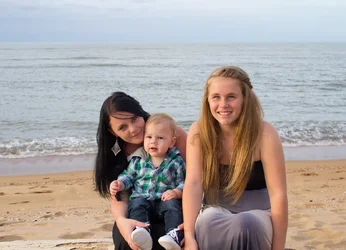
I did a shoot for free for a friend,asked nothing in return but got a bottle of bourbon for my troubles. (which was no trouble as they were my guinea pigs). :) So let me know what I did wrong and where I could do better etc.


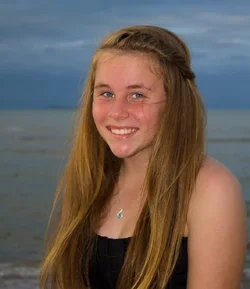
#1 $new-8311.webp
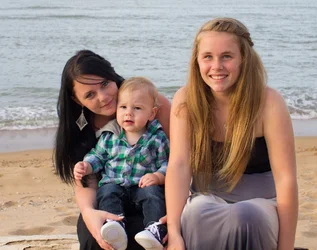
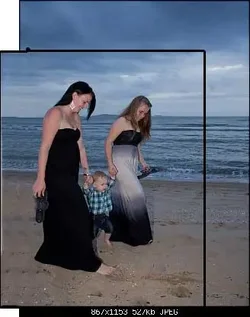
#2 $new-8344.webp

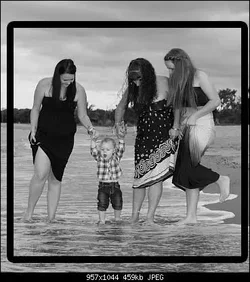
#3 $new-8547.webp

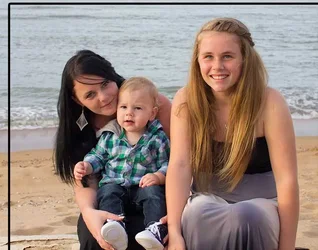
#4 $new-8386.webp

Also thanks to those that helped me earlier, to get them up here.
 
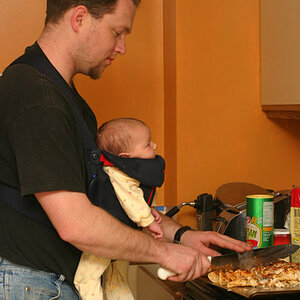
Viewing on my iPhone and I must say most people are going to nail you on the awkward limb cutting off. In the first one the girl on the right has her hands cut off.

#3 her hand holdin the flip flops are cut off which isn't too pleasin but it can be overlooked.

#4 elbow is cut off 1/4 of the girl on the left is cut off.

Just helpful tips from a rookie most people don't like limbs cut off. Not every photo has to be guidelined but I think these detract from your photos.
 
Hi! From my laptop screen, 3 and 4 are definitely not cut off! Love the composition, especially in number 3.

Number 1 I agree, cutting the hand and part of the baby's shoes was not the framing I would have aimed for.

Number 2 looks like it has been aggressively de-noised, which is impossible at ISO 200 (unless you pushed +3 EVs during development), maybe you did heavy skin smoothing?

Lovely shots, especially number 3!
 
these all seem to be odd sizes for no obvious reason.
that attracts the viewer to the shape (and away from the image) and makes it more expensive to mat, print and frame.

In #1 and #3 the subjects are not placed in the frame well.
 
Last edited:
Hi! From my laptop screen, 3 and 4 are definitely not cut off! Love the composition, especially in number 3.

Number 1 I agree, cutting the hand and part of the baby's shoes was not the framing I would have aimed for.

Number 2 looks like it has been aggressively de-noised, which is impossible at ISO 200 (unless you pushed +3 EVs during development), maybe you did heavy skin smoothing?

Lovely shots, especially number 3!


#1, Yea I know Im spewing about that, no excuses but that was probably the only time the little boy was looking anywhere in the vicinity of the camera lol.

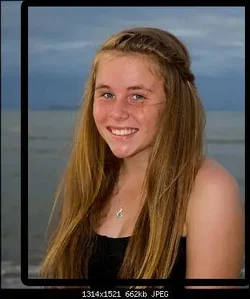
#2 It has been De-noised She had a few, actually a lot of pimples on her forehead. Im wondering if there is a better way in lightroom to fix that, or do I need PS?
 
these all seem to be odd sizes for no obvious reason.
that attracts the viewer to the shape (and away from the image) and makes it more expensive to mat, print and frame.

In #1 and #3 the subjects are not placed the the frame well.

Odd sizes, point taken. I will take remember that.

Where would you place a power point to better frame?
 
Viewing on my iPhone and I must say most people are going to nail you on the awkward limb cutting off. In the first one the girl on the right has her hands cut off.

#3 her hand holdin the flip flops are cut off which isn't too pleasin but it can be overlooked.

#4 elbow is cut off 1/4 of the girl on the left is cut off.

Just helpful tips from a rookie most people don't like limbs cut off. Not every photo has to be guidelined but I think these detract from your photos.

Thanks for looking, it must not have come out right on your phone. #1 the hands and feet are cut. however the rest aren't.
 
these all seem to be odd sizes for no obvious reason.
that attracts the viewer to the shape (and away from the image) and makes it more expensive to mat, print and frame.

In #1 and #3 the subjects are not placed the the frame well.

Odd sizes, point taken. I will take remember that.

Where would you place a power point to better frame?

Here is #1 with a bit of room to play with the crop.

$new-8311-4.webp
 
or do I need PS?
Try Paint.NET, a free program. I love it, it's kind of poor man's PS (which is why I use it - I'd rather spend money on LR, which I use for ALL photos, than on PS, which I would only use on a small subset of them). Lightroom does not have much to edit photos "locally". All you do (almost all you do) applies to the entire frame.

If you get familiar with clone brush and selective blurring on Paint.NET, you'll be able to remove pimples without making the entire image look like it's made of porcelain.

IMHO, though, just leave the pimples. Imperfections are what makes us who we are. Unless you want to sell that photo, just leave it as is. That girl is very beautiful in picture 1, where I did not see any strong smoothing.

Ciao!
 
Try Paint.NET, a free program. I love it, it's kind of poor man's PS (which is why I use it - I'd rather spend money on LR, which I use for ALL photos, than on PS, which I would only use on a small subset of them).

^^ Yes. I like Paint.NET quite a bit, and not just because it's free. I have PS CS6 and LR4. For many tasks, it's easier than PS.
 
I like Paint.NET quite a bit, and not just because it's free.
That is actually surprising to me! To be honest, if I had PS I would not use Paint.NET :-)

Two reasons: 1) Resizing/sharpening quality 2) JPEG compression.
In these two aspects, Adobe products destroy the competition. I'm convinced of that to the point that when I need to do some local edits with Paint.NET is, my workflow is:

1) Develop RAW with LR
2) Tell LR to export TIFF @ 16 bit color depth
3) Edit TIFF with Paint.NET
4) Import edited TIFF back into LR
5) Tell LR to export JPEG with desired file size, photo width or height and sharpening settings
6) Archive/publish photo

Have you found a Paint.NET plugin that handles resizing/sharpening with higher quality than the built-in algorithms?

Ciao!
 
Thanks for the input, I really appreciate it. I decided to JUST use the LR skin smoothing and a few heals here and there. I left the mole as its, who she is as you say and thats it.

$newest.webp

Thanks again.
 
Thanks The_Traveler!
 

Create an account or login to comment

You must be a member in order to leave a comment

Create account

Create an account on our community. It's easy!

Log in

Already have an account? Log in here.

Back
Top Bottom