What's new

On the Beach

noahx1

TPF Noob!
Joined
Sep 7, 2015
Messages
71
Reaction score
22
Can others edit my Photos
Photos OK to edit
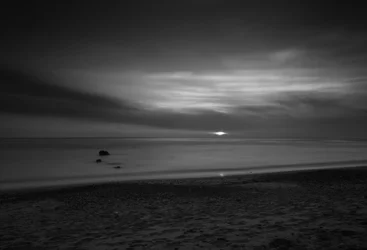
I took this in Santa Barbara while testing out my new ND filter. Settings on my 18-55mm lens, Canon Rebel T3 were: F/22, 175 Seconds, ISO 100. This was originally color, but I decided it may look better black and white-I usually don't do much B/W, so all criticism is appreciated! Thanks! :)
 

Attachments

  • IMG_8495-1.webp
    IMG_8495-1.webp
    483.5 KB · Views: 130
the file is big, I recommend posting it resized and clicking on option "full image" when posting
 
How many stops is the ND filter?

Just my opinion but there are two main issues with it the first being that the horizon is almost in the middle of the frame and the second is that there is no real definition between the sky and the water they look pretty much to be the same color.

With sunrises/sunsets the sky, clouds, and the colors tend to be the biggest features unless you have foreground to really frame with it. Not saying that B&W doesn't work because they can. These are just my two cents.
 
Last edited:
I agree that this could use a bit of a crop. I'd take a chunk off the bottom - the beach is not the interesting thing here and it's not needed to frame anything else.

As far as processing, I'd say the midtone greys are too dominant. Normally, with this kind of smooth water long exposure, the color can help give the image some depth so it doesn't look so flat. For a black and white image, however, you need more contrast to achieve that and to get more drama in the sky. Otherwise, it's just smooth grey flatness.
 
It is a fairly uninteresting picture. There is a content bar of uninteresting/interesting which most processing and field tricks cannot overcome. I like limr's suggestion to crop from the bottom. To up the success factor in your picture I would:

1) Crop out most of the beach leaving a small triangular sliver;
2) Up the global contrast a touch;
3) Hit the water with some dodging, the wand set on Highlights; and
4) Hit the clouds selectively and hard with dodging and burning (dodging to make portions of the clouds brighter and burning to add definition).

Yes, the ND filter works and long shutter speeds work, but you still need image content to pull all those elements together. The more you shoot and the more you use various photographic techniques the better understanding you will have of when and how to use those tools. Good Luck and Good Shooting.
 
Last edited:
You've gotten some good advice above. One thing that I would be interested in seeing is the color version, possibly cropped as suggested.
 
How many stops is the ND filter?

Just my opinion but there are two main issues with it the first being that the horizon is almost in the middle of the frame and the second is that there is no real definition between the sky and the water they look pretty much to be the same color.

With sunrises/sunsets the sky, clouds, and the colors tend to be the biggest features unless you have foreground to really frame with it. Not saying that B&W doesn't work because they can. These are just my two cents.

I used a 10 stop ND filter for this one. Thanks for the advice! Yeah, I was trying to add more contrast to make the sky and water stand out a little more, but I am pretty new to Lightroom and I was having trouble finding a good midpoint for the colors. I appreciate the feedback! :)
 
I agree that this could use a bit of a crop. I'd take a chunk off the bottom - the beach is not the interesting thing here and it's not needed to frame anything else.

As far as processing, I'd say the midtone greys are too dominant. Normally, with this kind of smooth water long exposure, the color can help give the image some depth so it doesn't look so flat. For a black and white image, however, you need more contrast to achieve that and to get more drama in the sky. Otherwise, it's just smooth grey flatness.

Thanks for the help! I played around with cropping, but will definitely go back to that. I will be sure to play around with the contrast too! :)
 
It is a fairly uninteresting picture. There is a content bar of uninteresting/interesting which most processing and field tricks cannot overcome. I like limr's suggestion to crop from the bottom. To up the success factor in your picture I would:

1) Crop out most of the beach leaving a small triangular sliver;
2) Up the global contrast a touch;
3) Hit the water with some dodging, the wand set on Highlights; and
4) Hit the clouds selectively and hard with dodging and burning (dodging to make portions of the clouds brighter and burning to add definition).

Yes, the ND filter works and long shutter speeds work, but you still need image content to pull all those elements together. The more you shoot and the more you use various photographic techniques the better understanding you will have of when and how to use those tools. Good Luck and Good Shooting.

Thank you for the tips! I do think I am guilty of using the filters to try to make an image out of nothing, but I agree that I should be looking for better content to begin with. I appreciate the help! :)
 
You've gotten some good advice above. One thing that I would be interested in seeing is the color version, possibly cropped as suggested.

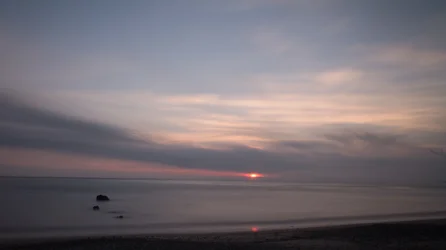
Here is the color image with a quick crop, I didn't really like how it came out in color too much-this is unedited.
 

Attachments

  • IMG_8495-1-2.webp
    IMG_8495-1-2.webp
    268.2 KB · Views: 135
You've gotten some good advice above. One thing that I would be interested in seeing is the color version, possibly cropped as suggested.

Here is the color image with a quick crop, I didn't really like how it came out in color too much-this is unedited.

This is the crop I had in mind, and it definitely directs the viewer's attention more clearly towards the horizon and sky.

I think the same techniques as Gary mentioned could brighten this color version up as well. I generally prefer the more subtle colors that you captured here to the oversaturated treatment that many sunset images get, so I would try to keep those gentle colors. You could, however, make them more dramatic with some contrast and selective dodging and burning. The rocks play a big part in breaking up the super smoothness of the image, so perhaps there's also a way to play those up a bit.

 
I think with some tweaking, that color with that crop could be a better image than the b&w one. Some levels and or curves adjustments with some dodge and burn
 
You've gotten some good advice above. One thing that I would be interested in seeing is the color version, possibly cropped as suggested.

Here is the color image with a quick crop, I didn't really like how it came out in color too much-this is unedited.

This is the crop I had in mind, and it definitely directs the viewer's attention more clearly towards the horizon and sky.

I think the same techniques as Gary mentioned could brighten this color version up as well. I generally prefer the more subtle colors that you captured here to the oversaturated treatment that many sunset images get, so I would try to keep those gentle colors. You could, however, make them more dramatic with some contrast and selective dodging and burning. The rocks play a big part in breaking up the super smoothness of the image, so perhaps there's also a way to play those up a bit.

Thanks! My main issue with the color photo was that the clouds were too similar in color to the blurred ocean. I guess that plays into the black and white photo too, but I figured adding a bit of contrast in that one could spice it up. I will definitely edit the color one and post it later on though!
 
I think with some tweaking, that color with that crop could be a better image than the b&w one. Some levels and or curves adjustments with some dodge and burn

Thanks! I must admit, though, that I am pretty bad with tools like the brush in Lightroom. Whenever I use dodge/burn, the new coloring always bleeds into different parts of the photo. Should I just be more patient and use a smaller brush size with larger feathering?
 
zooming in and patience are part of it. Also, double check the area being painted by clicking on the box at the bottom that shows what you've already painted over.
 

Create an account or login to comment

You must be a member in order to leave a comment

Create account

Create an account on our community. It's easy!

Log in

Already have an account? Log in here.

Back
Top Bottom