What's new

One from a small wedding

MohaimenK

TPF Noob!
Joined
Nov 13, 2008
Messages
2,583
Reaction score
11
Location
In between her...
Can others edit my Photos
Photos NOT OK to edit
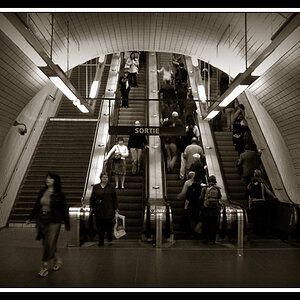
This is the bride being walked by her brother. The dad was actually their minister.

Does it have too much contrast? Sorry couldn't make it much larger than this. I uploaded this to my FB private album.

It's a 1:2 ratio. Should I change the ratio? I have a much tighter crop with 2:3 ratio but this one I wanted to give it the feel as the bride is in spotlight and guests are taking her pics as she's walking down the isle.

73030_10150304825115226_882565225_15505713_5117139_n.jpg


Here's another version with less contrast

69882_10150304833435226_882565225_15505884_3091138_n.jpg
 
Last edited:
Tought to say without a histogram, but on my current monitor, I like #2 better.
 
I like it a lot. But I don't know that the photograhers add anything. Post the other one too :-)
 
I'dda cropped more off the right, and gave the last woman just a bit more space on the edge of the frame, to help convey your intent. Unless of course you can't because there was a garbage truck right behind her.

I also find it interesting that the walkway has the hard line on the right that visually cuts the image. It looks like everything past that is a seperate image.
 
I'dda cropped more off the right, and gave the last woman just a bit more space on the edge of the frame, to help convey your intent. Unless of course you can't because there was a garbage truck right behind her.

I also find it interesting that the walkway has the hard line on the right that visually cuts the image. It looks like everything past that is a seperate image.

+1 I'd be tempted to say cut the whole right side after that walkway line straight off as its really so final and dividing. At first (with your logo in the bottom right corner) I thought the right side was some sort of logo of your photography company it was so divided from the main part of the shot.

As for the contrast its hard to tell and I suspect its a case of print it out and see how it looks. The latter certainly shows up more details in the darker areas, though I wouldn't go any lower since you're in danger of sending his jacket a more grey shade.
 
I'dda cropped more off the right, and gave the last woman just a bit more space on the edge of the frame, to help convey your intent. Unless of course you can't because there was a garbage truck right behind her.

I also find it interesting that the walkway has the hard line on the right that visually cuts the image. It looks like everything past that is a seperate image.

I saw that too. Was going to say "why did you add another image into it?" but finally realized it's just the way the walkway's cut.

I'd agree with the rest. I'd say either extend it more to the left or even just crop it at the edge of that walkway. Depends what you're trying to do with the pic.
 
killer photo!! stick with #2 .. you loose too much detail in the shadows in #1.. i think the crop and composition is great too.. if anything i would clone stamp the fountain and make it BIGGER :)

great work
 
on a side note... that dood looks like the guy in the USF college ads above and below this post haha!
 
1. The face of the bride is better in this one. On my screen the face looks washed in 2.

Nice shot though.
 
Gah, that dividing line that makes it look like two images keeps messing with my eyes!!! :gah:
 
Thanx guys! This was her younger bro walking her to the alter. The groom was behind me on the left.
 

Create an account or login to comment

You must be a member in order to leave a comment

Create account

Create an account on our community. It's easy!

Log in

Already have an account? Log in here.

New Topics

Back
Top Bottom