What's new

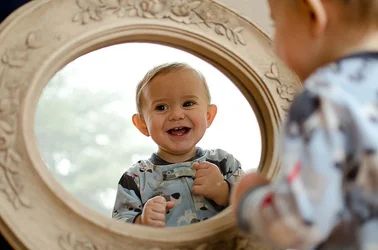
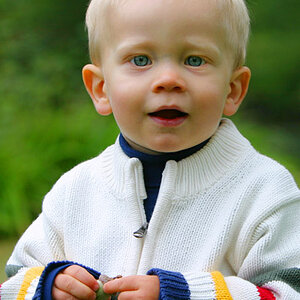
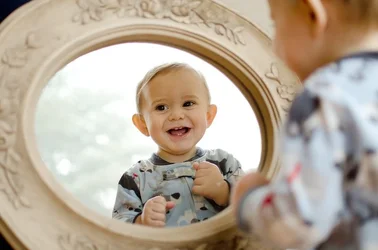
One way to get a toddler to sit still :)

YvetteC

TPF Noob!
Joined
Oct 19, 2012
Messages
84
Reaction score
49
Location
PA
Can others edit my Photos
Photos OK to edit
My youngest son loves mirrors more than anything so I wanted to capture it. Between kissing the mirror and smashing his face against it, I was able to get this...c & c always welcomed and if anyone has advice on what to with his dark eyes without making them look unnatural, I would be very appreciative!


DSC_6012 by Yvette C., on Flickr
 
Nicely captured; a cute shot indeed! If you have an application with a selective editing tool such as the dodge brush in Photoshop, or the selective enhancement brush in Lightroom, that would be the best way to deal with the eyes.
 
two words...

Duct Tape
 
Nicely captured; a cute shot indeed! If you have an application with a selective editing tool such as the dodge brush in Photoshop, or the selective enhancement brush in Lightroom, that would be the best way to deal with the eyes.

Thank you...I have tried dodge and I'm not getting it right. It always looks unnatural to me because his eyes really are dark brown. I guess what I am asking is if there is a way to "brighten" them without changing the color too much?
 
If you're in LR and using the Iris Enhance edit.. try adjusting the "flow" option.. I usually bring it down to 70ish I think because otherwise it looks completely unnatural to me. I'm sure you could adjust the dodge in PS in this way as well.
 
$8632732097_536c3bba1a_c.webp

sorry for all the sharpening.. lol it was set to that already, but you get the idea otherwise. I did both iris enhance and dodge in LR at 70% flow, whitened the eye whites a tiny bit and did a light dodge around the eyes entirely and a little fill light to the whole image.
 
I love the photo! Lovely composition, to me anyway. I like how he isn't looking right at the camera. I was about to suggest the fill light to brighten up the face a tad, but you got to it first! I might even hit it with a little more. I use a selection brush in LR, paint over the eyes and adjust the exposure up about .1 to .15, and bump the clarity by anywhere between about 5 and 15. That seems to do well for me when I want to brighten up the eyes a tad without making them look fake. It does look a tad odd now, since one eye is brighter than the other. That's just my two cents!
 
$mirroredit.webp Don't know if this works but using layers, working in cs5 and lightened up the entire photo then some just on the face
 
A VERY cute shot of a toddler!!! Nicely done! As to lightening up his eyes...that could be done a number of ways, but the easiest would be to use the "Dodge" tool, or a layer mask and brush, and to just sort of "paint on some digital lightening-up", so to speak, using like 45% opacity, and a soft flow, on a brush about 60 to 100 pixels in diameter, with a soft edge to the brush...just sort of move that around over the entire face a couple of times and voila!, lighten-up accomplished!
 
Thank you all so much...and for the edits...I can't wait to get home and try it out! I love the eye whites a little whiter...it never even occurred to me. CorrineMichael...I LOVE your edit...that's what I'm going to try for tonight. I'm going to "paint on some lightening-up" :)
 
Looks a LOT better than the original presentation! he's so cuuuute!!!!!! That is one of the cutest ages I think. Not full teeth yet, giggles a lot, laughs, easily amused, and so on.
 
Looks a LOT better than the original presentation! he's so cuuuute!!!!!! That is one of the cutest ages I think. Not full teeth yet, giggles a lot, laughs, easily amused, and so on.

Thank you...I'm really happy with it! It's time to focus on getting better at editing.

He is my youngest of three boys and while I love every stage, 6-24 months is my favorite. There is nothing like a baby giggling or those chubby arms around your neck :) I just wish it didn't go by so quickly.
 

Create an account or login to comment

You must be a member in order to leave a comment

Create account

Create an account on our community. It's easy!

Log in

Already have an account? Log in here.

New Topics

Back
Top Bottom