What's new

opinions on PP on this one

Ernicus

TPF Noob!
Joined
May 18, 2012
Messages
2,689
Reaction score
337
Location
Old Town, ME
Can others edit my Photos
Photos OK to edit
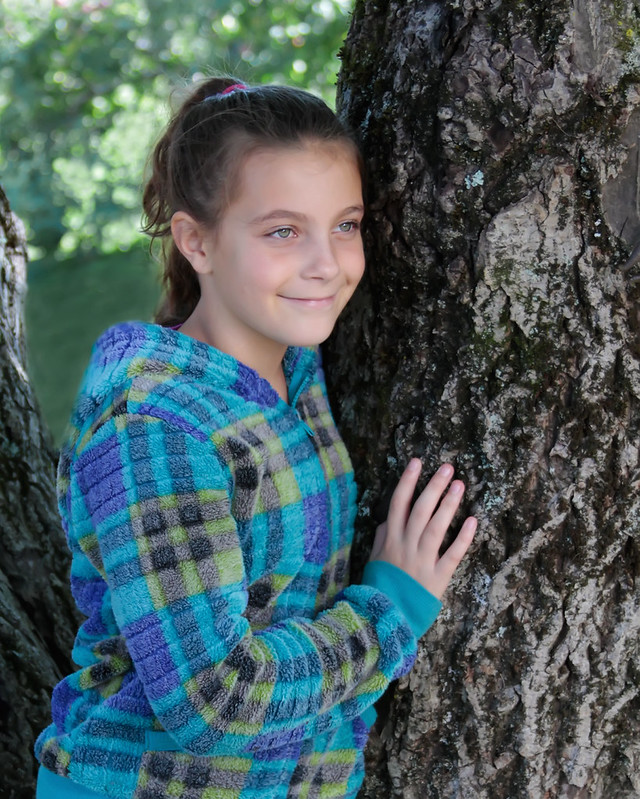
So, we went to the orchard today to go apple picking. Naturally the sun was brutal as it was mid day...yay for always being out at the worst photo time. I took some photos of my womans kids so she can have some to frame up around the house. This one does not particularly bug me for what it is, but I hate having hot spots and blown out spots in my shots, so I tried to pp them out.

Curious of thoughts if it is a win or just bad PP attempt. I'm sure mom will love it...but I'd like opinions that are not of "mom" opinions. lol

thanks


7993960840_207e9bb223_c.jpg


7993959402_33a9c3b3c2_c.jpg
 
The skin looks oversmoothed to me, and the light on her face looks.. completely unnatural. I don't know if you lightened her face up, or what. Eyes also look like you might have overcooked them a trifle.

On the up side, it's a good naturalistic pose, the kid has a great expression. Composition looks pretty ok, although it's likely someone wlll tell you she should be further left in the frame if she's going to be looking off right. That WOULD make the picture stronger, probably, but it's not a deal-breaker.

I'd just ease off the processing about 50 percent, and then you'd have something pretty solid. By which I mean, none of the processing is BAD, you've just done it a little too heavily. To my eye.
 
  • Thread Starter 🔹
  • Banned
  • #3
I ran an inverted highpass for the skin, they like that look, followed by a gaussian then brightened. I did nothing to the eyes though, so not sure what you're seeing there. I'll post up the original here in a minute. I was mostly questioning the PP on cloning/removing the blown spots...to which ya didn't comment on. lol
 
  • Thread Starter 🔹
  • Banned
  • #4
also, yeah, I had her look left...was hoping without moving..just tilt the chin...but she moved more than that...lol. 10 yr olds are hard to direct.
 
I don't know where the blown spots were! Probably the eyes just look oversharp because the skin is so smoothed (I don't understand any of the words you used, but they seem to boil down to "smoothing")
 
  • Thread Starter 🔹
  • Banned
  • #6
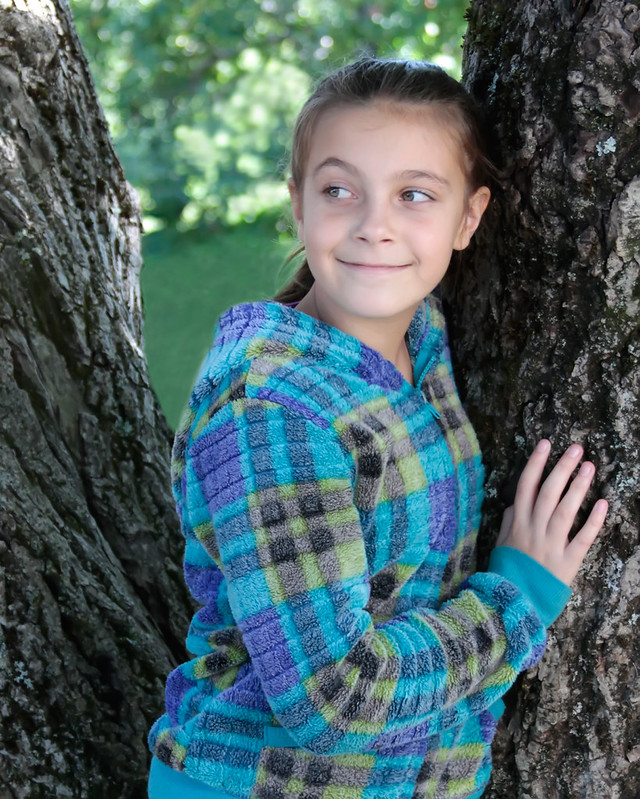
Here's a bit different crop, put her more left side, as I do agree that is more solid generally. I did nothing to this but crop, run imagenomic noiseware in portrait mode, and stabbed the eyes 2x with sharpen tool at 25% if skin tone looks off (and please tell me as I have trouble still "seeing" that), its most likely cause my wb was on auto like a tool, and my assistant (her mother) was most terrible with the reflector, lol

To me, this one just looks kinda "eh" and flat...I feel something should be done...but I don't know what. Any ideas? or is it good and I should leave it alone? Seems like at times I still get PP fever.

7994021814_7a7f5e6ddb_c.jpg
 
  • Thread Starter 🔹
  • Banned
  • #7
I don't know where the blown spots were! Probably the eyes just look oversharp because the skin is so smoothed (I don't understand any of the words you used, but they seem to boil down to "smoothing")

yeah, its one of the 3 diferent techniques I use to smooth skin. However, this one...if I don't the threshold just right in the high pass filter, it can come out looking stupid. So it's easy to "overdo" it. Sometimes ya need a new pair of eyes when staring at these things for a while.
 
Okay I see the blown spot, it took me a minute and I was searching her face for it! (it is behind her amolitor). I think her skin and hair look way better on this last image. The first ones were way too smoothed out. I also like this new crop with more space for her to look into.
 
  • Thread Starter 🔹
  • Banned
  • #9
k, so the PP on the bright areas behind her were cool, but the skin on the latter is best I take it? lol. I added a touch more color, I'll fix the highlighted areas in the new version and repost a bit. I notice they are also suffering a bit from web kill, in photoshop, she is not as pale, but when I save for web and post...she looks pale. So I'm sure it will print fine.
 
and yeah, in the first image, the spots were not "blown" really, but too bright for my liking, I hate bright spots in my photos as they usually make the eye drift toward them.
 
Here is my final rendition...

7994115562_1fddc4d8e0_c.jpg
 
I like your last edit the best. :)
 
another post, same sort of thing.

7994173816_a76deb2ba7_c.jpg
 
YESSSSSS! The final rendition in post #11, is solid! Sooo much more naturalistic. Lovely.
 

Create an account or login to comment

You must be a member in order to leave a comment

Create account

Create an account on our community. It's easy!

Log in

Already have an account? Log in here.

New Topics

Back
Top Bottom